
 Facebook
 Google
 GitHub
 Linkedin
I have designed my first pcb (4 layer) and I have a question about power planes versus power traces. I am using KiCad 7. I have tested the circuitry on a proto-board.
I have a high current section (12-15 V dc @ 3-6 A for 100 - 500 msec), and a lower powerlogic control section (3.3V) - a DAC and ADC controlled by a Raspberry Pi SPI buss (2.4 MHz). I have 2 signal layers, front and back, a ground plane, and a power plane (green). I am debating whether I should (1) use a power plane for the logic chips or just larger traces, and (2) whether I should use a couple of power planes for the high current section or just really fat (5-7 mm) traces.
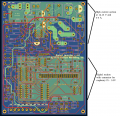
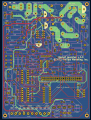
I have attached two pictures that show the power layer traces in green and potential power planes. Creating a power plane for the logic portion of the design seems to be a good idea. However, the high current section is broken up into so many pieces (e.g. power connector, then a fuse, then a switch, then a relay etc.) that perhaps the fat traces are a better design. What do you think?
I have a high current section (12-15 V dc @ 3-6 A for 100 - 500 msec), and a lower powerlogic control section (3.3V) - a DAC and ADC controlled by a Raspberry Pi SPI buss (2.4 MHz). I have 2 signal layers, front and back, a ground plane, and a power plane (green). I am debating whether I should (1) use a power plane for the logic chips or just larger traces, and (2) whether I should use a couple of power planes for the high current section or just really fat (5-7 mm) traces.
I have attached two pictures that show the power layer traces in green and potential power planes. Creating a power plane for the logic portion of the design seems to be a good idea. However, the high current section is broken up into so many pieces (e.g. power connector, then a fuse, then a switch, then a relay etc.) that perhaps the fat traces are a better design. What do you think?






