noob and oscilloscope

Ya’akov

Joined Jan 27, 2019
10,243
I earned my trouble shooting badge by reading Practical Wireless.
They would have a huge foldout centerfold with a trouble shooting flowchart on how to proceed with fault finding.

How many people today would know what is motor-boating?
I think you'd find they'd have a very different and not family friendly idea of what it is than low frequency oscillation.
 

Thread Starter

v1x2w3

Joined Jan 20, 2007
54
One 7 hour round trip later, I'm the proud owner of the Siglent.

I'm off to read some "noob questions about oscilloscopes." :)
 

Thread Starter

v1x2w3

Joined Jan 20, 2007
54
One oscilloscope knob missing and the only colored rings are yellow on both probes.

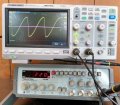
The Wavetek exterior looks good. Pictured is the first time I turned it on.
That wave pattern is supposed to be a sine wave.
Hopefully that is improved with adjustments. :)
 

Ya’akov

Joined Jan 27, 2019
10,243
One oscilloscope knob missing and the only colored rings are yellow on both probes.

The Wavetek exterior looks good. Pictured is the first time I turned it on.
That wave pattern is supposed to be a sine wave.
Hopefully that is improved with adjustments. :)
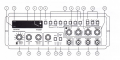
This may be unrelated but it looks like the "MOD" button (17) is pressed in. That turns on the internal modulation. It should be out for normal use.

1644350680215.png
 

Thread Starter

v1x2w3

Joined Jan 20, 2007
54
Thanks Yaakov

With both 17 & 18 out and all knob controls centered, I only see the sine wave displayed like in the photo.

Square wave looks ok.

So I guess the signal generator is not functioning correctly?
 

Ya’akov

Joined Jan 27, 2019
10,243
Thanks Yaakov

With both 17 & 18 out and all knob controls centered, I only see the sine wave displayed like in the photo.

Square wave looks ok.

So I guess the signal generator is not functioning correctly?
It might not be. are to tell without more information but the waveform does look like something is off.

In case you don't have it yet, here's the manual:
 

Attachments

Thread Starter

v1x2w3

Joined Jan 20, 2007
54
I assume you meant 'hard to tell.'

I tried all frequencies, the pattern stayed the same. (The Oscilloscope had a problem displaying the 1 and 10 hz.)
 

sparky 1

Joined Nov 3, 2018
1,218
You can download a trial version usb scope and bode plot like virtens multi-instrument and it comes on right away using your soundcard doing amazing things. After you finally get the settings right and get used to it, a lot of the problems are resolved and you will better interpret your wavetek and scope. You will notice that testing your sound system with microphone gives you all the details and that the standard response chart is only relative, not that important. So when you think about calibration think about live sound even with a cheap mike it's the flexibility you have to do all that. It take time to get it set up right.
 

Thread Starter

v1x2w3

Joined Jan 20, 2007
54
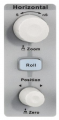
For frequencies that low, press the Roll button.
Thank you Yaakov. (Now that you showed me, I see the zoom symbol above it.)

You can download a trial version usb scope and bode plot like virtens multi-instrument and it comes on right away using your soundcard doing amazing things. After you finally get the settings right and get used to it, a lot of the problems are resolved and you will better interpret your wavetek and scope. You will notice that testing your sound system with microphone gives you all the details and that the standard response chart is only relative, not that important. So when you think about calibration think about live sound even with a cheap mike it's the flexibility you have to do all that. It take time to get it set up right.
Not sure I followed all that sparky. Being a noob, no doubt I'll figure out more with time.
Thank you for the encouragement!
 

Ya’akov

Joined Jan 27, 2019
10,243
Thank you Yaakov. (Now that you showed me, I see the zoom symbol above it.)
Zoom is something different. That is invoked by pressing the knob. It lets you narrow the amount of the waveform you are viewing, and "zoom in". Also, the "single" button own the "trigger" panel is very important.
 

sparky 1

Joined Nov 3, 2018
1,218
What I am saying is the free software has everything put together good to go so you can compare it to your the settings
and you can calibrate using the virtual generator will give you confidence that your equipment will show the same results.
On a sidenote I mentioned that using a microphone live or whatever your computer has is what your ears are hearing.
The sound system is sampled. Later you can make circuits, test them with all measurement features on the scope.
The advice from an experienced audio person is much better than all the marketing nonsense is just to take your money.
 

Thread Starter

v1x2w3

Joined Jan 20, 2007
54
I sent the ebay seller of the waveteck the above image. His reply is: "
would you like to send back we tested it and it was working?
 
Top