Noise in NRF24 Walkie Talkie Project (PAM8403 + NRF24Audio) and Disabled Analog Pins

Thread Starter

OmarTPX

Joined May 30, 2024
19
Hello,

I’m building a simple walkie-talkie project using NRF24L01+ modules and the RF24Audio library on Arduino. The setup works, but I’m facing two big problems:

Hardware setup:
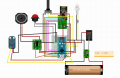
  • Power: Single 18650 Li-ion battery → MT3608 boost converter → 5V rail
  • NRF24L01+ module connected to Arduino (SPI)
  • PAM8403 amplifier connected to Arduino output (D10, library audio output pin)
  • All components share the same 5V and GND from the MT3608
  • Led , 10k potensiometer and a push button

Problems:
  1. Noise / hiss from the speaker
    • The PAM8403 output has constant noise, even when no audio is playing.
    • I connected R+ of PAM8403 to Arduino D10, gnd to GND. VCC = 5V, GND = common ground.
    • Noise increases when the NRF24 transmits.
  2. How can I filter or properly connect the Arduino → PAM8403 so that I get clean audio?
  3. Analog pins disabled when RF24Audio is active
    • When I call rfAudio.begin();, my Arduino’s analog pins stop working.
    • I need to read a potentiometer for volume control, but all analog reads return 0.
    • Is there a workaround for using analogRead() while RF24Audio is running?

Power details:
  • Single 18650 cell
  • MT3608 boost set to 5V
  • Common ground between Arduino, PAM8403, and NRF24

My questions are:
  • What’s the best way to clean up the speaker noise in this circuit?
  • How can I keep analogRead() working while still using RF24Audio?
Thanks in advance!
Capture.PNG
 

KeithWalker

Joined Jul 10, 2017
3,603
Hello,

I’m building a simple walkie-talkie project using NRF24L01+ modules and the RF24Audio library on Arduino. The setup works, but I’m facing two big problems:

Hardware setup:
  • Power: Single 18650 Li-ion battery → MT3608 boost converter → 5V rail
  • NRF24L01+ module connected to Arduino (SPI)
  • PAM8403 amplifier connected to Arduino output (D10, library audio output pin)
  • All components share the same 5V and GND from the MT3608
  • Led , 10k potensiometer and a push button

Problems:
  1. Noise / hiss from the speaker
    • The PAM8403 output has constant noise, even when no audio is playing.
    • I connected R+ of PAM8403 to Arduino D10, gnd to GND. VCC = 5V, GND = common ground.
    • Noise increases when the NRF24 transmits.
  2. How can I filter or properly connect the Arduino → PAM8403 so that I get clean audio?
  3. Analog pins disabled when RF24Audio is active
    • When I call rfAudio.begin();, my Arduino’s analog pins stop working.
    • I need to read a potentiometer for volume control, but all analog reads return 0.
    • Is there a workaround for using analogRead() while RF24Audio is running?
Reading the voltage on the volume potentiometer and using the result to adjust the volume with the arduino is just adding pointless complexity to the project. The amplifier has a gain of 24db which is much too high to connect directly to an arduino analog pin. Connect the volume control between the arduino audio output and the amplifier input. That way it will always be operational, and unless it is set to maximum, it will attenuate both the signal and the noise.
 
Last edited:
Hello,

I’m building a simple walkie-talkie project using NRF24L01+ modules and the RF24Audio library on Arduino. The setup works, but I’m facing two big problems:

Hardware setup:
  • Power: Single 18650 Li-ion battery → MT3608 boost converter → 5V rail
  • NRF24L01+ module connected to Arduino (SPI)
  • PAM8403 amplifier connected to Arduino output (D10, library audio output pin)
  • All components share the same 5V and GND from the MT3608
  • Led , 10k potensiometer and a push button

Problems:
  1. Noise / hiss from the speaker
    • The PAM8403 output has constant noise, even when no audio is playing.
    • I connected R+ of PAM8403 to Arduino D10, gnd to GND. VCC = 5V, GND = common ground.
    • Noise increases when the NRF24 transmits.
  2. How can I filter or properly connect the Arduino → PAM8403 so that I get clean audio?
  3. Analog pins disabled when RF24Audio is active
    • When I call rfAudio.begin();, my Arduino’s analog pins stop working.
    • I need to read a potentiometer for volume control, but all analog reads return 0.
    • Is there a workaround for using analogRead() while RF24Audio is running?

Power details:
  • Single 18650 cell
  • MT3608 boost set to 5V
  • Common ground between Arduino, PAM8403, and NRF24

My questions are:
  • What’s the best way to clean up the speaker noise in this circuit?
  • How can I keep analogRead() working while still using RF24Audio?
Thanks in advance!
View attachment 354818
1.Add a low-pass RC filter between Arduino and PAM8403 input.
2. The RF24Audio library uses Timer1 (on Arduino Uno/Nano), which is also used internally for PWM and ADC timing.
 

Thread Starter

OmarTPX

Joined May 30, 2024
19
Reading the voltage on the volume potentiometer and using the result to adjust the volume with the arduino is just adding pointless complexity to the project. The amplifier has a gain of 24db which is much too high to connect directly to an arduino analog pin. Connect the volume control between the arduino audio output and the amplifier input. That way it will always be operational, and unless it is set to maximum, it will attenuate both the signal and the noise.
how i didn't understand. You mean like this ?

  • Left pin ---> connect to Arduino AUDIO OUT.
  • Right pin ---> connect to GND.
  • Middle pin ---> goes to the Max9814 Out pin ?
 

Justin Spencer

Joined Jul 22, 2017
10
The NRF24 has problems with power supply noise (I remember something about it having intermittent connections a few years back). You might want to try better alternatives (maybe an NRF52), especially with the potentiometer for volume control (like a digitally controlled one with the Arduino already at hand).
 
Top