Newbie solder question

Thread Starter

bose4

Joined Jul 13, 2026
2
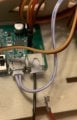
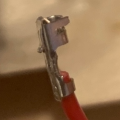
The red wire got detached from a child's toy, see image. The toy works if the wire is manually held in place (in the opening next to the black wire).

Can this be fixed using a very basic soldering iron? I'm thinking of buying a cheap one on amazon. Anything to be mindful of? (I have no experience with soldering so far but would read up on basics before starting.)

Apologies for such a basic question.
 

Attachments

dl324

Joined Mar 30, 2015
18,421
Welcome to AAC!
Can this be fixed using a very basic soldering iron?
It's a crimp type connector inserted into the enclosure. What makes you think it can be repaired by soldering?

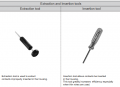
It looks like a JST connector. Specialized tools are used for crimping the wire, inserting the connector into the housing, and removing.
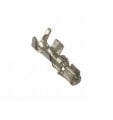
1783993319510.png
Can't tell if the crimped-on terminal is damaged. If it isn't, you might be able to re-insert with a stiff wire, paper clip, or tweezers.
 

MrChips

Joined Oct 2, 2009
34,968
As mentioned, this is not a solder repair job.
You need to withdraw (unplug) the entire white part holding the black wire. Then insert the red wire into its slot.

If the red wire comes out with a gentle tug, look closely at the metallic pin on the red wire. There should be a retaining flap that holds the connector in place. It needs a slight adjustment to stop the wire from coming out of the connector.

The flaps (wings) towards the lower part of the connector pin (not the top part) needs to flare out as shown. This stops the pin from coming out of the hole. I know yours does not look like this but it should be similar.

1783994279548.jpeg
 

dl324

Joined Mar 30, 2015
18,421
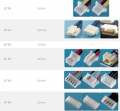
There are many types of JST connectors. Some examples:
1783994773933.png
The random picture on the internet didn't label the columns. The middle one is pin pitch.
 

MrChips

Joined Oct 2, 2009
34,968
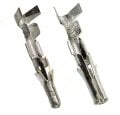
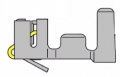
Your connector pin looks something like this.
On the back, there should be a tiny piece of metal (hook or clip) that needs a slight adjustment.

1783995118375.jpeg
 
Last edited by a moderator:
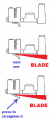
retaining clip has obvious kink, which is result of pulling on wire and ripping the contact out of connector. i would gently insert thin blade under clip till proper angle of the clip is reached, then stop moving blade and press the bent portion (end of the clip) against blade to make it straight again. after this restoration (if you are lucky) this can be inserted back into white connector body (should be unplugged from board). if the connector body is also damaged so repaired contact does not stay inserted, then you need to identify the connector type, get extraction tool (to safely extract black wire) then insert both black and red wires in correct order into new body.

1784038396115.png

if finding replacement or cost of tools is not worth the hassle, consider just cutting off the deformed contact and soldering wire directly to PCB.
 
Last edited:
another home remedy would be to insert the contact into connector body and carefully glue the back side so that contact is secured. this may be the most convenient DIY hack option, specially if retention is no longer working.
 

MrChips

Joined Oct 2, 2009
34,968
another home remedy would be to insert the contact into connector body and carefully glue the back side so that contact is secured. this may be the most convenient DIY hack option, specially if retention is no longer working.
I was going to suggest this if it is still easy to come loose.
Insert the pin into the connector body and apply hot glue to secure it in place.
 
I think this needs no soldering at all. The red wire still has its Molex connector attached (Source: what is a molex connector ) . It probably pulled from the white connector housing. First check the terminal for visible damage.
Check whether the retaining tab became flattened. Carefully lift the tab using a fine needle. Reinsert the terminal until it clicks securely. Replace the white housing if its latch is damaged. It looks like a JST connector to me.
 
I think this needs no soldering at all. The red wire still has its Molex connector attached (Source: what is a molex connector ) . It probably pulled from the white connector housing. First check the terminal for visible damage.
Check whether the retaining tab became flattened. Carefully lift the tab using a fine needle. Reinsert the terminal until it clicks securely. Replace the white housing if its latch is damaged. It looks like a JST connector to me.
No soldering appears to be needed. The red wire still has its connector terminal attached, so it likely pulled out of the white connector housing rather than breaking.

First, inspect the terminal for visible damage. Check whether the retaining tab has become flattened. If needed, carefully lift the tab using a fine needle or small tool. Reinsert the terminal into the housing until it clicks and locks securely.

If the housing latch is damaged and cannot hold the terminal in place, replace the connector housing.

The connector appears to be a JST-style connector rather than a Molex connector, so confirm the exact type before replacing it.
 
Bending the connector insert back to the correct shape requires knowing what that shape is! The problem that I have had is that the insert metal tends to break if it is bent very much. The biggest problem has always been not having access to a replacement terminal to crimp on. THAT has often lead to removing the insert from the housing and very carefully soldering the wire onto the insert in a way that allows itto be inserted correctly. It seems that the various inserts are only available in packageds of 100 or rolls of 100 terminals.
 

Thread Starter

bose4

Joined Jul 13, 2026
2
You guys are amazing! Thank you all! I never received so nearly many helpful responses to a basic question :) (even after my too naive guess of needing to solder)

In particular the detail several of you showed me of the clip was so useful! I had no idea there was a clip there...

I just used my fingernail to gently bend the clip, and then it clicked back into the connector and stayed. Problem solved!!
 
Top