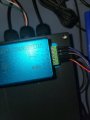
Need Help With Arduino

Thread Starter

ericw46732

Joined Jun 24, 2023
5
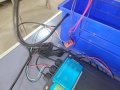
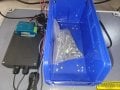
I am new to the world of Arduino IDE. I am trying to build a scale using in-line load cells to a junction box to an amplifier to an Arduino Uno R3. I have a display hooked into the Arduino. I am looking to put fasteners onto the scale and convert the weight to PC count and have it show on the display. I am having problems on which libraries to load in the IDE and the proper coding to use to get the results that I seek. Any suggestions????
 

Attachments

Last edited by a moderator:

ericgibbs

Joined Jan 29, 2010
21,439
hi ericw,
Welcome to AAC,
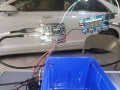
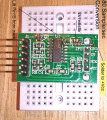
Checking your images it looks like a HX711 load cell amplifier.
This is a sample of a Sketch that I use, note it uses a TFT screen display, but the HX711 routines should give you an idea for the weighing code.
E
C-like:
// Include application, user and local libraries
//Edited and TFT added 260918EG

#include "SPI.h"
#include "TFT_22_ILI9225.h"

#include "HX711.h"

// HX711.DOUT  - pin #A1
// HX711.PD_SCK - pin #A0

// parameter "gain" is ommited; the default value 128 is used by the library
HX711 scale(A1, A0);  

String hxString ="";
float weight = 0;

#define TFT_RST 8
#define TFT_RS  9
#define TFT_CS  10  // SS
#define TFT_SDI 11  // MOSI
#define TFT_CLK 13  // SCK
#define TFT_LED 3   // 0 if wired to +5V directly

#define TFT_BRIGHTNESS 200 // Initial brightness of TFT backlight (optional)

// Use hardware SPI (faster - on Uno: 13-SCK, 12-MISO, 11-MOSI)
TFT_22_ILI9225 tft = TFT_22_ILI9225(TFT_RST, TFT_RS, TFT_CS, TFT_LED, TFT_BRIGHTNESS);
// Use software SPI (slower)
//TFT_22_ILI9225 tft = TFT_22_ILI9225(TFT_RST, TFT_RS, TFT_CS, TFT_SDI, TFT_CLK, TFT_LED, TFT_BRIGHTNESS);

// Variables and constants
uint16_t x, y;
boolean flag = true; //false;

// Setup
void setup() {
  tft.begin();
  Serial.begin(38400);
   Serial.println();
  Serial.println("HX711 LC Calibration Demo Program");

    tft.clear();
    tft.setOrientation(3);
//   tft.drawRectangle(0, 0, tft.maxX() - 1, tft.maxY() - 1, COLOR_WHITE);
    tft.setFont(Terminal11x16);
    tft.drawText(0, 160, "HX711 Calibrating.", COLOR_WHITE);

// print a raw reading from the ADC  

  Serial.println("Starting Calibrating");
  Serial.print("Raw Read: \t\t");
  Serial.println(scale.read());
    hxString = (scale.read());
    hxString = ("RawRead= " + hxString + "  ");
    tft.drawText(00, 60, hxString);
   
// print the average of 20 readings from the ADC
  Serial.print("Raw Avg(20): \t\t");
  Serial.println(scale.read_average(10));
    hxString = (scale.read_average(10));
    hxString = ("RawAvg = " + hxString + "  ");
    tft.drawText(00, 80, hxString);

// print the average of 5 readings from the ADC minus the tare weight (not set yet)
  Serial.print("Raw Value(5): \t\t");
  Serial.println(scale.get_value(5));  
    hxString = (scale.get_value(5));
    hxString = ("RawVal = " + hxString + "  ");
    tft.drawText(00, 100, hxString);


// print the average of 5 readings from the ADC minus tare weight (not set yet)
// divided by the SCALE parameter (not set yet)
  Serial.print("Raw Units(5): \t\t");
  Serial.println(scale.get_units(5), 1);
    hxString = (scale.get_units(5));
    hxString = ("RawUni = " + hxString + "  ");
    tft.drawText(00, 120, hxString);
   
// this value is obtained by calibrating the scale with known weights

  scale.set_scale(358.f); // edit factor to suit scale

  Serial.println();  Serial.println("Scale Tared to Zero:");
  scale.tare(); // reset the scale to Zero

// Serial.println();  Serial.println("HX711 LC Calibrated");

  Serial.println();
  Serial.println("Scale now Calibrated:");

// print a raw reading from the ADC
// Serial.print("Raw Read: \t\t");
// Serial.println(scale.read());  

// print the average of 20 readings from the ADC            
//  Serial.print("Avg Raw(20): \t\t");
//  Serial.println(scale.read_average(20));      

// print the average of 5 readings from the ADC minus the tare weight, set with tare
  // Serial.print("Value(5): \t\t");
//  Serial.println(scale.get_value(10));  

// print the average of 5 readings from the ADC minus tare weight
  Serial.print("Units(10): \t");
  Serial.println(scale.get_units(10), 1);  
     
// by the SCALE parameter set with set_scale
Serial.println();Serial.println("Weights:[Units]");

delay(1000);
tft.clear();
  tft.drawText(0, 160, "HX711 L/C Calibrated", COLOR_RED);
}

// Loop
void loop() {
    tft.drawText(0, 00,"Dir= " + String( scale.get_units())+ " gms      ", COLOR_GREEN);
    tft.drawText(0, 20,"Avg= "+ String(scale.get_units(10))+ " gms      ", COLOR_YELLOW);

  Serial.print("Dir(1):\t");
  Serial.print(scale.get_units(), 2);
  Serial.print("\t Avg(10):\t");
  Serial.println(scale.get_units(10));
   
  }
 

Attachments

Last edited:

Thread Starter

ericw46732

Joined Jun 24, 2023
5
Code:
// Include application, user and local libraries
//Edited and TFT added 260918EG

#include "SPI.h"
#include "TFT_22_ILI9225.h"

#include "HX711.h"

// HX711.DOUT  - pin #A1
// HX711.PD_SCK - pin #A0

// parameter "gain" is ommited; the default value 128 is used by the library
HX711 scale(A1, A0); 

String hxString ="";
float weight = 0;

#define TFT_RST 8
#define TFT_RS  9
#define TFT_CS  10  // SS
#define TFT_SDI 11  // MOSI
#define TFT_CLK 13  // SCK
#define TFT_LED 3   // 0 if wired to +5V directly

#define TFT_BRIGHTNESS 200 // Initial brightness of TFT backlight (optional)

// Use hardware SPI (faster - on Uno: 13-SCK, 12-MISO, 11-MOSI)
TFT_22_ILI9225 tft = TFT_22_ILI9225(TFT_RST, TFT_RS, TFT_CS, TFT_LED, TFT_BRIGHTNESS);
// Use software SPI (slower)
//TFT_22_ILI9225 tft = TFT_22_ILI9225(TFT_RST, TFT_RS, TFT_CS, TFT_SDI, TFT_CLK, TFT_LED, TFT_BRIGHTNESS);

// Variables and constants
uint16_t x, y;
boolean flag = true; //false;

// Setup
void setup() {
  tft.begin();
  Serial.begin(38400);
   Serial.println();
  Serial.println("HX711 LC Calibration Demo Program");

    tft.clear();
    tft.setOrientation(3);
//   tft.drawRectangle(0, 0, tft.maxX() - 1, tft.maxY() - 1, COLOR_WHITE);
    tft.setFont(Terminal11x16);
    tft.drawText(0, 160, "HX711 Calibrating.", COLOR_WHITE);

// print a raw reading from the ADC 

  Serial.println("Starting Calibrating");
  Serial.print("Raw Read: \t\t");
  Serial.println(scale.read());
    hxString = (scale.read());
    hxString = ("RawRead= " + hxString + "  ");
    tft.drawText(00, 60, hxString);
  
// print the average of 20 readings from the ADC
  Serial.print("Raw Avg(20): \t\t");
  Serial.println(scale.read_average(10));
    hxString = (scale.read_average(10));
    hxString = ("RawAvg = " + hxString + "  ");
    tft.drawText(00, 80, hxString);

// print the average of 5 readings from the ADC minus the tare weight (not set yet)
  Serial.print("Raw Value(5): \t\t");
  Serial.println(scale.get_value(5)); 
    hxString = (scale.get_value(5));
    hxString = ("RawVal = " + hxString + "  ");
    tft.drawText(00, 100, hxString);


// print the average of 5 readings from the ADC minus tare weight (not set yet)
// divided by the SCALE parameter (not set yet)
  Serial.print("Raw Units(5): \t\t");
  Serial.println(scale.get_units(5), 1);
    hxString = (scale.get_units(5));
    hxString = ("RawUni = " + hxString + "  ");
    tft.drawText(00, 120, hxString);
  
// this value is obtained by calibrating the scale with known weights

  scale.set_scale(358.f); // edit factor to suit scale

  Serial.println();  Serial.println("Scale Tared to Zero:");
  scale.tare(); // reset the scale to Zero

// Serial.println();  Serial.println("HX711 LC Calibrated");

  Serial.println();
  Serial.println("Scale now Calibrated:");

// print a raw reading from the ADC
// Serial.print("Raw Read: \t\t");
// Serial.println(scale.read()); 

// print the average of 20 readings from the ADC           
//  Serial.print("Avg Raw(20): \t\t");
//  Serial.println(scale.read_average(20));     

// print the average of 5 readings from the ADC minus the tare weight, set with tare
  // Serial.print("Value(5): \t\t");
//  Serial.println(scale.get_value(10)); 

// print the average of 5 readings from the ADC minus tare weight
  Serial.print("Units(10): \t");
  Serial.println(scale.get_units(10), 1); 
    
// by the SCALE parameter set with set_scale
Serial.println();Serial.println("Weights:[Units]");

delay(1000);
tft.clear();
  tft.drawText(0, 160, "HX711 L/C Calibrated", COLOR_RED);
}

// Loop
void loop() {
    tft.drawText(0, 00,"Dir= " + String( scale.get_units())+ " gms      ", COLOR_GREEN);
    tft.drawText(0, 20,"Avg= "+ String(scale.get_units(10))+ " gms      ", COLOR_YELLOW);

  Serial.print("Dir(1):\t");
  Serial.print(scale.get_units(), 2);
  Serial.print("\t Avg(10):\t");
  Serial.println(scale.get_units(10));
  
  }


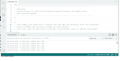
Do you know what this error message means?


C:\Users\EWoodard\AppData\Local\Temp\.arduinoIDE-unsaved2023525-8464-wukv99.wdu5\sketch_jun25a\sketch_jun25a.ino:11:10: fatal error: TFT_22_ILI9225.h: No such file or directory
#include "TFT_22_ILI9225.h"
^~~~~~~~~~~~~~~~~~
compilation terminated.

exit status 1

Compilation error: TFT_22_ILI9225.h: No such file or directory
 

ericgibbs

Joined Jan 29, 2010
21,439
hi ericw,
This is a simpler sketch for the HX711, it uses the Arduino IDE serial out as a display, no LCD's, so you can use it to test your HX711 & Load cells.

Ask if you have a problem.
E
@ericw46732
There was a Code error, now corrected and updated... 27/06/23

C-like:
// Include application, user and local libraries
//Edited 270623EG  Corrected Error.

// #include "SPI.h"
#include "HX711.h"

const int LOADCELL_DOUT_PIN = A1;
const int LOADCELL_SCK_PIN = A0;

// parameter "gain" is omitted; the default value 128 is used by the library
HX711 scale;

String hxString ="";
float weight = 0;

// Variables and constants
uint16_t x, y;
boolean flag = true; //false;

// Setup
void setup() {
  Serial.begin(115200);
   scale.begin(LOADCELL_DOUT_PIN, LOADCELL_SCK_PIN);
  Serial.println("HX711 LC Demo1");

// print a raw reading from the ADC
  Serial.println("Raw Data, Scale not Zeroed or Calibrated:");
  Serial.print("Raw Read: \t\t");
if (scale.is_ready()) {
    float reading = scale.read();
// reading=reading +7540;
// reading= reading/432;
    Serial.print("HX711 reading: ");
    Serial.println(reading);
  } else {
    Serial.println("HX711 not found.");
  }

  Serial.println(scale.read());
 
// print the average of 20 readings from the ADC
  Serial.print("Raw Avg(20): \t\t");
  Serial.println(scale.read_average(20));

// print the average of 5 readings from the ADC minus the tare weight (not set yet)
  Serial.print("Raw Value(5): \t\t");
  Serial.println(scale.get_value(5));

// print the average of 5 readings from the ADC minus tare weight (not set yet)
// divided by the SCALE parameter (not set yet)
  Serial.print("Raw Units(5): \t\t");
  Serial.println(scale.get_units(5), 1);
 
// this value is obtained by calibrating the scale with known weights

  Serial.println();  Serial.println("Scale Calibrated");
  scale.set_scale(358.f); // edit factor to suit scale

  Serial.println();  Serial.println("Scale Tared to Zero:");
  scale.tare(); // reset the scale to Zero

  Serial.println();
  Serial.println("After setting up the scale.set:");

// print the average of 5 readings from the ADC minus the tare weight, set with tare
  Serial.print("Weight Value(5): \t\t");
  Serial.println(scale.get_value(5));

// print the average of 5 readings from the ADC minus tare weight
  Serial.print("Weight Units(5): \t\t");
  Serial.println(scale.get_units(5), 1);
   
// by the SCALE parameter set with set_scale
Serial.println();Serial.println("Calibrated Weights:[Units]");
}

// Loop
void loop() {

  Serial.print("Dir(1):\t");
  Serial.print(scale.get_units(), 2);
  Serial.print("\t Avg(10):\t");
  Serial.println(scale.get_units(10));
    delay (100);
  }

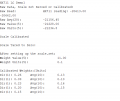
Sample Output.

EG57_ 920.png
 
Last edited:

ericgibbs

Joined Jan 29, 2010
21,439
Hi ericw,
Did you try the Sketch in my post #6, it does work OK with HX711 and Arduino?

I cannot read your background text in post #8.

E
 

ericgibbs

Joined Jan 29, 2010
21,439
Hi ericw,
I would prefer to help by using the Forum.
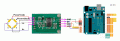
Check that your circuit is connected as this ericw1.gif diagram, for the first test use only one load cell connected to the HX711.
Don't have the Display or any other module connected to the UNO, let's check out the Load Cell, HX711 & UNO first, then we can look at the TFT part.

Also, did you search the web for the"HX711.h", which you must have in the test Sketch I posted in post #6.
Load that Sketch #6,
in the UNO using the Arduino IDE.

E
The ericw2.gif is for reference only, check this link for more details.
https://randomnerdtutorials.com/arduino-load-cell-hx711/
ericw1.gif
 

Attachments

Last edited:

Thread Starter

ericw46732

Joined Jun 24, 2023
5
Hi ericw,
I would prefer to help by using the Forum.
Check that your circuit is connected as this ericw1.gif diagram, for the first test use only one load cell connected to the HX711.
Don't have the Display or any other module connected to the UNO, let's check out the Load Cell, HX711 & UNO first, then we can look at the TFT part.

Also, did you search the web for the"HX711.h", which you must have in the test Sketch I posted in post #6.
Load that Sketch #6,
in the UNO using the Arduino IDE.

E
The ericw2.gif is for reference only, check this link for more details.
https://randomnerdtutorials.com/arduino-load-cell-hx711/
View attachment 297984
How would you plug these outputs into an Arduino?
 

Attachments

ericgibbs

Joined Jan 29, 2010
21,439
hi ericw,
I have found this video for the ATO DY510 weight amp and transmitter.
Check on the V output, you should measure 0 to 5Vdc or 0 to 10Vdc, when you place the maximum weight on your load cells.
If you get 0v to +5Vdc or 0v to +10Vdc, on the V output, you could use an ADC input on the Arduino to convert to a weight.

Lets us know what the other output ranges are for the I [current 4mA to 20mA] and the P [pulse string].

If you want to use the Pulse output, contact the manufacturer for the data formats, so that we can decide which Arduino library may be suitable
E


https://www.ato.com/load-cell-transmitter-output-0-5v-4-20ma
 
Top