Need Advice on Time Domain Reflectometry

MisterBill2

Joined Jan 23, 2018
27,577
The responses presented in that article were reflections in the millivolt ranges,annd both inverted and non inverted, depending on if the fault in the cable was an open circuit or a shorted circuit. So it does not seem likely to me that adding a micro and just a fast A/D would produce a useful tool.
Of course, if this is a student project, then half the grade is based on the presentation, not the content. So the possibility is greater.

And I seldom even waste my time with presentations on "The Cartoon Channel", aka YouTube. I see an excessive amount of fakery there.
 

nsaspook

Joined Aug 27, 2009
16,330
The responses presented in that article were reflections in the millivolt ranges,annd both inverted and non inverted, depending on if the fault in the cable was an open circuit or a shorted circuit. So it does not seem likely to me that adding a micro and just a fast A/D would produce a useful tool.
Of course, if this is a student project, then half the grade is based on the presentation, not the content. So the possibility is greater.

And I seldom even waste my time with presentations on "The Cartoon Channel", aka YouTube. I see an excessive amount of fakery there.
Like most things, it takes discernment on YouTube and life in general. To disregard potentially valuable information because of lack of knowledge of specific controller functionality or other reasons is wasteful and IMO short-sighted.

The OP thinks its valuable and that's what really matters.
 
Last edited:

Ramussons

Joined May 3, 2013
1,568
If you only want to detect the returned pulse, arduino will do,
If you looking to detect a reflection of a fault in the cable, then that's a tdr,
Look at speed of pulse in cable,
300mm per ns, as a start,
If you want to tell within 300mm where the fault is, you need a resolution of at least 1 Ghz, preferably 10 Ghz,
That's not a small microcontroller,
But a 1000 dollar adc
You also need to generate a very fast pulse edge, Into a capacitive cable load, that's not a logic output , but a rf driver chip,
Hmmmmmm... 200 mm per nS would be for optical fibres.
 

nsaspook

Joined Aug 27, 2009
16,330
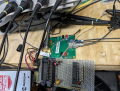
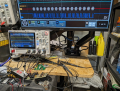
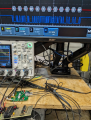
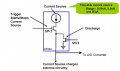
A quick demo sub-Meter plastic fiber cable length detector using a PIC18F25K22 with the CTMU. I used plastic fiber because I already had a driver board for them. For a cable TDR a different front-end is needed to detect the returned pulse level change but the basic controller board and principle remains the same with the actual length measurement in the analog domain as an analog voltage set with digital timing.
https://github.com/nsaspook/Q84vtouch/tree/q84/tdr.X
Tested and calibrated with three cable 1M 2M and 5M. The 1 and 5 meter cables were used for calibration and checked with the 2M cable.

1696306638932.png
1696306700902.png
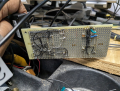
Reused vector board from another old prototype that not being used here.
RigolDS10.png
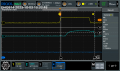
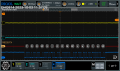
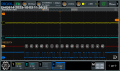
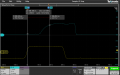
TX pulse and received pulse waveforms.
RigolDS9.png
RigolDS8.png
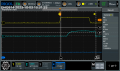
The delta X in ns from the 1M, 2M and 5M cables. I need to detect that 24ns difference between the 1M and 5M cables. The CTMU makes that possible using a analog RC start/stop linear voltage rise on a small capacitance ~4pf (the unconnected ana0 pin) connected to a very fast set of level detectors that sequence the constant current source. Start the CC with the TX pulse positive (yellow) and stop the CC with the returned positive RX pulse (green). The absolute point of TX and RX edge detection is not important, what is important is the repeatability and stability of the CTMU switching the CC at the same points every time. The voltage increase on that tiny capacitance is measured with the ADC and is value converter to Meters after calibration with standard length light cables.


RigolDS13.png
5M cable
RigolDS12.png
2M measurement validation cable
1696308438245.png
1M cable connected. Length readout via the serial port on the controller to the scope display.
1696308732217.png
Raw ADC value for a 1M cable.


C:
#pragma warning disable 520
#pragma warning disable 1090
#pragma warning disable 1498
#pragma warning disable 2053

#include "mcc_generated_files/mcc.h"
#include "tdr.h"

volatile bool printout = false;
volatile adc_result_t tdr_adc = 0;
char buffer[255];

void blinker(void);
void wdtdelay(uint32_t);

/*
             Main application
*/
void main(void)
{
    float adc_raw_float = 0.0f, adc_scaled = 0.0f, r_m, s_m, l_m;
    // Initialize the device
    SYSTEM_Initialize();

    // If using interrupts in PIC18 High/Low Priority Mode you need to enable the Global High and Low Interrupts
    // If using interrupts in PIC Mid-Range Compatibility Mode you need to enable the Global and Peripheral Interrupts
    // Use the following macros to:

    // Enable high priority global interrupts
    INTERRUPT_GlobalInterruptHighEnable();

    // Enable low priority global interrupts.
    INTERRUPT_GlobalInterruptLowEnable();

    // Disable high priority global interrupts
    //INTERRUPT_GlobalInterruptHighDisable();

    // Disable low priority global interrupts.
    //INTERRUPT_GlobalInterruptLowDisable();

    // Enable the Peripheral Interrupts
    INTERRUPT_PeripheralInterruptEnable();

    // Disable the Peripheral Interrupts
    //INTERRUPT_PeripheralInterruptDisable();

    TMR5_SetInterruptHandler(blinker);
    TMR5_StartTimer();

    /* CTMU pins setup */
    TRISBbits.TRISB2 = HIGH; //CTED1
    TRISBbits.TRISB3 = HIGH; //CTED2


    //CTMUCONH/1 - CTMU Control registers
    CTMUCONH = 0x04; //make sure CTMU is disabled and ready for edge 1 before 2
    CTMUICON = 0x03; //.55uA*100, Nominal - No Adjustment default
    CTMUCONLbits.EDG1SEL = 3; // Set Edge CTED1
    CTMUCONLbits.EDG2SEL = 2; // CTED2
    CTMUCONLbits.EDG1POL = HIGH; // Set Edge
    CTMUCONLbits.EDG2POL = HIGH; // positive edges
    CTMUCONHbits.EDGSEQEN = HIGH;
    CTMUCONHbits.CTMUEN = HIGH; //Enable the CTMU
    CTMUCONHbits.IDISSEN = HIGH; // drain the circuit
    CTMUCONHbits.CTTRIG = LOW; // disable trigger

    ADC_SelectChannel(channel_AN0);


    while (1) {
        // Add your application code
        if (printout) {
            adc_raw_float = (float) tdr_adc;
            printout = false;

            adc_scaled = adc_raw_float - offset_meter;
            r_m = five_meter - one_meter;
            s_m = r_m / 4.0f;
            l_m = (adc_scaled / s_m) + 1.0f;
//            snprintf(buffer, 255, "TDR %.2fM cable ", l_m);
            snprintf(buffer, 255, "ADC %.2f ", adc_raw_float);
            printf("%s", buffer);
        }
    }
}

void blinker(void)
{
    uint32_t del = 0;

    DLED2_SetLow();
    CTMUCONHbits.CTMUEN = LOW;
    CTMUICON = 0x03; // 55uA
    CTMUCONHbits.CTMUEN = HIGH;
    CTMUCONHbits.IDISSEN = HIGH; // start drain
    wdtdelay(100); // time to drain the internal cap for measurements
    CTMUCONHbits.IDISSEN = LOW; // end drain
    CTMUCONLbits.EDG1STAT = 0; // Set Edge status bits to zero
    CTMUCONLbits.EDG2STAT = 0;
    CTMUCONHbits.EDGEN = HIGH; // start looking at external edges
    DLED2_SetHigh();

    while (!PIR3bits.CTMUIF) {
        if (++del > 1000) {
            DLED2_SetLow();
            return;
        }
    }
    DLED2_SetLow();

    // CTED (tx1) is high then CTED2 (rx2)went high
    PIR3bits.CTMUIF = LOW; // clear CTMU flag
    ADC_StartConversion();
    CTMUCONHbits.CTMUEN = LOW;
    CTMUICON = 0x00; // current off
    PIE3bits.CTMUIE = LOW; // disable interrupt
    CTMUCONHbits.EDGEN = LOW;
    CTMUCONLbits.EDG1STAT = 0; // Set Edge status bits to zero
    CTMUCONLbits.EDG2STAT = 0;

    while (!ADC_IsConversionDone()) {

    }

    if (!printout) {
        tdr_adc = ADC_GetConversionResult();
    }

    DLED1_Toggle();

    printout = true;
}

/*
* value of 1 for 3.6us, 10 for 15us, 100 = 126us, 1000 for 1256us
*/
void wdtdelay(uint32_t delay)
{
    static uint32_t dcount;

    for (dcount = 0; dcount <= delay; dcount++) { // delay a bit
        Nop();
        ClrWdt(); // reset the WDT timer
    };
}

/**
End of File
*/
C:
#ifndef TDR_H
#define    TDR_H

#ifdef    __cplusplus
extern "C" {
#endif

#include <xc.h> // include processor files - each processor file is guarded.
#include <stdint.h>
#include <stdbool.h>
#include <stdlib.h>
#include <time.h>
#include <math.h>
#include <stddef.h>
#include <stdio.h>
#include <string.h>


#define DLED1        LATCbits.LATC1
#define DLED2        LATCbits.LATC2
#define DLED3        LATCbits.LATC3

// CTMU ADC results for cables
#define offset_meter    2752.0f
#define    one_meter    2752.0f
#define five_meter    3264.0f


#ifdef    __cplusplus
}
#endif

#endif    /* TDR_H */
 
Last edited:

MisterBill2

Joined Jan 23, 2018
27,577
The performance of the scope appears to vastly exceed the performance of the items proposed for the TS project.
Sort of like comparing the performance of a top fuel drag car with a 1965 VW Beetle.

Also, it seems that the amplitudes are quite a bit higher than what would be delivered by an average 74HC14 device
With those wide pulses and recording the time between the pulse rise and the reflected pulse fall, the actual time is not even shown.
An actual TDR measurement shows the time between leading edges. And the leading edge of the reflected pulse is not so clearly defined in those impressive photos.
 

nsaspook

Joined Aug 27, 2009
16,330
The performance of the scope appears to vastly exceed the performance of the items proposed for the TS project.
Sort of like comparing the performance of a top fuel drag car with a 1965 VW Beetle.

Also, it seems that the amplitudes are quite a bit higher than what would be delivered by an average 74HC14 device
With those wide pulses and recording the time between the pulse rise and the reflected pulse fall, the actual time is not even shown.
An actual TDR measurement shows the time between leading edges. And the leading edge of the reflected pulse is not so clearly defined in those impressive photos.
What? You obviously don't understand what's being shown with that response. It's possible to make a controller measure in the ns range if you actually understand the simple process of using the CTMU.
A typical lab (top fuel drag car) scope far exceeds the cheap RIGOL 100MHz scope (nice family car), it does make pretty pictures. :)

I used the falling ring dip on the returned pulse because it's a easy place to measure the total delta (a relative delta measurement that must be stable, repeatable and linear as cable lengths change) delay times with different cables. The system obviously actually measures the time between leading edges but the received signal leading edge is not a sharp response on the scope so using that increases the cursor placement error on the scope to show that time delta accurately. The actual between leading edge time is used in the software calculation that's derived from the ADC measured voltage as a function of when the CTMU edge detectors see EDGE2 after EDGE1 is detected. The leading edge of the reflected pulse is not so clearly defined (slow scope and slow fiber receiver, only 5Mbps data-rate) but that not a important detail as long as the detection point on the leading edges is noise free and consistent with the level detected.

https://datasheet.octopart.com/HFBR-1522-Avago-datasheet-7271941.pdf
 
Last edited:

nsaspook

Joined Aug 27, 2009
16,330
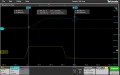
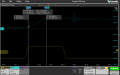
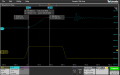
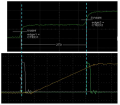
Some scope probes of the charging ADC pin voltage that actually measures the leading edge of the received pulse. The probe impedance is loading down the voltage from the normal measurement amount but it's an accurate indication of what's happening as the edges are set when unloaded.

1696348331104.png
Tek009.png
Cursor. Its's fancy two channel scope ;) so I'm only showing the TX pulse and the ramp voltage.
A: Edge 1 set, constant current source ON. B: Edge 2 received pulse falling.

Tek010.png
1M cable A: Edge CTED1 set, constant current source ON. B Edge CTED2 received pulse rising edge stopping constant current source. 1M length ADC calibration is digital result from measuring 175.985 mV
Tek011.png
pin voltage RAMP channel 2
Tek012.png
RECEIVED PULSE channel 2

5M cable A: Edge CTED1 set, constant current source ON. B Edge CTED2 received pulse rising edge stopping constant current source. 5M length ADC calibration is digital result from measuring 191.949 mV

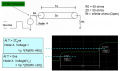
For unterminationed TIME DOMAIN REFLECTOMETRY

1696349473159.png
You have the same linear voltage ramp between edges to measure with the ADC.
1696349663088.png
 
Last edited:

MisterBill2

Joined Jan 23, 2018
27,577
If you look at the pulse reflected from 100 feet of older cable it will not be as great as the pulse reflected from 3 meters of high quality cable. and if you are looking at an echo from a damaged point somewhere toward the far end of that old cable the pulse will be a bit smaller yet. And those pulses probably did not come from that 2 IC TDR pulser in the QST article. the very short pulse fron the quad XOR gate feeding one section of the 74HC14 hex schmidt inverter.
 

nsaspook

Joined Aug 27, 2009
16,330
If you look at the pulse reflected from 100 feet of older cable it will not be as great as the pulse reflected from 3 meters of high quality cable. and if you are looking at an echo from a damaged point somewhere toward the far end of that old cable the pulse will be a bit smaller yet. And those pulses probably did not come from that 2 IC TDR pulser in the QST article. the very short pulse fron the quad XOR gate feeding one section of the 74HC14 hex schmidt inverter.
Wow, no kidding. That's why I did the simple demo with something easy to show the principle. The OP can examine and think about the details of why it's harder to build a practical TDR for general use outside of a lab exercise.

https://www.tek.com/en/documents/fact-sheet/tdr-impedance-measurements-foundation-signal-integrity
TDR Accuracy Factors
Many factors contribute to the accuracy of a TDR measurement. These include the TDR system’s step response, interconnect reflections and DUT losses, step amplitude accuracy, baseline correction and the accuracy of the reference impedance (ZO) used in the measurements.
 
Last edited:

nsaspook

Joined Aug 27, 2009
16,330
Im going to be using a ATTINY85 and just need general advice on how to go about it, as am a novice in this area of electronics.

Many Thanks
https://www.epanorama.net/circuits/tdr.html
Without specialized hardware pulse generation/timing and/or circuits for analog signal amplification and filtering the ATTINY85 (as a substitute for a scope to display and measure the waveform) is IMO useless for a transmission line TDR.
 

nsaspook

Joined Aug 27, 2009
16,330
what would you recommend using?
You might try this.
Build the old school pulse generator. You can then use the ATTINY85 (with a network shield or similar interface) to automate display/calculate timing speed/ranges from the scope (if the scope has something like LXI or serial remote capabilities). Use a scope as the waveform monitor and data collector you adjust like a manual TDR system while the controller reads the scope data and displays TDR range information as the scope updates.
https://siglentna.com/application-note/lxi-tools/
 
Top