Mysterious Industrial PC

Thread Starter

meowsoft

Joined Feb 27, 2021
666
Hello
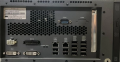
anyone know what is this mysterious industrial PC and how to use those "EXT IO" ports ?, and how much I can upgrade those RAM and CPU ?, I plan it to update those PC with 16GB RAM and Core i7-2600K

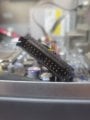
Its EXT IO port is have 25 pin inputs which I also doesn't have appropriate plugs or wire, but probably can just cut its wire and solder it, do you think I can use that like raspberry GPIO pin ?

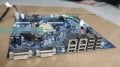
Its have 2 gigabit ethernet ports, 12 USB 2.0 ports, 2 COM ports, 2 DVI ports, 3 SATA ports two goes to SSD bracket and one goes to slim DVD RW, a PCIe port with probably x4 or x8 electrical lanes, a DC power input and even a EXT IO ports

Its also have two RAM slots, with Intel Core i3 2nd gen and 2GB RAM by default
Its labelled OMRON TS-M772 Hitachi Omron Terminal Solutions Corp.

Its also have 24v 15a power label and also two mysterious jumpers like usual arduino relay jumpers to choose voltage between 3.5v and 5v

I plan to use it as my data logger for my weather station with each USB ports then connected to a USB sensors but passing through USB to Fiber (to prevent lightning hazard which can damage my entire home datacenter) and use it for data logger in my electronic workbenchs, to capture and record data from multiple multimeters, oscilloscopes, etc, I got a half dozen of those PC for free from building decomissioning projects, unfortunately I can't find its documentation or manual

Do you have any idea ?
s-l500__69914.1694627626-3989657990.jpgimage.png.5f9a5db2f2e40f80ff3d1e15bb0e488b.png
 

panic mode

Joined Oct 10, 2011
4,866
why? personally i would not bother.

motherboard will have name and version printed on it. and anything unusual (like the built in IO) means proprietary. also industrial PCs are pricey. if i had it, i would try to sell it. no point in spending time trying to dig out some driver or write your own for some unicorn. if it fails, all your effort is also wasted - or you need to buy pricey replacement. if you need some I/O, get I/O... or PLC...
 

MisterBill2

Joined Jan 23, 2018
27,186
The six position DC-IN connector is for the external power supply, which is for the external 24 volt DC power supply to run the computer.
The two "DVI" connectors are for either one or dual monitors.
The "EXT I/O may be to drive an external SSR board for actual external on/off control. It looks like a ribbon cable connector. OR it might be for an external hard drive.
If you cut the wires to that connector the whole thing will be only good for scrap!

If you provide an in-focus photo of the area where the EXT I/O wires attach we should be able to provide a bit more information. Are there connectors for disk drives?
I see that something in the view of the motherboard is blocked out, what are you hiding??
AND please show us the front view.
because that may reveal useful information.
My results with industrial computers have been more successful than p m, it seems.
 

Thread Starter

meowsoft

Joined Feb 27, 2021
666
The six position DC-IN connector is for the external power supply, which is for the external 24 volt DC power supply to run the computer.
The two "DVI" connectors are for either one or dual monitors.
The "EXT I/O may be to drive an external SSR board for actual external on/off control. It looks like a ribbon cable connector. OR it might be for an external hard drive.
If you cut the wires to that connector the whole thing will be only good for scrap!

If you provide an in-focus photo of the area where the EXT I/O wires attach we should be able to provide a bit more information. Are there connectors for disk drives?
I see that something in the view of the motherboard is blocked out, what are you hiding??
AND please show us the front view.
because that may reveal useful information.
I will give more photo later
It think its not for disks, its already have 3 SATA ports and one has goes to DVD RW
 

Thread Starter

meowsoft

Joined Feb 27, 2021
666
it does not seem to be an industrial PC, this appears to be part of ATM machine.
Previous inventory record when I got them is recorded as industrial PC, but I am not sure, and its only use 2nd Intel Core CPU, also a 2012 warranty label
 

Thread Starter

meowsoft

Joined Feb 27, 2021
666
it does not seem to be an industrial PC, this appears to be part of ATM machine.
Maybe, because its has two DVI and multiple USB ports alongside with dual gigabit ethernet and more interesting likely its have RTC too
What do you think ?
 

MisterBill2

Joined Jan 23, 2018
27,186
I certainly DO NOT regard $583 as "peanuts." And my local computer chain store (MicroCenter) sells NEW mother boards for less than that. So certainly, if there is a need for a computer, to consider using this package, UNLESS one has absolutely no computer pieces to work with. But if the TS has a suitable 24 volt DC supply, a monitor, keyboard and mouse. then it can be powered up and see what shows up on the screen. And proceed from there.
 

Thread Starter

meowsoft

Joined Feb 27, 2021
666
What do you think @Ya'akov
I certainly DO NOT regard $583 as "peanuts." And my local computer chain store (MicroCenter) sells NEW mother boards for less than that. So certainly, if there is a need for a computer, to consider using this package, UNLESS one has absolutely no computer pieces to work with. But if the TS has a suitable 24 volt DC supply, a monitor, keyboard and mouse. then it can be powered up and see what shows up on the screen. And proceed from there.
Yes, but I have no available documentation at all, as for its DC supply I was already have and its an advantage, I can use 24v DC power supply to its PC and a 24v battery between, so its can act as UPS and its more cost efficient and power efficient as I doesn't need AC to DC then DC to AC conversion like using usual UPS
 

Thread Starter

meowsoft

Joined Feb 27, 2021
666
I certainly DO NOT regard $583 as "peanuts." And my local computer chain store (MicroCenter) sells NEW mother boards for less than that. So certainly, if there is a need for a computer, to consider using this package, UNLESS one has absolutely no computer pieces to work with. But if the TS has a suitable 24 volt DC supply, a monitor, keyboard and mouse. then it can be powered up and see what shows up on the screen. And proceed from there.
I am not sure for its EXT IO and for memory and CPU, maybe if I upgrade to i7 2600k its will works or its damage its motherboard nor CPU ?, but theoritically its has 24v 15a nameplate so its probably can handle 95w of i7 2600k, what do you think ?
 

Thread Starter

meowsoft

Joined Feb 27, 2021
666
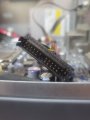
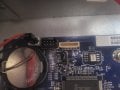
EXT IO socket20241009_152147.jpg

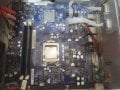
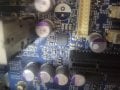
Motherboard Top View
20241009_151904.jpg

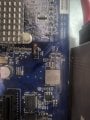
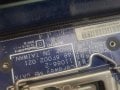
Mysterious Jumper Labelled JP2 and nearby "X1 : 32.768KHz X5 : 32.768KHz" label20241009_152211.jpg

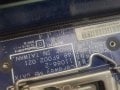
Mysterious Jumper Labelled "JP1" and nearby mysterious socket labelled "LPC1" and "CN16"
20241009_152329.jpg
 

MisterBill2

Joined Jan 23, 2018
27,186
I see two SATA cables plugged in, so it seems that there may be some sort of disk memory included, although that has not been mentioned at all. My guess is that 32.76Khz is a reference to the monitor output scan rate, which presently many monitors can handle.
Unfortunately the view of the "external I/O" connection to the motherboard is totally hidden from view. I did not see what the other ends of those two red SATA cables connected to, although my guess would be hard drives. Please let us know about that.
So it looks very much like it would be reasonable to connect a monitor, keyboard, mouse, and 24 volt power supply, and switch the computer on and see what appears on the screen.
 

Thread Starter

meowsoft

Joined Feb 27, 2021
666
I see two SATA cables plugged in, so it seems that there may be some sort of disk memory included, although that has not been mentioned at all. My guess is that 32.76Khz is a reference to the monitor output scan rate, which presently many monitors can handle.
Unfortunately the view of the "external I/O" connection to the motherboard is totally hidden from view. I did not see what the other ends of those two red SATA cables connected to, although my guess would be hard drives. Please let us know about that.
So it looks very much like it would be reasonable to connect a monitor, keyboard, mouse, and 24 volt power supply, and switch the computer on and see what appears on the screen.
I has been post dismantled EXT IO sockets and very clear picture of it in the first picture
 

Thread Starter

meowsoft

Joined Feb 27, 2021
666
I see two SATA cables plugged in, so it seems that there may be some sort of disk memory included, although that has not been mentioned at all. My guess is that 32.76Khz is a reference to the monitor output scan rate, which presently many monitors can handle.
Unfortunately the view of the "external I/O" connection to the motherboard is totally hidden from view. I did not see what the other ends of those two red SATA cables connected to, although my guess would be hard drives. Please let us know about that.
So it looks very much like it would be reasonable to connect a monitor, keyboard, mouse, and 24 volt power supply, and switch the computer on and see what appears on the screen.
20241009_152147.jpg
 

MisterBill2

Joined Jan 23, 2018
27,186
That very clear picture tells me nothing at all about what signals may be present on the connector. What may be useful is reading the identifications printed on the mother board. THAT is what is required.
How would anybody without super-powers be able to tell what signals would be present on the pins of the connector??? Think carefully about THAT.
 
Last edited:

KeithWalker

Joined Jul 10, 2017
3,603
It looks like the control and data processor of a larger system, probably medical. You are not likely to find any detailed information about it. You have spent a lot on something that has very limited domestic use. You could spend a lot of time and expense trying to turn it into a common or garden type PC. You might succeed, but is it really worth it?
 

panic mode

Joined Oct 10, 2011
4,866
Motherboards nowadays are much more than they used to be. everything is integrated including kitchen sink. and this one has more things than usual and obviously customized for some special use.

all things need drivers and maybe your OS find right driver for everything or just some thing or maybe not much at all. this could severely impact what you can get out of it. good luck...
 

MisterBill2

Joined Jan 23, 2018
27,186
Certainly the value of this particular item depends on the planned application. The last 24 volt supplied computer I saw was in an office, processing cash flow and receipts.
So just because it is a bit different does not make it obsolete. Except, possibly for those folks who have far more wealth than they know what to do with. (That ain't me)
 
Top