Facebook
 Google
 GitHub
 Linkedin

MaxHeadRoom
- Joined Jul 18, 2013
- 30,810
Have you checked out the usual PicList site routines?I need to write two routines for the PIC16LF1823:
- Non-signed three byte by three byte multiplication
- Non-signed 6-byte number to BCD conversion
Have you checked out the usual PicList site routines?I need to write two routines for the PIC16LF1823:
- Non-signed three byte by three byte multiplication
- Non-signed 6-byte number to BCD conversion
Good to know you randomly decided to point out the Ya'akov is a good man by using a Yiddish word on a thread where he is not participating. Let's get back to PIC16LF1823.No. I am just pointing out that Ya'akov is a good man and a person of high integrity.
Yes I have. And most of the code I found is either uncommented or of no use to me because it's been written for a different architecture.Have you checked out the usual PicList site routines?
OK, There is also Pic AN-526 that might help the assembly code process unless already have it.Yes I have. And most of the code I found is either uncommented or of no use to me because it's been written for a different architecture.
Anyway. I'd like to write the code myself so that in the end I can have a thorough understanding of how it works and its intrinsic limitations.
Don't forget to initialize R to zero before the first R <= R + N operationNow that we have shown you the Top-Down Design, let us look at the Bottom-Up Implementation.
I am going to use PB's approach because it is going to be faster when working with small multipliers.
There are 5 functions that you will need to implement. Do not use subroutine calls as this will require extra cycles. Use in-line coding instead.
The objective is: R <= M x N
where,
R is 48-bit result
M is 24-bit multiplier
N is 48-bit multiplicand
Note that we make N = (n5, n4, n3, n2, n1, n0)
You can start with N = 0 and only initialize (n2, n1, n0) with a 24-bit multiplicand.
Here are the 5 functions you need:
48-bit addition
R <= R + N
48-bit Left Shift
N <= N << 1
24-bit Right Shift
M <= M >> 1
Test LSB of M
is LSB of M equal to 1?
Test if M is zero
is M = 0?
Once you have code for these five operations the full multiplication should be straight forward.

This takes me back... writing my own mult and div routines in assembly for 3D robotics simulators in reactor cores. We had to create a visual 3D simulator (this was well before 3D games) to test fuel-handling tapes in nuclear reactors prior to actually doing the operations to prove the paper-tapes were valid and would not get the grapple-head stuck with a block attached in an open core.I know how to do the multiplication by "brute force" using a 6-byte accumulator, a 6-byte multiplicand shift register, and a 3-byte multiplier shift register. I don't know the details of any more efficient multiplication algorithms.
- Clear the Accumulator
- Repeat steps 3-6 24 times, goto 7
- Test the LSB of the multiplier, if it is a 1, add the multiplicand register to the accumulator
- Shift the multiplicand register left 1 bit
- Shift the multiplier right 1 bit
- If the multiplier is equal to 0, then DONE, else goto 3.
- DONE
To convert 6 ASCII digits belonging to the set [0-9], you clear a 3 byte shift register. Then you start with the most significant byte, subtract '0' and OR that into the least significant byte of a 3-byte shift register. Shift the 3 byte shift register to the left by 4 bits. Repeat for the remining 5 characters.
Sounds like there was a premium on getting it right each time, every time. There were no points for 2nd place.This takes me back... writing my own mult and div routines in assembly for 3D robotics simulators in reactor cores. We had to create a visual 3D simulator (this was well before 3D games) to test fuel-handling tapes in nuclear reactors prior to actually doing the operations to prove the paper-tapes were valid and would not get the grapple-head stuck with a block attached in an open core.
Papabravo, one question. In step 3, what happens if the LSb of the multiplier is a 0? Should the algorithm execute step 4 immediately? Does that mean that step 4 will always be executed?3.- Test the LSB of the multiplier, if it is a 1, add the multiplicand register to the accumulator

Thanks, I get it now ... I was a little confused with your notation. I would've written the algorithm rather as:What you are computing is
R <= R + N x m
where m is the LSB, least significant bit.
m has a value of 0 or 1.
If m is 0 there is nothing to add.
If m is 1, you add N to R and put the result in R.
Then you go to the next step.
;*
;*
;*****************************************************************************************
;                                   Macro definitions
;*****************************************************************************************
MovLf macro Literal, File           ;Move a literal value into a file (register)
         movlw Literal              ;it's important to select the proper memory
         movwf File                 ;bank before using this macro
       endm

MovF2F macro FileSource, FileDest   ;Move a file into another file, using w as a mediator
         movf FileSource, w
         movwf FileDest
       endm
;*****************************************************************************************
;                               End of Macro definitions
;*****************************************************************************************


;********************************** Zone of common RAM ***********************************
;  Only 16 bytes are available, but there's no need to switch memory Banks to work on it
; available addresses are 70H-7FH
;*****************************************************************************************

PUSH01             EQU 74H
PUSH02             EQU 75H

GPT00              EQU 76H
GPT01              EQU 77H
GPT02              EQU 78H

CNT00              EQU 79H

NUMBER             EQU 7DH


;*****************************************************************************************
; The following arrays of 8 bytes will be used in 64 bit math calculations and are located
;                                  in memory Bank 12
;*****************************************************************************************
A0         EQU 0xA0
A1         EQU 0xA1
A2         EQU 0xA2
A3         EQU 0xA3
A4         EQU 0xA4
A5         EQU 0xA5
A6         EQU 0xA6
A7         EQU 0xA7

B0         EQU 0xA8
B1         EQU 0xA9
B2         EQU 0xAA
B3         EQU 0xAB
B4         EQU 0xAC
B5         EQU 0xAD
B6         EQU 0xAE
B7         EQU 0xAF

C0         EQU 0xB0
C1         EQU 0xB1
C2         EQU 0xB2
C3         EQU 0xB3
C4         EQU 0xB4
C5         EQU 0xB5
C6         EQU 0xB6
C7         EQU 0xB7

D0         EQU 0xB8
D1         EQU 0xB9
D2         EQU 0xBA
D3         EQU 0xBB
D4         EQU 0xBC
D5         EQU 0xBD
D6         EQU 0xBE
D7         EQU 0xBF

;*
;*
;*
;*
;*
;*


;*****************************************************************************************
; Multiply two arrays whose LSB is pointed at by GPT00 and GPT01, and leave the result in
; GPT02. The GPT02 array must be cleared prior to calling this function
; The size of GPT02 should be the total size in bytes of GPT00 and GPT01. For this purpose
; we will set a size of NUMBER = 8 for GPT02. And the same size for GPT00 and GPT01, but
; their combined values should always fit in 8 bytes or less. This means that at least
; the upper 8 bytes in both GPT00 and GPT01 combined must be set as zeroes.
; This algorithm stops when one of the arrays becomes zero during the process.
; This function works in memory Bank 1 and does not switch active banks during its
; execution
;
; This function uses Papabravo's algorithm shown at:
; https://forum.allaboutcircuits.com/threads/multiplication-and-bcd-conversion-routines-for-the-pic16lf1823.187336/post-1738564
;
;   1.- Clear the Accumulator (GPT02)
;   2.- Test the LSB of GPT01, if it's set, then add GPT00 to GPT02
;   3.- Shift GPT01 right 1 bit
;   4.- Shift GPT00 left 1 bit
;   5.- If GPT01 is equal to 0, then DONE, else goto 2.
;   6.- DONE
;
; GPT02 MUST BE CLEARED prior to calling this function
;*****************************************************************************************
Multiply_GPT00_by_GPT01:

      MovLf 0x00, FSR0H            ;set FSR0H and FSR1H adresses as that of memory Bank 0 and 1
      MovLf 0x00, FSR1H

      MovLf 0x01, CNT00            ;number of bits to shift the arrays

Multiply_GPT00_by_GPT01_Loop:
        MovF2F GPT01, FSR0L        ;make FSR0 point to the array pointed at by GPT01
        btfsc INDF0, d'0'          ;Test the LSB of array pointed at by GPT01
         call Add_GPT00_To_GPT02   ;if it's set, then add GPT00 to GPT02

        call Shift_GPT01_Right     ;shift GPT01 one bit to the right
        call Shift_GPT00_Left      ;shift GPT00 one bit to the left

        call Is_GPT01_Zero         ;test if the array pointed at by GPT01 is all zeroes
       btfss STATUS, Z             ;test the result reported by Is_GPT01_Zero
      goto Multiply_GPT00_by_GPT01_Loop ;keep going if GPT01 is not zero

    return


;*****************************************************************************************
;                        Clear Arrays A, B, C, D, and BCD in Bank 1
;                     W, STATUS, NUMBER, PUSH01 and FSR0 are destroyed
;*****************************************************************************************
Clear_All_Arrays:
     MovLf 0x00, FSR0H   ;FSR0H adress of memory Bank 0 and 1

     MovLf d'36', NUMBER ;arrays A, B, C and D are all consecutive and
                         ;are 8 byte long each, the BCD array is
     movlw 0xA0          ;consecutive to array D and is 4 bytes long
     call Clear_Array
    return


;*****************************************************************************************
;    Clear an array with NUMBER of bytes starting at location pointed at by W upwards
;   This routine does not change the active bank
;                       W, STATUS, PUSH01 and FSR0 are destroyed
;*****************************************************************************************
Clear_Array:

     ;Warning, the value of FSR0H must be set prior to calling this function to set
     ;the memory bank in which it will work

     movwf FSR0L                  ;copy W into FSR0L
     MovF2F NUMBER, PUSH01        ;both NUMBER and PUSH01 are located in common RAM

Clear_Array_Loop:
       clrf INDF0                 ;clear register pointed at by FSR0
       incf FSR0L, f              ;point to the next register upwards
      decfsz PUSH01, f
     goto Clear_Array_Loop

    return


;*****************************************************************************************
;  Test if the array whose LSB is pointed at by GPT01 with NUMBER bytes is all zeroes
; The Zero bit in the STATUS register will be either set or cleared as a result of this
; function. This routine does not change the active bank
;
;                   Destroyed registers: W, STATUS, PUSH01, FSR0
;*****************************************************************************************
Is_GPT01_Zero:

     ;Warning, the value of FSR0H must be set prior to calling this function to set
     ;the memory bank in which it will work

     MovF2F GPT01, FSR0L          ;make FSR0 point to the array pointed at by GPT01
     MovF2F NUMBER, PUSH01        ;load NUMBER into PUSH01

Is_GPT01_Zero_Loop:
      movf INDF0, f               ;test if the byte pointed at by FSR0 is zero
      btfss STATUS, Z             ;if it is not zero, then
       goto Exit_Is_GPT01_Zero    ;exit this routine immediately
      incf FSR0L, f               ;otherwise, point to the next byte in the array
      decfsz PUSH01, f            ;decrement the counter
     goto Is_GPT01_Zero_Loop      ;and test again

     ;To get here, an INCF instruction was executed AFTER testing the Zero bit in the
     ;STATUS register. And since INCF affects said bit, it means that we are going to have
     ;to set the Zero bit manually before exiting
     bsf STATUS, Z

Exit_Is_GPT01_Zero:

    return


;*****************************************************************************************
;  Shift an array to the RIGHT at LSB location pointed at by GPT01, with NUMBER of bytes,
; by CNT00 number of bits. This routine does not change the active bank
;  NUMBER cannot be so large as to exeed the designated memory bank size when added with
; W, or the FSR0 might point outside of said bank
;  This routine does not change the active memory bank
;  Destroyed registers: W, FSR0, STATUS, PUSH01, PUSH02 (the last three are in common RAM)
;*****************************************************************************************
Shift_GPT01_Right:

     ;Warning, the value of FSR0H must be set prior to calling this function to set
     ;the memory bank in which it will work

     MovF2F CNT00, PUSH02

Shift_GPT01_Right_Loop_00:
       movf GPT01, w
       addwf NUMBER, w
       movwf FSR0L                ;FSR0 now points to the MSB of the array
       decf FSR0L, f              ;necessary to make sure FSR0L points to MSB after adding

       MovF2F NUMBER, PUSH01      ;both NUMBER and PUSH01 are in common RAM

       bcf STATUS, C              ;clear the carry flag before beginning the shifting
Shift_GPT01_Right_Loop_01:        ;of NUMBER bytes
         rrf INDF0, f             ;rotate right the register pointed at by INDF0 through C
         decf FSR0L, f            ;point to the next register down
        decfsz PUSH01, f
       goto Shift_GPT01_Right_Loop_01

      decfsz PUSH02, f            ;shift the next bit
     goto Shift_GPT01_Right_Loop_00

    return


;*****************************************************************************************
;  Shift an array to the LEFT at LSB location pointed at by GPT00, with NUMBER of bytes,
; by CNT00 number of bits. This routine does not change the active bank.
;  NUMBER cannot be so large as to exceed the designated memory bank size when added with
; W, or the FSR0 might point outside of said bank
;  This routine does not change the active memory bank
;  Destroyed registers: W, FSR0, STATUS, PUSH01, PUSH02 (the last three are in common RAM)
;*****************************************************************************************
Shift_GPT00_Left:

     ;Warning, the value of FSR0H must be set prior to calling this function to set
     ;the memory bank in which it will work

     MovF2F CNT00, PUSH02

Shift_GPT00_Left_Loop_00:
       MovF2F GPT00, FSR0L        ;FSR0 now points to the LSB of the array
       MovF2F NUMBER, PUSH01      ;both NUMBER and PUSH01 are in common RAM

       bcf STATUS, C              ;clear the carry flag before beginning the shifting
Shift_GPT00_Left_Loop_01:         ;of NUMBER bytes
         rlf INDF0, f             ;rotate Left the register pointed at by INDF0 through C
         incf FSR0L, f            ;point to the next register up
        decfsz PUSH01, f
       goto Shift_GPT00_Left_Loop_01

      decfsz PUSH02, f
     goto Shift_GPT00_Left_Loop_00

    return


;*****************************************************************************************
;  Add two HEX arrays at LSB location pointed at by GPT00 and GPT02 correspondigly,
; with NUMBER of bytes each, and store the result in the same array pointed at by GPT02.
; The result will have the same NUMBER of bytes as the added arrays, and therefore this
; routine will not be able to handle an overflow. GPT00, GPT02 and NUMBER are all
; located in common RAM
;  This routine does not change the active Bank
;  Destroyed registers: W, FSR0, FSR1, PUSH01, STATUS
;*****************************************************************************************
Add_GPT00_To_GPT02:

     ;Warning, the values of FSR0H and FSR1H must be set prior to calling this function
     ;to set the memory banks in which it will work
     MovF2F NUMBER, PUSH01        ;preserve the value of NUMBER
     MovF2F GPT00, FSR0L          ;Prepare both FSR0 and FSR1 pointers
     MovF2F GPT02, FSR1L

     bcf STATUS, C                ;clear the carry flag before proceeding

Add_GPT00_To_GPT02_Loop:
       movf INDF0, w              ;add both bytes along with the carry flag, and
       addwfc INDF1, f            ;store the result in register pointed at by FSR1 (GPT02)

       incf FSR0L, f              ;increment pointers to the next byte up in the arrays
       incf FSR1L, f              ;the Carry Flag is not affected by this operation

      decfsz PUSH01, f            ;continue loop, the carry flag is not affected
     goto Add_GPT00_To_GPT02_Loop

    return


;*****************************************************************************************
;  Subtract two HEX arrays at LSB location pointed at by GPT00 and GPT01 correspondigly,
; with NUMBER of bytes each, and store the result in the same array pointed at by GPT01.
;  The formal operation is GPT01 <- GPT01 - GPT00
; The result will have the same NUMBER of bytes as the added arrays, and therefore this
; routine will not be able to handle an underflow. GPT00, GPT01 and NUMBER are all
; located in common RAM
;  This routine does not change the active Bank
;  In the end, if the result of the operation was a negative number, the Carry flag will
; be reported as set
;  Destroyed registers: W, FSR0, FSR1, PUSH01, STATUS
;*****************************************************************************************
Subtract_GPT00_from_GPT01:

     ;Warning, the values of FSR0H and FSR1H must be set prior to calling this function
     ;to set the memory bank in which it will work

     MovF2F NUMBER, PUSH01        ;use PUSH01 so as to preserve the value of NUMBER
     MovF2F GPT00, FSR0L          ;Prepare both FSR0 and FSR1 pointers
     MovF2F GPT01, FSR1L

     bsf STATUS, C                ;SET the carry flag before proceeding!

Subtract_GPT00_from_GPT01_Loop:
       movf INDF0, w              ;subtract GPT00 from GPT01 along with the carry flag,
       subwfb INDF1, f            ;and store the result in GPT01

       incf FSR0L, f              ;increment pointers to the next byte down in the arrays
       incf FSR1L, f              ;the Carry Flag is not affected by this operation

      decfsz PUSH01, f            ;continue loop, the carry flag is not affected
     goto Subtract_GPT00_from_GPT01_Loop

    return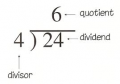
1.- Set quotient to 0, counter to 0
2.- Is the divisor less than the dividend?
    Yes:
      - Shift the divisor one bit to the left
      - Increment the counter
      - Goto step 2
3.- No, the divisor is equal to the dividend:
      - Subtract the divisor from the dividend
      - Set bit(counter) in the quotient
      - Goto step 4
    No, the divisor is greater than the dividend:
      - If counter = 0, goto step 4
      - Shift the divisor one bit to the right
      - Decrement the counter
      - Is the divisor less than the dividend?
        Yes:
          - Subtract the divisor from the dividend
          - Set bit(counter) of the quotient
          - Goto step 2
         No:
          - Goto step 3

4.- We're done, the result is contained in the quotient, and the remainder in the dividend
unsigned int bmult(unsigned int x, unsigned int y)
{
    int total = 0;
    int i;

    /* if the i-th bit is non-zero, add 'x' to total */
    /* Multiple total by 2 each step */
    for(i = 32 ; i >= 0 ; i--)
    {
        total <<= 1;
        if( (y & (1 << i)) >> i )
        {
            total = badd(total, x);
        }
    }

    return total;
}

unsigned int bdiv(unsigned int dividend, unsigned int divisor)
{
    int i, quotient = 0, remainder = 0;

    if(divisor == 0) { printf("div by zero\n"); return 0; }

    for(i = 31 ; i >= 0 ; i--)
    {
        quotient <<= 1;
        remainder <<= 1;
        remainder |= (dividend & (1 << i)) >> i;

        if(remainder >= divisor)
        {
            remainder = bsub(remainder, divisor);
            quotient |= 1;
        }
    }

    return quotient;
} XX EQU 0x70 ;both registers located in common ram
FF EQU 0x71
movlw d'3'
movwf XX
bsf FF, XXI think I found the answer ... a little cumbersome but it does the job:Here's a dumb question:
How do I set bit XX in file FF ?
Say:
The problem with the previous example, is that since XX EQU 0x070 (binary 0111 0000), it will be bit zero which will be set, not bit 3 as I want, because the bsf is expecting a literal that defines the bit number, not a file. I realized this when I read a warning from the compiler stating that only the three lower bits of the defined value would be used in the instruction.Code:XX EQU 0x70 ;both registers located in common ram FF EQU 0x71 movlw d'3' movwf XX bsf FF, XX
     ;FSR0 pints to the byte whose indicated bit will be set

     lslf PUSH01                  ;PUSH01 contains the bit # to be set, multiply it by 2
     movf PUSH01, w               ;load it into w

     brw                          ;branch the number of instructions
                                  ;as defined by the value of w
     bsf INDF0, d'0'              ;w = 0
     goto Exit_Setb_GPT02
     bsf INDF0, d'1'              ;w = 2
     goto Exit_Setb_GPT02
     bsf INDF0, d'2'              ;w = 4
     goto Exit_Setb_GPT02
     bsf INDF0, d'3'              ;w = 6
     goto Exit_Setb_GPT02
     bsf INDF0, d'4'              ;w = 8
     goto Exit_Setb_GPT02
     bsf INDF0, d'5'              ;w = 10
     goto Exit_Setb_GPT02
     bsf INDF0, d'6'              ;w = 12
     goto Exit_Setb_GPT02
     bsf INDF0, d'7'              ;w = 14
    ;goto Exit_Setb_GPT02         ;not necessary

Exit_Setb_GPT02: