MPLABX is getting better

Thread Starter

Markd77

Joined Sep 7, 2009
2,806
I've tried it again today on Linux and bits of it now seem to be working. I've managed to create a new project, done some simulation, and even programmed a PIC with it.
To my mind it's still a beta version and it's really counterintuative, but another year or so and it might be pretty good.
<rant>
Before trying it I'd recommend reading the (massive) errata list, there could be a major bug with the PIC you want to use.
There's still a lot to sort out, for example if you want to simulate you have to select the simulator as the debugger, then to program the chip you then have to change the debugger to your PICKIT, then back again for the next time you program the chip.
If the chip fails to program MPLAB hangs.
There are no settings that I could find to externally power the PIC. <ed> Found them now, thanks bance. </ed>
</rant>
 
Last edited:

Thread Starter

Markd77

Joined Sep 7, 2009
2,806
Thanks, the software I've used before (PICKIT2 standalone programmer and PK2CMD) had the PICKIT powering the circuit by default and had a setting that would allow the PIC to be powered by another source.
I'll give it a try at some point.
 

bance

Joined Aug 11, 2012
315
I agree, I use Arch and I've never used anything but MPLABX and it works just fine....
The only problem I've had is with a 16F628, and that is probably because I programme to a breadboard using ICSP.

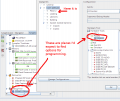
If you double click your programmer, under project properties, it will bring up a dialogue allowing you to power your chip and tristate the pins so they can be used as I/O's...

HTH Steve
 
Last edited:

t06afre

Joined May 11, 2009
5,934
I will still use and recommend the old MPLAB and not MPLABX. And I am also some puzzled by how small development steps take. Up to now MPLABX has just frustrated me
 

Thread Starter

Markd77

Joined Sep 7, 2009
2,806
I agree, I use Arch and I've never used anything but MPLABX and it works just fine....
The only problem I've had is with a 16F628, and that is probably because I programme to a breadboard using ICSP.

If you double click your programmer, under project properties, it will bring up a dialogue allowing you to power your chip and tristate the pins so they can be used as I/O's...

HTH Steve
Brilliant, thanks. I thought I'd clicked on everything.
This is the sort of thing I mean by counterintuitive, nothing in the menu, not in the other places I saw:
 

Attachments

ErnieM

Joined Apr 24, 2011
8,415
As far as I am concerned MPLAB X is still a beta.

MPLAB-X said:
Some of the files in this Project "MPLAB" contain spaces or odd characters in their name or their path. This could potentially cause issues during the build process. This is a limitation of GNU Make tool that we use as part of our build process. Removing spaces from all file and folder names included in this project will eliminate this potential issue.
Orly? This from a Microchip sample project after about a half an hour of trying to tie up the files it couldn't find.
 
Last edited:

Thread Starter

Markd77

Joined Sep 7, 2009
2,806
The installation for me was one of the most straightforward that I have done on my new 64 bit Mint linux system. I had to run the install as administrator, but it prompted me to do it.
A lot of software for 64 bit needs to be built from source code, but this was just a few clicks.
 

bance

Joined Aug 11, 2012
315
@ ErnieM
You're clearly a WINDOZE user since you expect "free" software to work perfectly out of the box.....

Us poor nixer's are used to software that doesn't.:D
 
Top