Mosfet open discussion

Thread Starter

q12x

Joined Sep 25, 2015
2,227
Do you have access to an ATX power supply or a car battery in decent shape?
Yes... now you and some time ago mister @Danko suggested the same thing with the ATX PSU. I have 3 of them and one with a very few wires on it, but working. I will have to test them because I dont know what I have there anymore. Ok then, thats my beating horse ! Very good idea, both of you.
--
Alright, I prepared an OK ATX PSU, only that I cut it's very long wires, and now it has a couple left, enough to do my experiments. I dont need all its output wires, only 2 or 3. I actually used this particular ATX PSU to power an old monitor that was having very thin and long neon tubes in it, right before LED monitors era. That PC monitor, it's black brick, I put something on top of it and it got so hot that it burned out. Leaving it in air alone, it powered my monitor fine for years. So I go with it in my hand to a electronic repair shop. And after 2 weeks, that guy call me and give me the new brick power supply. I go happy home, I power the monitor, and until the night, that new power supply got dead - without me putting anything on it because I learned my lesson. I even open it up and put holes in its plastic case for more cooling. Very quickly I realized that electronic engineer was a complete idiot. The original PSU that burned, was 4A probably. And this new one was 1A. Thats how I understood why it burned so fast. But that guy also give me a hint, because I was young and I didnt got in the habit to measure everything, I was an adolescent what can you ask from me back then. But I observed the voltage was 12V on that new PSU that burned in a couple of hours. So, I sacrificed this ATX PSU which was a weak one, 230W compared to my current one of 400W in my PC. But very good for powering my monitor. And guess what? It worked just fine. For another couple of years !!! in this configuration. That monitor neon back light got extremely yellow-orange, probably in 8 or 10 years of daily use and abuse. It was my very first thin monitor - before I had those big CRT monitors, I actually had a 21 inch diagonal CRT monitor (for artists). Hehehe. Yes, this is the history of this particular ATX PSU ! Now you will love it as much as I do.
This 4:3 type of monitor, only that one I had was 4 or 5 fingers thick, not 2 fingers or even 1 finger thick as the modern LED monitors are now.

1723111406475.png1723111431801.pngThe conclusion is that I was forced to learn electronics because I was surounded by idiots !
---
I think is a good idea to post it's label.
20240808_134555.jpg
I first look in the top-right corner where it says PS-230WB so that tells me is a 230W PSU.
But... in that table is a range of watages, and they mention some "voltage selector". I believe this PSU can be tweak to higher Wattage. But I have no idea from where. It might be dumbed down for commercial reasons? Hmmm.
 
Last edited:

Danko

Joined Nov 22, 2017
2,169
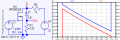
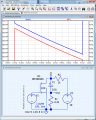
Сircuit consumes 10 mA max from V2 during C1 charging.
In this circuit:
Eliminated most part of inductance and resistance of wires.
Eliminated PS reaction on current step.
R1 used also as measuring current shunt.
Not necessary to use high current PS.
---
It will be very helpful to replace R2 by current source 10 mA.
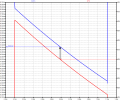
1723103989428.png1723181535123.png
EDIT:
Thanks to @q12x file test-fet.asc replaced by test-fet-fixed.asc.
 

Attachments

Last edited:

Thread Starter

q12x

Joined Sep 25, 2015
2,227
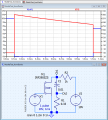
Here is your file tested in my side. Still not corresponding with your graph !
I even color match everything too with this occasion. Because I had the program in default mode. I even let it update 43Mb in about 1h - very limited bandwidth for updates this program have. I copied every visual setting you present in your screenshots. That was a very good reference for me to tweak mine here.
The right and the bottom of the graph are the same. Only the Left side is not the same - yours is in mV, mine is in V.
I couldnt find how to color red those 2 Ch like you have it in your img. Im not that good in this program.
I also dont understand completly what you did there; what you were thinking.
1723206093531.png
 
Last edited:

Danko

Joined Nov 22, 2017
2,169
The right and the bottom of the graph are the same. Only the Left side is not the same - yours is in mV, mine is in V.
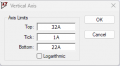
Set values for left and right sides:
1723216206753.png 1723216543640.png

How to do it, see in LTspice Help, Waveform Viewer, Axis Control:
1723217173819.png
I couldnt find how to color red those 2 Ch like you have it in your img. Im not that good in this program.
I'm not good in LTspice too. When I have any questions, I'm looking answers in Help.
I also dont understand completly what you did there; what you were thinking.
I was thinking about how to help @dl324 with his work.
Therefore I had to resolve such problems:
=Eliminate influence of resistance and inductance of feeding wires.
=Lead simultaneous record drain-source voltage and drain current.
=Use low current PS, like miniature 9 V battery.
 

Thread Starter

q12x

Joined Sep 25, 2015
2,227
Yah, it worked ! Now we are in sincron.
But... why did you changed these waveform values? Why you need it to look like this?
1723224059223.png
 
Last edited:

Danko

Joined Nov 22, 2017
2,169
But... why did you changed these waveform values? Why you need it to look like this?
Why me? You need!
On oscilloscope you need to set sensitivity selector to mV range, if you want to see mV signal.
The same is here. Waveform Viewer is LTspice oscilloscope.
For example, you want to know what is value of D-S voltage drop at current 26 A.
With millivolt range of left axis you can easily to do it:
1723232380279.png
 

dl324

Joined Mar 30, 2015
18,337
I prepared an OK ATX PSU
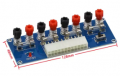
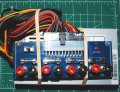
I bought a couple of these breakout boards years ago:
1723303501775.png
I found out the hard way that there are at least a couple variants for the "plus 4" part. The boards I bought were for the newer pinout and I didn't know until smoke started coming from the power supply. I put the boards aside, but decided to try again.

This time, I looked up specs for the connector and verified that the boards were for version 2.x. And that the small supply I wanted to use was compatible.

The old style "plus 4" were 2 12V and 2 grounds. The newer ones have 3.3, 5, 12, and gnd.

The terminals are cheaply made and I need to make a plexiglass shield to avoid shorting things.
 

Thread Starter

q12x

Joined Sep 25, 2015
2,227
what this represents? I never come across such a thing. Totally new for me and I have no idea what you are showing me here. I can see some screw connectors, glass fuses, a switch, a red led and a port like the one on a motherboard.
Hmmm...probably it is splitting more conveniantly some voltages on those screw connectors? Maybe? Its all I can think of it may do. It doesnt seem too complicated. Am I right?
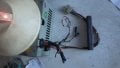
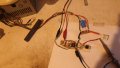
Also...you didnt seen my ATX PSU ... it's wiring condition... haha... like I said, I used it for a single purpose and I had to modify it in that direction. In a sense I transform it from multiple voltage output PSU into a single voltage output, well, maybe 2 or 3 not only 1 but still very minimalistic is now.
I literally cannibalize it. Hahaha. But all the original wiring was unnecesary and was bother me in my original application for this PSU.
Theoretically, if I need more voltages I do have those cut ends left. I left only that long wire and its plug intact. It has 5V and 12V on it. THe 12V line, the yellow plastic is a bit cooked next to the connector, probably weak connection and overheated. But it did worked for years, powering my monitor. I already find 2 pins and inserted them into the plug, barely visible in the img.
My white lamp is standing on top of this ATX PSU, since I dont have space.
20240810_183759.jpg
@dl324 what you have being doing these days? Did you made something interesting with that smd mosfet?
---
I just hook this new ATX PSU to the board and is behaving exactly as before, with very nice square wave. I have 100R5W Load white cement resistor.
Now, with it installed, I have 5V at the mosfet Drain but at a greater Amperage than with my 7V small isolation transformer. Is all you were insisting to do. So now, I should be set for some ridiculous high amperage driving, right?
-But what to test that consumes a lot of amperage? I was thinking at a piece of nichrome wire, to make a small heater from it. I do have a couple of diameters of it stored. Hmmm... or some power LEDs ? I do not have 1W, 5W, 10W LEDs unfortunately, but I know their existence. They can be an interesting load to drive. Or ultimately, like I did already, using smaller value power resistors, I only have to pay attention when the PSU is starting to get switched (remember that pulsed DC phenomenon) and the wattage to be high to keep the resistor cold long enough.
These are all the Loads I can think of, for big currents.
20240810_190118.jpg
 
Last edited:

dl324

Joined Mar 30, 2015
18,337
what this represents? I never come across such a thing.
It's an ATX breakout board. You connect the 20/24 pin connector to it and it gives you convenient connections to 3.3V, 5V, 12V, and -12V.

EDIT: add picture of supply with breakout board.
smallAtxWithBreakout.jpg
what you have being doing these days?
I've been spending most of my time working on my deck. The boards are in pretty bad shape, so I'm ripping up and replacing all of the floor boards. Around 700 square feet. I'll do the railing next year...
Did you made something interesting with that smd mosfet?
Nothing besides that voltage regulator.
 
Last edited:

Thread Starter

q12x

Joined Sep 25, 2015
2,227
- That is a very interesting board for ATX PSU ! I never come across one. I rather buy only the screws with the plastic caps and make my own output boards.
You see what I mean with all those wires? How getting in the way they are? I have 3 ATX's and only 1 is having all the original uncut wires.
- See if you can think on what Load I should test for higher currents with this new setup ! We have to test that IRFZ44N after all, no? I propose: - let's push it to the LIMIIIIT ! But we need a very comfortable and possible variable Load. I already enumerated my ideas. You should have done this things already so you should pick examples from your vast experience like candy, hehe.
- I am very inclined to switch my IRFZ44N test mosfet with a smd one, like you did in your side more smartly than me. I originally did think to use a smd one, but I push it to test these big ones in the end. Because I have a bunch of them and I was curious specifically how really strong they are, to build a reference in my head.
 

dl324

Joined Mar 30, 2015
18,337
How getting in the way they are?
The wires aren't in the way. They're on the left and back, but the power supply is lying flat. I just wish I had some better terminals to use on the board. The existing ones require spade connectors, and I'll have to make up some leads.
I have 3 ATX's and only 1 is having all the original uncut wires.
I have around a dozen if I start cannibalizing from computers that are no longer used. The one in the picture was given to me in a small case stripped of everything except the power supply.

Another larger case came with it. That one is missing the power supply but has a motherboard. The processor is AMD, so the heat sink is large.
You should have done this things already so you should pick examples from your vast experience like candy
I was going to, but after burning up a supply, I put that idea on the back burner. Now that I could use more current, I decided to try again.

The supply I'm using is a small one. It can only supply 13-14A for 3.3, 5, and 12V.
I originally did think to use a smd one, but I push it to test these big ones in the end. Because I have a bunch of them and I was curious specifically how really strong they are, to build a reference in my head.
I wanted to know if the AO3400 and AO3401 were actually capable of the current specified in the datasheet. Now I know they are and that the devices could be genuine (I bought them on AliExpress, which always makes them suspect).
 
Last edited:

Thread Starter

q12x

Joined Sep 25, 2015
2,227
I managed to lower to 10% duty cycle on the Drain of the mosfet. Remember I was always getting a 20%.
I had to modify the comparator cct a little bit for this.
Unfortunatly, less than 10% the pulse become very unstable and jumpy. So I was literally forced to get back to that 10% and stay there. I managed to obtain about 5% but unstable DC.
In all this tweaking process I managed to burn 2 mosfets. 1st because overheating with my soldering iron, staying too much on the pad, and 2nd because I changed that 4.7k on the Output to the Gate with 1k. Eh well.... I have 100.
I also changed the 100R5W with 1R50W. The R started to get worm, but not hot. ALso the mosfet was warm. I tested for 30sec or so, and finger and lip checked for temperature (while unpowered). The tr, because it is SMD, is loosing its heat in less than 1sec, so my lip test was fast but not fast enough. I think when is powered, is a little more hot than my lip temp reading.
- I am still wondering how in the hell DID YOU MEASURED YOURS so precisely. I still have no idea how you do it.
- Can you explain with clearer steps what I should do here to read the power dissipation both on Load and on the mosfet?
Especially now when Im using this small tr and also that I solved the 10% problem.
 

dl324

Joined Mar 30, 2015
18,337
I am still wondering how in the hell DID YOU MEASURED YOURS so precisely. I still have no idea how you do it.
I used a 5V supply for the MOSFET, a 1 ohm load resistor, and just measured the drain voltage. You calculate the current in the load resistor using Ohm's law. Knowing the voltage dropped by the MOSFET and the current, you can use Ohm's Law to calculate its on resistance.

Problems arise for P channel devices because I needed to use a 10V supply for both the PWM and MOSFET. Measuring the voltage drop across the MOSFET was difficult. That's why I added the subtracter circuit that had the effect of inverting the signal. I clamped with a 2.4V zener so I could use a higher resolution range.
Can you explain with clearer steps what I should do here to read the power dissipation both on Load and on the mosfet?
Since you need to calculate the current in the load resistor, you can use P=IV to calculate dissipation in the load resistor and the MOSFET.
 

Thread Starter

q12x

Joined Sep 25, 2015
2,227
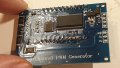
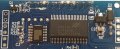
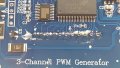
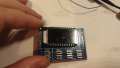
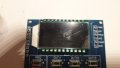
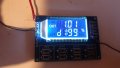
I received this [PWM Generator x3 Channel with LCD]
And I've notice some things that I wrote to the aliexpress seller product comment area and leave it a 1/5 star for this.
20240813_181656.jpg20240813_181757.jpg20240813_181819.jpg20240813_181826.jpg20240813_181842.jpg20240813_181949.jpg20240813_182031.jpg20240813_184325.jpg
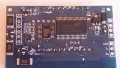
Its a WHITE crystalized salt drips on the back of the board. Especially on board pins.
Over the big IC pins, is a big blob and I clear it myself with a needle tip. Very strong bond.
This might be salt from a battery or capacitor leakage that died with this circuit inside it and got contaminated. And now you are selling it as is? Dude!
The small IC markings are laser erased, sign of very low grade or equivalent(not original) or very used IC, most probably the IC was touched by the battery that leaked.
The LCD screen, when is not powered, presents some very serious scratches over it ! When is powered, it presents a very low angle of reading, 95% of time it is showing those black segments instead of the blue background. At very specific angle, this LCD will look ok to read from it. This is a Very LOW quality LCD !!!

Overall I am very disappointed of this particular product. But, it is working (for now) and it is seriously not guaranteeing me if it will last too long.
There were a few more details but I was restricted by the website to 1000 characters.
It might have be some superglue that dripped and splashed all over, but still, not cool. Im turning the board in a picture to show the reflection of a very large drip along all those pins, you see how long it is? I was mad.
- I test it and I managed to make it work, the LCD was showing some data and I also check in // with my OSC. And both the duty cycle % 'es are quite in unison. Which is very good !
I also have HT1621B 20/20 HT1621B only multiplexed LCD Driver 1/2 or 1/3 bias, and 1/2 or 1/3 or 1/4 duty SSOP48 [smd] in my list of ICs. Still unused. I couldn't crack it's functionality to use it from a PIC mcu. I only crack it's functionality with a very obscure function from Arduino online library, and it worked very good, but only restricted to arduino. Not my PC serial communication or PIC mcu. I will address it in the future. You can see this exact same IC on this board for the LCD driver.
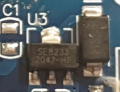
This must be it's 3V voltage regulator, which is a new part for me - never cross over it.
1723570774923.png
Also the markings for pos and neg are... weird. I managed to figure them out but... still a bit weird placement on the board, and confusing on the first look. Now is very clear, Im just mentioning my first impressions.
Now it is working ! Its all that matters. Thank you again to mister @Danko for this very interesting testing board.
 

sarahMCML

Joined May 11, 2019
697
I received this [PWM Generator x3 Channel with LCD]
And I've notice some things that I wrote to the aliexpress seller product comment area and leave it a 1/5 star for this.
View attachment 329224View attachment 329225View attachment 329227View attachment 329228View attachment 329229View attachment 329230View attachment 329231View attachment 329232
Its a WHITE crystalized salt drips on the back of the board. Especially on board pins.
Over the big IC pins, is a big blob and I clear it myself with a needle tip. Very strong bond.
This might be salt from a battery or capacitor leakage that died with this circuit inside it and got contaminated. And now you are selling it as is? Dude!
The small IC markings are laser erased, sign of very low grade or equivalent(not original) or very used IC, most probably the IC was touched by the battery that leaked.
The LCD screen, when is not powered, presents some very serious scratches over it ! When is powered, it presents a very low angle of reading, 95% of time it is showing those black segments instead of the blue background. At very specific angle, this LCD will look ok to read from it. This is a Very LOW quality LCD !!!

Overall I am very disappointed of this particular product. But, it is working (for now) and it is seriously not guaranteeing me if it will last too long.
There were a few more details but I was restricted by the website to 1000 characters.
It might have be some superglue that dripped and splashed all over, but still, not cool. Im turning the board in a picture to show the reflection of a very large drip along all those pins, you see how long it is? I was mad.
- I test it and I managed to make it work, the LCD was showing some data and I also check in // with my OSC. And both the duty cycle % 'es are quite in unison. Which is very good !
I also have HT1621B 20/20 HT1621B only multiplexed LCD Driver 1/2 or 1/3 bias, and 1/2 or 1/3 or 1/4 duty SSOP48 [smd] in my list of ICs. Still unused. I couldn't crack it's functionality to use it from a PIC mcu. I only crack it's functionality with a very obscure function from Arduino online library, and it worked very good, but only restricted to arduino. Not my PC serial communication or PIC mcu. I will address it in the future. You can see this exact same IC on this board for the LCD driver.
This must be it's 3V voltage regulator, which is a new part for me - never cross over it.
View attachment 329233
Also the markings for pos and neg are... weird. I managed to figure them out but... still a bit weird placement on the board, and confusing on the first look. Now is very clear, Im just mentioning my first impressions.
Now it is working ! Its all that matters. Thank you again to mister @Danko for this very interesting testing board.
I think you'll find that the white stuff is just flux residue that they didn't bother to remove. I have one that I got several months ago which was properly washed and is fine.
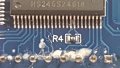
One thing you might want to change on yours is the resistor R4. I noticed that your's is 47K, whereas mine is 1K. It sets the bias on the LCD, and according to the HT1621B datasheet it should only be around 15K with a 5V supply. Since it's only running at 3.3V it should be even less! Mine is 1K and is perfect!
We had this problem on a different forum with the single output version of this board. The displays were having the same ghosting effects arising, so I removed the resistor and substituted a small 50K trimpot. When adjusted, the display came back to normal, but the value does differ from unit to unit.
The micro on mine has no identification either, but it hasn't been ground off like yours, it's perfectly flat. The micros on my single output ones however are different, and have had their markings ground off!
Are you sure the screen hasn't got the plastic protective cover still on?
 

Thread Starter

q12x

Joined Sep 25, 2015
2,227
I think you'll find that the white stuff is just flux residue that they didn't bother to remove. I have one that I got several months ago which was properly washed and is fine.
One thing you might want to change on yours is the resistor R4. I noticed that your's is 47K, whereas mine is 1K. It sets the bias on the LCD, and according to the HT1621B datasheet it should only be around 15K with a 5V supply. Since it's only running at 3.3V it should be even less! Mine is 1K and is perfect!
We had this problem on a different forum with the single output version of this board. The displays were having the same ghosting effects arising, so I removed the resistor and substituted a small 50K trimpot. When adjusted, the display came back to normal, but the value does differ from unit to unit.
The micro on mine has no identification either, but it hasn't been ground off like yours, it's perfectly flat. The micros on my single output ones however are different, and have had their markings ground off!
Are you sure the screen hasn't got the plastic protective cover still on?
very interesting points ! Thanks.
Yes the plastic protective cover is on and the scratches were visible on it when LCD is off. But I added a bit of drama to be a good movie. haha.
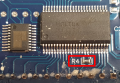
"One thing you might want to change on yours is the resistor R4. I noticed that your's is 47K, whereas mine is 1K. It sets the bias on the LCD, and according to the HT1621B datasheet it should only be around 15K with a 5V supply. Since it's only running at 3.3V it should be even less! Mine is 1K and is perfect!"
This one - right? I will try changing it as you suggest ! Very interesting! You're good -hehe
1723758926713.png
"I think you'll find that the white stuff is just flux residue"
Yaah.....I didnt think of this option at all ! You might be right. Eh well, If I screw it, why not screw it big? heh.
The micro on mine has no identification either, but it hasn't been ground off like yours, it's perfectly flat. The micros on my single output ones however are different, and have had their markings ground off!
From the little time I spent searching for this specific IC, I gathered that it might be those mcu's that are 1 time only programmable and extremely cheap, like 100pcs for 5$ or something like this. And even cheaper at 1000 or 10000pcs (per item price). The problem is assembler programming them ...which Im good to a level, but "not that good". I am actually with my eyes on such cheap deals and I plan in the future to delve into this niche. Until then.... we gather informations.
 

Thread Starter

q12x

Joined Sep 25, 2015
2,227
"One thing you might want to change on yours is the resistor R4. I noticed that your's is 47K, whereas mine is 1K. It sets the bias on the LCD, and according to the HT1621B datasheet it should only be around 15K with a 5V supply. Since it's only running at 3.3V it should be even less! Mine is 1K and is perfect!"
This one - right? I will try changing it as you suggest ! Very interesting! You're good -hehe
I change it right now, with 1k and the LCD is worse. In the sense that the opaque is not completly on but a bit off and the light instead of being completely shut off is visible when the segment should be turn off. In other words, the shot off segments are partially open (not fully) and the open segments are full open. So the entire segments are illuminated with small difference of illumination contrast.
Hmmm. Maybe that black is because is fully off? maybe from 47k to 42k to slightly open the segment? to balance it with the background blue intensity and contrast? But really its not a big issue, its more an annoyance that I can skip over.
 

sarahMCML

Joined May 11, 2019
697
I change it right now, with 1k and the LCD is worse. In the sense that the opaque is not completly on but a bit off and the light instead of being completely shut off is visible when the segment should be turn off. In other words, the shot off segments are partially open (not fully) and the open segments are full open. So the entire segments are illuminated with small difference of illumination contrast.
Hmmm. Maybe that black is because is fully off? maybe from 47k to 42k to slightly open the segment? to balance it with the background blue intensity and contrast? But really its not a big issue, its more an annoyance that I can skip over.
So try using a variable resistor of say, 25K instead, and find the optimum resistance, as I did. It'll only take 5 minutes but is well worth while. Then you can measure it and replace with the correct fixed one.
 
Top