Mimic PIR Sensor to Achieve AlwaysOn

Thread Starter

ShouldaRTFM

Joined Mar 23, 2026
10
Hello. Total newb here, but I have a reasonable amount of skills. Pretty good with general household electricity, but not strong on the electronics side.

I have a LED stair controller that is initiated by PIR sensors - one at the top of the stairs, one at the bottom. It works well, but it does not have an "Always On" capability. At times, we would just like the ambience of the lights always being on. Which leads to the need for help.

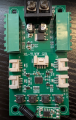
I removed the connector for one of the PIR sensors from the controller. There are 3 pins on the controller for the PIR sensor. The leftmost (Pin 1) appears to be ground, the rightmost (Pin 3) is 3V DC. When I short Pin 3 pin to the center pin (Pin 2), it activates the LEDs (as expected). Then the LEDs go out after a set amount of time, say 10 seconds. If I leave Pin 3 shorted to Pin 2, the lights still go out after 10 seconds. If I short Pin 2 to Pin 3, release, and then short them again before the 10 secs is up, the LEDs stay illuminated. If I repeat the shorting of Pins 2 and 3 every 5-8 seconds, the LEDs stay on indefinitely - ie AlwaysOn.

This is where I need help. What can be used to create a pulse every 'X' seconds to mimic the pulse generated by the PIR sensor? Also, I want to have the ability to switch between always on or PIR-activated.

Thanks! I look forward to what this group comes up with!
 

Reloadron

Joined Jan 15, 2015
7,850
If you want an always on feature why not just bypass the sensors with a simple On/Off switch? Creating a pulse is simple enough but a simple bypass switch is how I would go about it.

Just My Take....
Ron

<EDIT> actually you could use a a witch at the top and bottom of the stairs.
 

Thread Starter

ShouldaRTFM

Joined Mar 23, 2026
10
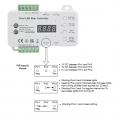
Thanks Ron. I appreciate the response. I would love a bypass switch, but I have no idea how to implement that on this controller. The controller is a "Step-09" stair controller. The seller said there was no always-on capability. That is why I was trying to seeing if I could control it via the PIR pins. If the lights would have stayed on when connecting pins 2-3, then I would have used that as a "switch". But even though the LED stays illuminated on the controller saying pins 2-3 are connected, the lights still go out after 10 seconds. Its only when I pulse it regularly will it stay on. When I disconnect the pir sensors, there is no way to turn the lights on unless I connect pins 2 and 3. Do you have any ideas how to implement an on/off switch on this controller?
Thanks again for your help.
Greg
 

Reloadron

Joined Jan 15, 2015
7,850
OK, just let me look into that controller manual. At first glance it looks interesting. Either myself or another member will come up with a solution which is simple.

Ron
 

Reloadron

Joined Jan 15, 2015
7,850
OK, so it uses a 24V power supply. Sorry it took me a few days to get back to you. I was out of town. I looked at the manual after some Googling and in all honesty I don't have a solution. The thing is feature packed. Your initial thought of pulsing the PIR sensors may be viable. Normally a sensor will send a high or low logic level when it detects something. The trick is knowing which it does. Using a switch to apply a logic high or low may work but less a schematic it's hard to know how these things work. PIR are normally 3 wire, a Power +, a Power -, and the output. Knowing the voltage out of the PIR is necessary and again no schematic. There should be a simple way to do this. Do you have for example a DMM (Digital Multimeter) to read the PIR outputs?

Ron
 

Reloadron

Joined Jan 15, 2015
7,850
OK, you can try applying the 3 VDC on pin pins 2 & 3. That should simulate motion sensed. Next is we hope that the internals are retriggerable meaning after awhile it won't time out. Should this work then we add a bypass switch. That being my best guess. :)

Ron
 

Reloadron

Joined Jan 15, 2015
7,850
Pretty much. However you may want to apply a + to Pin 2 and - to Pin 1. I am not sure if the system looks for a logic Hi or Low. Trying both won't hurt.

Ron
 

Reloadron

Joined Jan 15, 2015
7,850
That's what I was afraid of. This likely uses a uC (micro-Controller) The way it works is the IR sensor triggers a circuit similar to a non-retriggerable timer. Meaning it will run for a delay time and timeout. Waiting for another trigger,retriggerable meand if you hold a logic high or low (whatever it wants) it would remain On. I would have thought, with all the functions it has they would have included an always on function.

OK, I work tomorrow and Wednesday but will give it more thought. I hope for simple.

Eon
 

Thread Starter

ShouldaRTFM

Joined Mar 23, 2026
10
Ron,
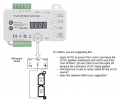
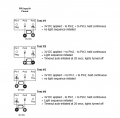
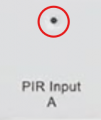
Yeah, that was my suspicion as well. In the snip below of the PIR input on the controller, there is an LED (circled in red). When Pins 2 and 3 are shorted (or Test #2 or Test #3 are executed), the LED illuminates and stays on, but the timeout ultimately wins out. The timeout is currently set to 20 seconds. So if I short Pins 2 and 3 every 10-15 seconds (or execute Test #2 and Test #3 but rather than held continuous, apply the voltage every 10 15 seconds) the lights stay on - suggesting the timer is reset every time "motion" is recognized.
1774986460728.png

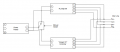
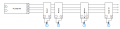
I had a thought the below might work. From the Seller's response, I was of the understanding that the Step-09 was a "timer-based" controller. So I thought maybe bypassing it with another LED controller that offered "always on" and having a switch between the two might work. So I bought a SP108E controller as it supports Data and Clock. That yielded very unpredictable results. Maybe it was something I did wrong. The wire from the controller to the lights is like a bus with connection nodes on it. I think the way this stair controller works is that the nodes that the 2 wire COB LEDs connect to have the "addressable pixel" smarts inside of them. My setup has 13 steps, so 13 nodes and 13 strips of COB LEDs. I don't believe the COB LEDs themselves are addressable (as they are only 2 wire) which leads me to believe the addressability is in the node. And I haven't been able to get the SP108e to manage those 13 nodes correctly. Anyway, here is a diagram of the concept I tried. The "Always On" controller in my test was the SP108e. Also, the very last diagram is a diagram of the wiring "bus" from Controller to Nodes.

Greg

1774986058309.png


1774987704369.png
 

AnalogKid

Joined Aug 1, 2013
12,043
Based on the first 12 posts, I guessed that post #13 test #4 would work.

Suggestion (no warranties etc):

CMOS 555 oscillator circuit, circuit GND connected to pin 1, output connected to pin 2, Vcc to pin 3. With the simple 50% duty cycle circuit running at 0.1 Hz, this will drive pin 2 with 5 seconds on, 5 seconds off. Circuit power comes from pin 3. The CMOS 555 is rated to run on 3 V, and the current draw will be less than 1 mA.

1 - LMC555
2 - 1.0 uF ceramic cap (timing and decoupling)
1 - 470K resistor

That's 13 circuit pins to be connected, plus three external wires.

If you don't want to build this, there probably is a small timer module on ebay for $2.

ak
 
Last edited:

MisterBill2

Joined Jan 23, 2018
27,159
From post#1 it is unclear just exactly whatyou have. " I have a LED stair controller that is initiated by PIR sensors - one at the top of the stairs, one at the bottom. It works well, but it does not have an "Always On" capability. At times, we would just like the ambience of the lights always being on. "

My guess is a stairway LIGHTS controller. BUT maybe it is more than that. Evidently it senses motion at the top and bottom of the steps and triggers a sequence of lighting, but you want instead for constant lighting.
And you have decided that the solution is to repeatedly trigger that timer by simulating the pulsetriggers from the motion sensors.

An alternative scheme would be to trigger each step light repeatedly, and a second alternative scheme wouold be to modify each unit to stay illuminated constantly. CAUTION: That might not be a reversable modification.
 

Thread Starter

ShouldaRTFM

Joined Mar 23, 2026
10
@Reloadron Thanks for the suggestion on the timer relay. I ordered one and received it last week, but have not had the time to set it up and test it. I will update my results once I get to testing it.

@AnalogKid Thank you for the suggestion and taking the time to propose a solution. As stated above, I purchased a timer relay and will give that a try. I realized this prebuilt timer relay is the more expensive option.

@MisterBill2 Thank you for taking the time to review my problem. I did try to set up a second circuit to each light strip separately, but that second circuit interfered with the stair light controller features. As stated above, I'm going to give the timer relay solution a try and will report my results.

Thanks again to all of you for taking the time to read through the posts and offer you help. Its greatly appreciated.
Greg
 
Top