LTspice rename / label calculated traces

Thread Starter

ebeowulf17

Joined Aug 12, 2014
3,307
I've just recently learned how to use formulas to get LTspice to plot all sorts of fun stuff, but sometimes the formula that's required is totally unclear as a label.

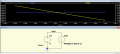
Here's an example; I just created this sim a few minutes ago, and I included the expression "V(v-load)/I(R-load)" to get it to plot the resistance of "R-Load." This works perfectly, but the formula looks silly. I'd love to be able to rename the resulting trace as "R(R-load)" or some such thing. Does LTspice support anything like that? I've tried a bunch of google searches to no avail. Lots of info on plotting formulas, nothing on renaming the results.
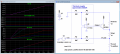
laser-current-source_01.png
 

crutschow

Joined Mar 14, 2008
38,503
Don't think you can rename the labels as they define the trace operation.
What I do is use the Place Text command under the Plot Settings/Notes & Annotations drop-down to add text to the plot, such as placing "R-Load =" in front of the trace label so it ends up as
R-Load = V(v-load)/I(R-Load).
Still a little kludgy, but at least it better defines what the trace is plotting.

The main disadvantage of this is that the text is not anchored to the label, so it can move out of position if you change the plot plane and then you have to move it back into the desired location.
 

Thread Starter

ebeowulf17

Joined Aug 12, 2014
3,307
Don't think you can rename the labels as they define the trace operation.
What I do is use the Place Text command under the Plot Settings/Notes & Annotations drop-down to add text to the plot, such as placing "R-Load =" in front of the trace label so it ends up as
R-Load = V(v-load)/I(R-Load).
Still a little kludgy, but at least it better defines what the trace is plotting.

The main disadvantage of this is that the text is not anchored to the label, so it can move out of position if you change the plot plane and then you have to move it back into the desired location.
Thanks!

That's certainly not as slick and integrated as I'd hoped, but it gives me a way to get it done.
 

Alec_t

Joined Sep 17, 2013
15,117
If you edit the Plot Defs file from the Plot Settings menu you can define the R(load) function there, then save the file. The function can then be used in place of Time on the X-axis. I haven't found a way to use the function on the Y-axis.
PlotDefs.PNG
UsingPlotDef.PNG
 
Top