LTSpice help - newbie

Thread Starter

Ramussons

Joined May 3, 2013
1,568
I've just started playing around wit LTSpice XVII. I would like some help on how to change the IC pin layout for drawing easier schematics.
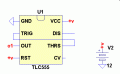
For eg, take the NE555 that is available in the LTSpice package. It is displayed as a square with the pins in a cyclic order.

I would like it with pins 4 and 8 on Top, 1 and 5 at the bottom, 3 or the right and 2,6 and 7 on the left. Is it possible to do this? Not only for 555 but with any IC in general?

Thanks.
 

crutschow

Joined Mar 14, 2008
38,435
Yes.
You can open the NE555.asy symbol file (or any .asy symbol file) in LTspice and edit the pins in Edit/Attributes.
In my computer 555 file is located in C:\Program Files (x86)\LTC\LTspiceIV\lib\sym\Misc.
but I have LTspice IV and the location may be different in your computer.
Note that when you move the pins, the netlist order must move with it.
You right-click on the pins to see their attributes.
 

ericgibbs

Joined Jan 29, 2010
21,425
I would like it with pins 4 and 8 on Top, 1 and 5 at the bottom, 3 or the right and 2,6 and 7 on the left. Is it possible to do this? Not only for 555 but with any IC in general?
hi,
I would recommend that you do not modify the 'standard' symbols in LTSpice, it makes a problem for other users who may need to check your work.

If you are concerned about criss/crossing connections, use a simple method like this, use Labels [F4]
E
A005.gif
 
Last edited:

spinnaker

Joined Oct 29, 2009
7,830
hi,
I would recommend that you do not modify the 'standard' symbols in LTSpice, it makes a problem for other users who may need to check your work.

If you are concerned about criss/crossing connections, use a simple method like this, use Labels [F4]
E
View attachment 119883

To expand on this is called a Label Net upload_2017-2-4_9-33-3.png. They are very useful and easy to use. Personally, I would avoid their over use. A couple of crisscross wires is not that big a deal. Reserve the label nets for major inputs and outputs. They can be a cool way to break your schematic down into functional blocks. For example your 555 timer might be driving something else. Build both of those circuits by separate blocks and connect them through Label Nets.
 

crutschow

Joined Mar 14, 2008
38,435
I would recommend that you do not modify the 'standard' symbols in LTSpice, it makes a problem for other users who may need to check your work.
Good point.
Such changes will make it difficult for anyone else to simulate your circuit, since their library will likely have the original pinout orientation.
 

spinnaker

Joined Oct 29, 2009
7,830
Good point.
Such changes will make it difficult for anyone else to simulate your circuit, since their library will likely have the original pinout orientation.

I would think it would simulate OK. Being able to follow the schematic would be a different matter.
 

crutschow

Joined Mar 14, 2008
38,435
I would think it would simulate OK.
The .asc file does not include the models or symbols so those are used from the local library files.
Thus if the symbol pinout is changed, the file won't simulate properly because the wires will be going to the incorrect pins.
 

crutschow

Joined Mar 14, 2008
38,435
You can move the positions of the pins in the symbol as you wish, provided you don't alter the Netlist Order of the pins.
Okay.
But I'm just not sure if the .asc file finds the same symbol, but with a different pinout, how it will be connected.
 

eetech00

Joined Jun 8, 2013
4,705
Hi

The NE555 is defined using a .sub file. If the symbol's pins are MOVED to a different position, and the visible pin names are not changed, then it will still simulate correctly, but the user will have to re-connect the pins on the schematic accordingly. However, If you DELETE a pin, then re-add a pin, the pin order will change unless you specify the pin number when you re-add it. LTspice doesn't like gaps in pin numbers either. So...as long as the PIN ORDER does not change (so it still matches the subcircuit definition) then the part should simulate correctly.

Using the NE555 as an example, if I open the symbol, move the pins, and save the changes (to its default sub folder location), then any schematic where I've used that symbol previously, will auto-update with the new pin arrangement. But obviously, the wires in the schematic connected to the new NE555 will have to be corrected.

Using the example above, if I, instead, saved the symbol to a new name, then none of my existing schematics will be affected unless I unknowingly used the same symbol name in a schematic.

Symbols with a circuit defined as a "block" (the symbol has a matching .asc file) will be behave similarly, except the symbols pin order doesn't matter. The pin label names are honored at all times and the pin order is ignored.
 

Thread Starter

Ramussons

Joined May 3, 2013
1,568
Thanks a ton to all for the advice given.

I followed crutschow's idea on post 2 and saved the asy as LM555 as the original is NE555. There's no problem in the simulation.

I'm paying special attention to posts # 5 and #10 - special thanks for the caution alert.
 

spinnaker

Joined Oct 29, 2009
7,830
Thanks a ton to all for the advice given.

I followed crutschow's idea on post 2 and saved the asy as LM555 as the original is NE555. There's no problem in the simulation.

I'm paying special attention to posts # 5 and #10 - special thanks for the caution alert.

Not that crutshow is not a genius in LTSpice, the best solution is Eric's. If you go changing symbols it is just going to create more confusion for you down the road. Not to mention the fact that you need to take the time to do it when it is not really necessary.
 

Deleted member 115935

Joined Dec 31, 1969
0
I gather the NE555 is a standard symbol in LTSpice,

just as a general comment, as above, dont change standard parts.
what happens in 5 / 10 years when you look again at the schematic,

OK, in this case, not too likely, but its a good habit to get into thinking about the future.

As a general, if you want a new standard part,
make your own with a new name , NE555_alt or such like.

You should even be able to may your own symbol , which calls up a standard NE555 symbol,
so you get 'standard' and your own symbol.

but i bet you soon get tired of doing that, and use globals as defined above.
 

spinnaker

Joined Oct 29, 2009
7,830
Guys....its OK to change the parts as long as the user manages the resulting files properly....
There is the issue. You need to be careful about upgrading.

Also if you you want to share your work that causes problems too.

Why mess with it when Eric presented a very viable solution?
 

eetech00

Joined Jun 8, 2013
4,705
There is the issue. You need to be careful about upgrading.

Also if you you want to share your work that causes problems too.

Why mess with it when Eric presented a very viable solution?
I agree with Eric, but at the same time I don't want disuade the user from exercising the flexibility of LTspice..
 

Thread Starter

Ramussons

Joined May 3, 2013
1,568
I do understand the dangers of doing the modifications. It's just that I'm an oldie and am used to drawing schematics grouping inputs on 1 side, outputs on the other, VCC on top and GND at the bottom :cool:.

That aside, I read that you can use a "include" statement for a custom asy and enclose it with the asc for others to follow up.

Thanks again for a whole lot of very informative suggestions.
 
Top