LTspice continues to befuddle me... please help

Thread Starter

Hpfiend

Joined Jan 11, 2013
23
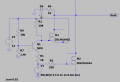
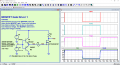
Ok all, I have tried LTspice simulation again with another circuit and it still isn't doing what I intended. This circuit is supposed to be switch 12V or ground at the shared output based on the logic of the esp32 pin being high or low. IE if you provide 12V and want it to switch ground on the wire it will or if you provide a ground and want it to switch 12v with the same wire it will. The leds are supposed to provide visual indication which mode is active and functional. I get mv outputs when I am supposed to get 12V pulse. Is it the simulator or the circuit design? I have checked for floating connections and am using the standard npn instead of the mmbt2222 I plan to use. The standard LEDs were a problem last time. I tried updating the library with the borydonov zip, tried led.txt which I found in another thread. It seems like everything written on the internet is based on older versions of LTspice as my version 24 does not allow me to change D to DLED3 when I right click. I cannot find any folder named stdiode.dio or whatever it was called I was supposed to paste into and downloading spice model files and using .inc just doesn't work either!
 

Attachments

Art Vandelay

Joined Nov 1, 2024
140
You should use real models instead of the generic ones such as Q1, D4, D5, D6. I've had problems with generic models in some circuits.

You can also use a spice directive to input custom parameters but I suggest you pick from one of the models from the list that comes with the program. For example, change NPN to 2N3904 and change LED to NSPW500BS (right click -> select new diode).

Well, I did that and I'm only getting 400mV at Vout. Something else is wrong and frankly your circuit is a bit of a mess to decipher. How about we start from scratch?

For this I'll ask for the algorithm you want to implement. Using pseudo-code, list every operation you want the circuit to perform as well as what happens if that operation can't be completed. It can be in plain language and no need to get overly formal:

IF (condition_1) THEN (statement_1) ELSE (statement_2)

Doing it this way makes it easier for folks to understand what you are trying to achieve. I read your description three times and I'm having a hard time understanding how the circuit you made is supposed to work. For example, M2 doesn't appear to be doing anything because the drain is blocked by D4.
 

Papabravo

Joined Feb 24, 2006
22,058
From your diagram, it is clear you do not understand how an N-channel MOSFET works. Q1 is shorting the SOURCE terminal of M1 and the 12V source V2 to GROUND. In order to turn an N-channel MOSFET on, the GATE terminal must be about 10V above the SOURCE terminal. Part of your problem stems from not starting with simpler circuits to build you confidence in how the simulator works. Go back to basics to gain and improve your confidence
 

Thread Starter

Hpfiend

Joined Jan 11, 2013
23
You should use real models instead of the generic ones such as Q1, D4, D5, D6. I've had problems with generic models in some circuits.

You can also use a spice directive to input custom parameters but I suggest you pick from one of the models from the list that comes with the program. For example, change NPN to 2N3904 and change LED to NSPW500BS (right click -> select new diode).

Well, I did that and I'm only getting 400mV at Vout. Something else is wrong and frankly your circuit is a bit of a mess to decipher. How about we start from scratch?

For this I'll ask for the algorithm you want to implement. Using pseudo-code, list every operation you want the circuit to perform as well as what happens if that operation can't be completed. It can be in plain language and no need to get overly formal:

IF (condition_1) THEN (statement_1) ELSE (statement_2)

Doing it this way makes it easier for folks to understand what you are trying to achieve. I read your description three times and I'm having a hard time understanding how the circuit you made is supposed to work. For example, M2 doesn't appear to be doing anything because the drain is blocked by D4.
Thank you for your time!! I will definitely give it a try. This is what is supposed to happen.

If esp32 pin is HIGH,
Q1 npn turns ON → PMOS (IRLML6402) gate = 0V → PMOS is ON 12V output at Vout.
NMOS gate has 3.3V, but PMOS’s D3 blocks reverse current and LED D6 lights
If esp32 pin is LOW,
Q1 turns OFF → PMOS gate = 12V → PMOS OFF.
NMOS gate = 0V → NMOS conducts → LED D5 lights.
D1 and D2 are supposed to provide flyback protection from relays which would be connected at their high side or low side to Vout. D4 blocks reverse current so it doesn't interfere with the high side.

I think now that I have written it out I need to invert the logic of the nmos circuit so that when the pin is low it is active as I don't see how it would conduct with 0 gate voltage. Basically I was trying to combine another circuit I had used that used inverted logic with two nmosfets but only output 10v when it was supposed to put out 12 because the nmosfet wasn't fully saturated. I fixed it by using the npn/pmosfet combo here but wanted to use just the ground side switching single logic level IRLML6344 nmosfet I have working elsewhere but obviously am in over my head.


Basically it is supposed to use a single 3.3V digital esp32pin that can be configured by switching logic from low to high to be able to switch the ground side or high side of a 12v relay.
 

ronsimpson

Joined Oct 7, 2019
4,646
Basically it is supposed to use a single 3.3V digital esp32pin that can be configured by switching logic from low to high to be able to switch the ground side or high side of a 12v relay.
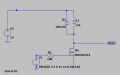
That is simple. You want 3.3V logic to switch the low side of a 12V relay.
Now knowing what relay, I set L1 to 1mH and 100 ohms series resistance.
1747089760799.png
----edited----
R3 should be 10 to 100 ohms. Will work at 10k.
 
Last edited:

Thread Starter

Hpfiend

Joined Jan 11, 2013
23
That is simple. You want 3.3V logic to switch the low side of a 12V relay.
Now knowing what relay, I set L1 to 1mH and 100 ohms series resistance.
View attachment 349076
----edited----
R3 should be 10 to 100 ohms. Will work at 10k.
Sort of. I need the same circuit to be versatile enough to be able to switch the high side of a 12v relay, or the low side of a 12v relay. Basically a switchable positive or negative 12v trigger using one pin. I have already built the pcb using a circuit with a mechanical switch to change modes but it failed miserably even though I paid an ee from pakistan to go over it from Fiverr. Granted 75-80% of the board functions as designed but this part was not correct. It was supposed to do 0 and 12 volts and while it does switch polarity and is protected from flyback it puts out 4 and 8 volts.
 

crutschow

Joined Mar 14, 2008
38,316
I paid an ee from pakistan to go over it from Fiverr.
You apparently wasted you money. :eek:
Should have posted here first.

Ltspice simulates the convoluted circuit you designed.
The befuddling is not with LTspice.

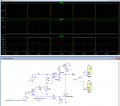
Below is the circuit with an active high and active low output output option as determined by switch U3:
V(u1) (green trace) shows relay U1 turning ON and OFF with U3 and U4 in the upper position (12V is relay ON).
V(u2) (yellow trace) shows relay U2 turning ON and OFF with U3 and U4 in the lower position (0V is relay ON).

D1 and D2 are for spike suppression.
U4 is for simulation purposes and is not necessarily needed in the real circuit.

Is that what you wanted?

1747156582146.png
 
Last edited:

Thread Starter

Hpfiend

Joined Jan 11, 2013
23
You apparently wasted you money. :eek:
Should have posted here first.

Ltspice simulates the convoluted circuit you designed.
The befuddling is not with LTspice.

Below is the circuit with an active high and active low output output option as determined by switch U3:
V(u1) (green trace) shows relay U1 turning ON and OFF with U3 and U4 in the upper position (12V is relay ON).
V(u2) (yellow trace) shows relay U2 turning ON and OFF with U3 and U4 in the lower position (0V is relay ON).

D1 and D2 are for spike suppression.
U4 is for simulation purposes and is not necessarily needed in the real circuit.

Is that what you wanted?

View attachment 349085
Yes that is precisely it! Thank you! Where did you get the switches from? sw looks nothing like that.
 
Last edited:

crutschow

Joined Mar 14, 2008
38,316
Where did you get the switches from?
Not sure where I got them.

Attached are the symbol and model files.
The .asy file can be put in the /Misc directory, and the .sub file can be put in the /sub directory.

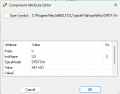
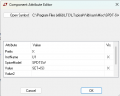
If you right-click on the symbol in the schematic, the SET value can be set to 1 for connecting the shown contact, and to 2 for connecting to the other contact.
In my sim I made the SET value equal to {S} (include the curly brackets as below), so the .step command then changes the contact setting from 1 for the first simulation to 2 for the second simulation.

Note that an LTspice simulation generally gives a good indication of how the real circuit will work.
If the sim values are off, then it's likely there is a problem with the circuit.

One thing it doesn't do is give a direct indication that a component is operating beyond its design limits.
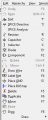
It will happily simulate even when components are grossly overloaded, so you need to look at the component values after a transient simulation, such as voltage, current, and power (Alt/left-click the component to show its instantaneous power dissipation in a plot. Ctrl/left-click the plot title to get the average power during the plot period).

1747150387977.png
 

Attachments

Thread Starter

Hpfiend

Joined Jan 11, 2013
23
Not sure where I got them.

Attached are the symbol and model files.
The .asy file can be put in the /Misc directory, and the .sub file can be put in the /sub directory.

If you right-click on the symbol in the schematic, the SET value can be set to 1 for connecting the shown contact, and to 2 for connecting to the other contact.
In my sim I made the SET value equal to {S} (include the curly brackets as below), so the .step command then changes the contact setting from 1 for the first simulation to 2 for the second simulation.

Note that an LTspice simulation generally gives a good indication of how the real circuit will work.
If the sim values are off, then it's likely there is a problem with the circuit.

One thing it doesn't do is give a direct indication that a component is operating beyond its design limits.
It will happily simulate even when components are grossly overloaded, so you need to look at the component values after a transient simulation, such as voltage, current, and power (Alt/left-click the component to show its instantaneous power dissipation in a plot. Ctrl/left-click the plot title to get the average power during the plot period).

View attachment 349126
Thank you for those files!

Is the power distribution why you decided to change the second MOSFET from an irlml6402 to an a0n6407?
 

Papabravo

Joined Feb 24, 2006
22,058
Thank you for those files!

Is the power distribution why you decided to change the second MOSFET from an irlml6402 to an a0n6407?
No. One is an N-channel MOSFET, and the other is a P-channel MOSFET. In P-channel MOSFETs, Vgs must be negative to turn them on.
I thought I recommended you go back and learn the basics.
 

crutschow

Joined Mar 14, 2008
38,316
Is the power distribution why you decided to change the second MOSFET from an irlml6402 to an a0n6407?
No.
As noted by Pb, one is an N-MOSFET and one is a P-MOSFET.
Just about any device model will do as long as they meet your voltage and on-resistance needs, and the N-MOSFET is a logic-level device that will fully turn on with 3.3V Vgs.
 

Thread Starter

Hpfiend

Joined Jan 11, 2013
23
No. One is an N-channel MOSFET, and the other is a P-channel MOSFET. In P-channel MOSFETs, Vgs must be negative to turn them on.
I thought I recommended you go back and learn the basics.
I appreciate your reply. Based on the direction of the arrow, the AO6407 appears to be a P-channel Mosfet in the circuit and so was the IRLML6402 I originally used? The AON6407 is most definitely an N -channel mosfet and is what pulled up in digikey when I tried to find the AO6407. The IRLML6344 is an N-channel mosfet at the bottom.
 

Papabravo

Joined Feb 24, 2006
22,058
I appreciate your reply. Based on the direction of the arrow, the AO6407 appears to be a P-channel Mosfet in the circuit and so was the IRLML6402 I originally used? The AON6407 is most definitely an N -channel mosfet and is what pulled up in digikey when I tried to find the AO6407. The IRLML6344 is an N-channel mosfet at the bottom.
Digi-Key is a great resource, and they usually provide a link to the manufacturer's datasheet. Datasheets are the ultimate authority. The AON6407 is most definitely a P-channel device.

AON6407 by Alpha & Omega Semiconductor Inc. Datasheet | DigiKey

Also, the AO6407 (probably obsolete) is also a P-channel device. When the manufacturer no longer has a datasheet available it means the no longer support the part. Note the January 2003 date on the datasheet

1747226666339.png
 
Last edited:

Thread Starter

Hpfiend

Joined Jan 11, 2013
23
Not sure where I got them.

Attached are the symbol and model files.
The .asy file can be put in the /Misc directory, and the .sub file can be put in the /sub directory.

If you right-click on the symbol in the schematic, the SET value can be set to 1 for connecting the shown contact, and to 2 for connecting to the other contact.
In my sim I made the SET value equal to {S} (include the curly brackets as below), so the .step command then changes the contact setting from 1 for the first simulation to 2 for the second simulation.

Note that an LTspice simulation generally gives a good indication of how the real circuit will work.
If the sim values are off, then it's likely there is a problem with the circuit.

One thing it doesn't do is give a direct indication that a component is operating beyond its design limits.
It will happily simulate even when components are grossly overloaded, so you need to look at the component values after a transient simulation, such as voltage, current, and power (Alt/left-click the component to show its instantaneous power dissipation in a plot. Ctrl/left-click the plot title to get the average power during the plot period).

View attachment 349126
Ok, thank you for this design. I have tried to build the schematic and I think I have the switch incorporated properly into the schematic and the appropriate PMOSFET and LED incorporated (I hope) but how do you switch the switch? I have tried typing "S" and changing the value from 1 to 2 previously and I cannot get the arrow to move. I can see the instantaneous power dissipation for each component (!!!!), but am not sure which plot title I am supposed to ctrl left click on for the average power. It says step'd data sets cant be integrated? Also, I could not see an option under netlist for V+ coming out of the flyback Diode D2 so I just connected it to V+. Why do your resistors have a little dot to the right and top and mine do not?
 

Attachments

Last edited:

crutschow

Joined Mar 14, 2008
38,316
I have tried typing "S" and changing the value from 1 to 2 previously and I cannot get the arrow to move.
You can right-click on the switch and change {S} to 1 or 2.
Or do a Spice Directive of .param S=x where x=1 or 2.

The arrow does not move on the schematic but the connection is still changed.

1747326053106.png 1747326274801.png
I could not see an option under netlist for V+ coming out of the flyback Diode D2 so I just connected it to V+.
You have D2 connected in series with M2, which will prevent it from conducting. It's not going to V+.
I labeled the V2 power supply net (node) V+ (Label Net command) on my schematic.
Why do your resistors have a little dot to the right and top and mine do not?
I added the dot on my resistor symbol to show which side shows a positive voltage for current into that node.
 
Last edited:
Top