LTSpice - floating components?

Thread Starter

Hpfiend

Joined Jan 11, 2013
23
Hey all- I have a circuit I have built into a pcb and have tested with multimeter in real life. It outputs differently than I hoped it would. It will prob still work but as I implement other changes I would like to simulate circuits before expense and hassle of making another board. I have downloaded ltspice and built the circuit and it will not give me the same result as reality so that I am confident in simulations. I asked on analog devices and someone told me they could see a few components were floating ( The wire from D2 to drain of M1 is actually floating. I.e. the drain is floating and the D1 cathode is floating. Assuming this is not intentional, so I connected them, and I get ~19mA through the LED. ) and that it simulated for them very close to what I get in reality. I asked how they could tell they were floating and no response. Perhaps too dumb of a question for that forum. Can anyone help?
 

Attachments

Thread Starter

Hpfiend

Joined Jan 11, 2013
23
Hi Hp,
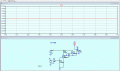
These two images show a floating connection and a correct connection.
E
Oh! I see that now. Thank you! After correctly connecting can you see 19ma through the led? I get 30pico amps? He said he could see 11.1V at Vout and I am still getting 200nv... What do you see?
 

Thread Starter

Hpfiend

Joined Jan 11, 2013
23
hi,
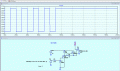
This is what I see in simulation.
Can you explain what you are requiring from the circuit?
E
View attachment 347761
hmm.. That's neat! I am not sure how to get current from vout. I do know hovering over components shows the clamp which I can click but it doesn't appear when I hover over Vout. But to the real issue- in the real pcb circuit I am getting 10.9 volts at Vout with a 3.29v digital input to the first mosfet and 12v vcc. I expected 12v at Vout and I don't know if it is because the LED and resistor is causing a drain or if the mosfets aren't fully turned on. When I simulate it myself, even after fixing the connection with your help, I can only get 200mv when the person that discovered the floating pin is getting 11.1 volts through simulation... pretty close to 10.9 especially when you figure the LED model is prob different than the one I am using. In the real circuit it will be ok because the alternator will put out more like 13.5 to 14.4 so I will still get 12 there luckily but I want to fix other parts of the board that aren't close enough and if I am getting 200mv when its supposed to be 10.9/11.1, I am doing something seriously wrong that I need to figure out! I appreciate your patience!
 

Alec_t

Joined Sep 17, 2013
15,103
There is something strange happening in the posted asc schematic. The vertical line from M1 drain is node N003 (11.1V), but the horizontal line from M1 drain is node N002 (200mV) !!
 

Thread Starter

Hpfiend

Joined Jan 11, 2013
23
There is something strange happening in the posted asc schematic. The vertical line from M1 drain is node N003 (11.1V), but the horizontal line from M1 drain is node N002 (200mV) !!
Thanks for taking a look and sharing in my frustration. Fortunately or unfortunately I am not skillful enough to check all of these lines to add to the confusion as the only line I am interested in is the wire coming off of the source of M2, this is an inverted logic PWM signal or inverted digital low (ground) side switch depending on what I output with the esp32 the led and resistor are there just for visual feedback. When analog output is minimum it outputs maximum 100% duty or when set low it outputs high 12v. Well at least it is supposed to.
 

Thread Starter

Hpfiend

Joined Jan 11, 2013
23
hi Hp,
That LED you are using has a forward voltage drop of only 1v, change it to a standard LED type.
E
BTW: Your circuit needs a redesign

View attachment 347779
Thank you for fixing this for me! I agree there are some issues present! This is only 1/6 of the total pcb I made... :) A proper EE would have a complete meltdown if they saw it I am sure. The sad part is I paid a supposed "EE" from Pakistan off of FIVERR to look it over and simulate /error check it for me and they said it was perfect...silly me.
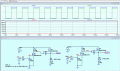
When I switched the mosfets to logic level 6344s it works to output 11.1 v with your microcontroller pulse program that you put there just as it does in real life. However, when I switch the voltage to just a solid digital 3.29V it goes back to 200 mv which is solid 10.9v by DVM in reality (11.1 sim?). That LED I originally had in the circuit was the standard "LED" that I chose from the first screen of "add component" of LTspice? Yours would not simulate for some reason on my version of LTspice so I randomly picked another one the "NSSWS108T" and it worked! The actual LED I am using is the SML-D12V8W (attached spice zip) but I couldn't get it to incorporate into the schematic either I wonder if that one would bring it to 10.9 v from 11.1...

Can you recommend a tutorial that is correct on how to bring models in that aren't in the library or see what I am doing wrong with the pulse program you wrote vs simply right clicking and typing 3.29v so that I can do this on my own and not bother experts like you guys?
 

Attachments

Last edited:

ericgibbs

Joined Jan 29, 2010
21,390
hi Hp,
With a Vin of 3.3v the first MOSFET is always ON.
I have drawn the circuit twice to show the problem with the circuit.

With the first MOSFET always ON , the second MOS is OFF.

Do you follow OK.?
E
EG57_ 2842.gif
 

Alec_t

Joined Sep 17, 2013
15,103
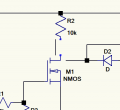
I see the problem with your post #1 asc schematic: D2 is not connected to the M1 drain at all.
The drain connection is actually a bit above where you have D2 connected.
See below :-
1745519931956.png
 

Thread Starter

Hpfiend

Joined Jan 11, 2013
23
hi Hp,
With a Vin of 3.3v the first MOSFET is always ON.
I have drawn the circuit twice to show the problem with the circuit.

With the first MOSFET always ON , the second MOS is OFF.

Do you follow OK.?
E
View attachment 347792
Thank you SOO much for taking the time to draw this twice to explain it to me. I don't know how its working in real life with the 3.29v at the gate of M1 but I your simulation shows it most def should not be! Is the difference between Vd and Vout a result of the LED and its ground path through the resistor?
 

eetech00

Joined Jun 8, 2013
4,704
Hey all- I have a circuit I have built into a pcb and have tested with multimeter in real life. It outputs differently than I hoped it would. It will prob still work but as I implement other changes I would like to simulate circuits before expense and hassle of making another board. I have downloaded ltspice and built the circuit and it will not give me the same result as reality so that I am confident in simulations. I asked on analog devices and someone told me they could see a few components were floating ( The wire from D2 to drain of M1 is actually floating. I.e. the drain is floating and the D1 cathode is floating. Assuming this is not intentional, so I connected them, and I get ~19mA through the LED. ) and that it simulated for them very close to what I get in reality. I asked how they could tell they were floating and no response. Perhaps too dumb of a question for that forum. Can anyone help?
What is the function the circuit is supposed to provide??
 

0ri0n

Joined Jan 7, 2025
160
But to the real issue- in the real pcb circuit I am getting 10.9 volts at Vout with a 3.29v digital input to the first mosfet and 12v vcc. I expected 12v at Vout and I don't know if it is because the LED and resistor is causing a drain or if the mosfets aren't fully turned on.
1. As shown, with two NMOS transistors you get inverting logic. A 3.3V input voltage will result in 0V out.

2. The output voltage will always be well below the supply voltage with M2 being a NMOS transistor and without any bootstrapping. Replacing M2 with a PMOS transistor would give you full voltage out and, as a side benefit, non-inverting operation.
 
Top