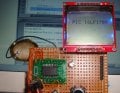
Look, it's not Arduino...using a Nokia 5110 with a PIC16LF1709

Thread Starter

takao21203

Joined Apr 28, 2012
3,702
That said, I am also selling small Arduino's now, and programmer modules for these. Why not? But I dont use them myself.

Well yesterday I have taken a source code written for Arduino, and changed it for PIC- was very easy, and I got it working in very little time.

The source code is here:
http://aranna.altervista.org/dragon...-projects/nokia-5110-example-c-source-pic16f/

Some customer had trouble with these Nokia 5110 displays, even claiming eventually they'd be defective.

The circuit I made works at 3.0 volts.

The complete source also is included on the blog as zip file.

I was indeed wondering how easy it is to get the Nokia display working, none of the timing hassles known from HD4450 displays.

So if anyone ever wanted to use a Nokia 5110 with a PIC (not in assembler of course), here the source code.
 

Attachments

THE_RB

Joined Feb 11, 2008
5,438
...
Some customer had trouble with these Nokia 5110 displays, even claiming eventually they'd be defective.
Some usually are. I bought a lot of 10 displays and some were funky, some fixable and some perfect.

...
The circuit I made works at 3.0 volts.
They will run fine from 5v, which is very handy. Especially considering without a backlight they only draw about 0.8mA total for the entire display. On 5v you will need to tweak the LCD contrast and bias registers in the setup.

...
So if anyone ever wanted to use a Nokia 5110 with a PIC (not in assembler of course), here the source code.
Been using them for years, but thanks for sharing anyway. ;)
 

Thread Starter

takao21203

Joined Apr 28, 2012
3,702
hmm useful reply, for me this means, I have to test them before shipping.

For 5 volts they need resistors on the serial port lines, as well CE and RST?
 

THE_RB

Joined Feb 11, 2008
5,438
No, they will run fine with 5v power and 5v logic signals. I have a couple projects running like that and another as a test display with a wire connector to plug into my EasyPIC6 dev board (all 5v wiring).

The main problem I found is that the metal frame might not be seated properly onto the display and PCB. Sometimes this causes a total fail, sometimes it just messes up the contrast because that changes with physical pressure of the frame onto the display glass.

A couple I was able to fix by bending and reseating the metal frame. Another one I can only use by changing the contrast register value. You may still need to tweak the contrast register from display to display.
:)
 

MMcLaren

Joined Feb 14, 2010
861
Hey guys, may I ask if there's a faster way to access five consecutive bytes from that character table (array) in C (using free/lite XC8 compiler)?

I noticed that the following LCDCharacter() routine runs about 2.3 times slower (1554 cycles) than a comparable assembly language routine (679 cycles).

Rich (BB code):
   void LCDCharacter(char character)
   { cd = 1;                    // data
     for(int index = 0 ; index < 5 ; index++)
       wrLcd(font5x7[character - 32][index]);
     wrLcd(0);                  // Blank vertical line padding
   }
Here's the quick-n-dirty assembly language replacement for the C routine above;

Rich (BB code):
   void wrChar(char data)       //
   { cd = 1;                    // lcd 'cd' = 1 (data)
     asm("addlw  -32   ");      // FSR0 = data - 32
     asm("movwf  FSR0L");       //  "
     asm("clrf   FSR0H");       //  "
     asm("lslf   FSR0L,F");     // FSR0 *= 5
     asm("rlf    FSR0H,F");     //  "
     asm("lslf   FSR0L,F");     //  "
     asm("rlf    FSR0H,F");     //  "
     asm("addwf  FSR0L,F");     //  "
     asm("movlw  0     ");      //  "
     asm("addwfc FSR0H,F");     //  "
     asm("movlw  low(_font5x7)");
     asm("addwf  FSR0L,F");     //
     asm("movlw  high(_font5x7)|0x80");
     asm("addwfc FSR0H,F");     //
     asm("moviw  FSR0++");      //
     asm("call   _wrLcd");      // 1st column
     asm("moviw  FSR0++");      //
     asm("call   _wrLcd");      // 2nd column
     asm("moviw  FSR0++");      //
     asm("call   _wrLcd");      // 3rd column
     asm("moviw  FSR0++");      //
     asm("call   _wrLcd");      // 4th column
     asm("moviw  FSR0++");      //
     asm("call   _wrLcd");      // 5th column
     wrLcd(0);                  // one blank column
   }                            //
 
Last edited:

Thread Starter

takao21203

Joined Apr 28, 2012
3,702
sure there are many ways:

first you get the start address:

st_addr=chr_arr_st+(chr_idx*5);

or

((chr_idx<<2)+chr_idx) if you fancy to shave off some more cycles.

then you inline the wr_chr code

inline wr_chr *(st_addr++);
inline wr_chr *(st_addr);
 

MMcLaren

Joined Feb 14, 2010
861
What would working code look like, please?

I thought I might be close with the routine below but it's incrementing everything by two. For example, the array += (data-32)*5; instruction multiplies the operand by two before adding it to the array variable and the array variable also increments by two after each wrLcd(*array++) instruction.

Other than the fact that it doesn't work right (lol), it does appear to be quite a bit faster, using ~873 cycles, compared to the ~1550 cycles of the original routine.

Rich (BB code):
   void wrChar(char data)       //
   { int *array = &font5x7;     //
     array += (data-32)*5;      //
     wrLcd(*array++);           //
     wrLcd(*array++);           //
     wrLcd(*array++);           //
     wrLcd(*array++);           //
     wrLcd(*array++);           //
     wrLcd(0);                  //
   }                            //
 
Last edited:

Thread Starter

takao21203

Joined Apr 28, 2012
3,702
What would working code look like, please?

I thought I might be close with the routine below but it's incrementing everything by two. For example, the array += (data-32)*5; instruction multiplies the operand by two before adding it to the array variable and the array variable also increments by two after each wrLcd(*array++) instruction.

Rich (BB code):
   void wrChar(char data)       //
   { int *array = &font5x7;     //
     array += (data-32)*5;      //
     wrLcd(*array++);           //
     wrLcd(*array++);           //
     wrLcd(*array++);           //
     wrLcd(*array++);           //
     wrLcd(*array++);           //
     wrLcd(0);                  //
   }                            //
On 8bit chips, multiplication requires a lot of code space, and it is actually slow.

Of course, using int, you get the pointer increased by 2 chars each time.

So, unsigned char* would be appropiate.
 

MMcLaren

Joined Feb 14, 2010
861
Ah, this seems to work correctly;

Rich (BB code):
   void wrChar(char data)       //
   { char *array = font5x7;     //
     array += (data-32)*5;      //
     wrLcd(*array++);           //
     wrLcd(*array++);           //
     wrLcd(*array++);           //
     wrLcd(*array++);           //
     wrLcd(*array++);           //
     wrLcd(0);                  //
   }                            //
I thought that the "int" was telling the compiler the width of the "array" variable but it must be telling the compiler the width of the data to which "array" points. I wonder how the compiler knows that "array" must be a 16-bit variable without being told, or, is that simply implied by the "*" character?

Anyway, this routine paints a character onto the LCD in ~867 cycles which is much faster than the original ~1550 cycle routine. The assembly language version uses 97 less words of program memory and paints a character onto the LCD in ~679 cycles.

Thank you. Cheerful regards, Mike
 

Thread Starter

takao21203

Joined Apr 28, 2012
3,702
hmm I'd use unsigned char, ASCII is from 0..255, no negative values.

Also did you try the shifting approach instead of multiplication?

It wont be much but will further reduce cycles/memory requirement.

Good C can come pretty close to assembler.

Yes the data width is resolved at time of dereferencing, and also when doing pointer arithmetic.

You can even try this:

Make the pointer variable global, and dereference/increment inside the function.

then you only write:

Rich (BB code):
wrLcd();wrLcd();wrLcd();wrLcd();wrLcd();
Eventually you can make a further improvment, even if it wont be much.
 

MMcLaren

Joined Feb 14, 2010
861
((chr_idx<<2)+chr_idx) if you fancy to shave off some more cycles
Yep. That appears to shave off ~128 cycles and 33 words of memory by eliminating a multiply library function. Now the routine paints a character onto the LCD in ~739 cycles (only 60 cycles slower and 60 words longer than the assembler code)... and much of that time is spent in the wrLcd() routine bit-banging serial data to the LCD...

Rich (BB code):
   void wrChar(char data)       //
   { char *array = font5x7;     //
     array += (data<<2)+data;   //
     wrLcd(*array++);           //
     wrLcd(*array++);           //
     wrLcd(*array++);           //
     wrLcd(*array++);           //
     wrLcd(*array++);           //
     wrLcd(0);                  //
   }                            //
 
Last edited:

MMcLaren

Joined Feb 14, 2010
861
Would there be any advantage (size and/or speed) using hardware SPI on the PIC to drive the CLK and DATA lines on the display? If so, which SPI mode would be used?

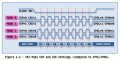
Lastly, can anyone verify that my understanding of the SPI Modes and their relationship to PIC SPI module settings, depicted in the drawing below, is correct? Perhaps I should post this question in a new thread?

TIA, guys... Regards, Mike


Graphics (C) 2014, Michael McLaren, Micro Application Consultants, All Rights Reserved
 

Attachments

Last edited:

Thread Starter

takao21203

Joined Apr 28, 2012
3,702
Mode 0 should be OK.

Yes it can make sense to use the hardware SPI.
You need to interrupt very often to load, especially at high frequency. Or you need to wait inline each time. The interrupt flag gets set anyway, no matter if the serial int is enabled.

For monochrome, it's not that important, it's not much data.
But color TFT can be very slow if the code is not optimized.

Some more gain can be made, if the calls are directly embedded in the character printing routine (it will use a lot of code space in this case).

Each function call requires a little time. And eventually, some settings (such as to send data or command), are only required once.

I don't mind taking over the thread, as I don't need help, just wanted some info about the troubles with these displays.

I also was surprised how easy going these Nokia displays are.

2

It is also interesting if you erase the background or not, or for instance, only draw set pixels. Makes sense on color TFT, filling a rectangle is fast, but setting pixels is slow.

Does it make sense to optimize a serial display so much? if you need high speed, use a parallel display.

Interesting tough, how much a Nokia 5110 interface can become "tuned".
 

John P

Joined Oct 14, 2008
2,068
Does all of this use of a pointer mean that the processor is setting a new value for the indirect memory index (i.e. File Select Register) every time you call it? You could save time by just working with the FSR. Also, calling a function costs time and program space even if it's inline (depending on the compiler).
 

Thread Starter

takao21203

Joined Apr 28, 2012
3,702
Hmm, normally just make it working and them check some common C issues for optimization, if it is still too slow, take a more powerful chip.

OK yes people wrote software USB stack on small Atmel chips, and they made Oscilloscope on a small 8bit PIC for television, and somehow they cram a scrolling text message into 1K or 2K.

There is no real need for that. With some years experience and working with the debugger, you'd just know certain things will be awful slow, and some things can be factored out.

Besides, there is a crowd on forums, for sure someone will find another additional trick, but inverse exponentially, it will move towards what is technically possible (unless a breakthrough happens, like some new idea for pre-computation, or something "pervert", resulting in non-maintainable code).

At X MHz on a 8bit bus with Y bytes memory, you can move such and such an amount of data, and with a certain instruction set, you have Z amount of computation power. It is usually hard to squeeze out 10x times of that, except with precomputation.

You could use 8bit port for all serial bits, and then just transfer waveforms from a table (that would be hudge, but not endless).

So as for the topic, I got the Nokia 5110 working almost immediately, while when using HD4480, there are always issues with the timing, must change code, and the fully correct code for 4 bits bus does not exactly look nice.

Result is I will use Nokia 5110 instead of old Hitachi Character LCDs.

Actually I plagued around with them some 5 years ago, using a 1K chip, assembler, and a small external EEPROM to store menu strings. I still have the project, about nearly 20 "well met" assembler files.

Nowadays I would not bother at all trying to save code space.
 

MMcLaren

Joined Feb 14, 2010
861
Does all of this use of a pointer mean that the processor is setting a new value for the indirect memory index (i.e. File Select Register) every time you call it?
Yes, that's exactly what's happening. The pointer is copied into the FSR register and post-incremented for each wrLcd(*array++) function call. This however is much smaller and much faster than the original function which referenced a standard 2-dimensional array using variables for both array indexes. That routine had much more overhead as it performed the math to calculate the physical address of the target element for each function call.

You could save time by just working with the FSR.
I agree. If you need the performance, that's a viable way to do it.

Also, calling a function costs time and program space even if it's inline (depending on the compiler).
No argument from me, Sir...

I apologize to the OP for side-tracking the thread. I've always been interested in program size and performance and I realize this isn't something he's concerned about.

Cheerful regards, Mike
 

Thread Starter

takao21203

Joined Apr 28, 2012
3,702
It's OK, because it is related to the thread topic, and I did not post a question, just reported my observation.

If there is a discussion going, fine?

Yes I do try to optimize my C sources, by considering carefully which computations are really absolutely required.

FLASH memory isn't an issue anymore, new PICs have much larger memories.

Also nothing against Arduino, just it's not the only available platform.

I digged out the components for my serial LED displays again, assembled 5 carrier PCBs, and put most of the parts in a new box, but too lazy to take a photo.

Sure I create a new thread soon, or maybe use the blog here for that.

Today I linked a thread here to my google community:
https://plus.google.com/117731549339430353983/posts/ahbV6Dwg1a6

There are some large groups out there...

Soldering TSSOP manually with a 50W iron is not so easy but I designed a new method today (sacrifice solder blob, XRAY the carrier PCB with an incandescent lamp). I get perfect alignment...

My point is, I see very few members reporting their projects, maybe asking some questions or looking for feedback. Most only post a narrow question, which apparently, isn't solveable by using google.
 

MMcLaren

Joined Feb 14, 2010
861
Gosh, these Nokia 5110 displays are relatively inexpensive, aren't they? I got one last year that came with a Chinese DDS board but I never really looked at ebay prices for just the display.

Anyway, I just built up a breakout board that includes a header for the display and I would be happy to report back on my experiments using hardware SPI to drive it, if anyone is interested.

Cheerful regards, Mike
 

Attachments

THE_RB

Joined Feb 11, 2008
5,438
I use hardware SPI to drive mine, but my original code was bit banging (handy to keep for cases where the pins are not available).

From memory i think there was an issue running 40MHz HSPLL with SPI at full speed, it worked pretty good but I remember something about getting an errant pixel at times. I'm now running at the next SPI speed down.

They are great little displays for the money, <1mA operating current and 6 lines of 14 chars across (plus graphics) etc.

About the only thing I don't like is they are too small and I need to put glasses on to see the fine print... ;)
 
Top