Logic gate IC

Thread Starter

Kelvin Lee

Joined Oct 22, 2018
111
Dear Sir/Madam,

I want to teach student how the logic gate work, is there any IC include several logic gate inside, for example, pin 1,2 are input of an AND gate and pin 3 is the output, pin 4, 5 are input of an OR gate and pin 6 is the output, etc. I don't know whether there is such IC in the market. Thanks for your help.

Best regards,

Kelvin
 

dl324

Joined Mar 30, 2015
18,329
When they get more advanced, you might find CD4007 interesting.

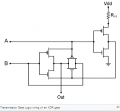
It's an inverter with dual complementary pairs. With them, you can create NOR, NAND, bi-directional transmission gates, high sink/source inverters, etc. With a couple IC's, you can make a D flip flop or XOR/XNOR.

This schematic shows an XOR with one IC:
upload_2018-12-14_7-43-7.png
From Wikipedia

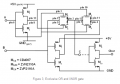
XOR/XNOR using 2 IC's:
upload_2018-12-14_7-45-15.png
From wiki.analog.com
EDIT: Just noticed that they're not using the correct device symbols.
 
Last edited:

cmartinez

Joined Jan 17, 2007
8,763
Dear Sir/Madam,

I want to teach student how the logic gate work, is there any IC include several logic gate inside, for example, pin 1,2 are input of an AND gate and pin 3 is the output, pin 4, 5 are input of an OR gate and pin 6 is the output, etc. I don't know whether there is such IC in the market. Thanks for your help.

Best regards,

Kelvin
Hello, Kelvin.

You may find it extremely useful if you were to download Digital Works. It's a beautiful piece of free software that allows you to visualize how all of the basic logic gates work. It also allows you to design and simulate simple circuits, all the way up to very complicated ones.
 

danadak

Joined Mar 10, 2018
4,057
A drag and drop GUI, free tool, all kinds of logic, LUT, and functions.
And advanced students there is an ARM CPU inside which can be coded.

Tool (Free) -

http://www.cypress.com/products/psoc-creator-integrated-design-environment-ide

Board ($ 15, there is a $ 4 board but basic students would have more difficulty
with that) - Note board is a lot smaller than pic shows. I would not be surprised
if you contacted Cypress they would lower cost for educational situations.


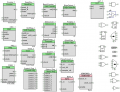
Here is a pic of just some of the stuff internal to the part. You drag and drop onto
a design canvass, then use wire tool to connect items internal and/or to external
pins. Stuff shown on left complex components, on right simple gates. A component
is an internal item resource on the chip. Shown just digital stuff, there is also a lot
of analog stuff as well onchip. Attached a component list.

upload_2018-12-14_11-39-36.png

Even though there is a processor onboard you can do codeless designs, like simple
logic attached to pins. You choose what resources you want to use. In fact some of
the more advanced components, in some cases, you can config them and only write
one line of code, a start instruction.

http://www.cypress.com/training/psoc-101-video-tutorial-series-how-use-arm-cortex-m0-based-psoc-4


Regards, Dana.
 

Attachments

Last edited:

danadak

Joined Mar 10, 2018
4,057
I had a discrete based freq counter, with lamps in columns for each
numeric digit. Thought I was on top of the world. Weighed as much as
Grandma. Took the Grand Coulee Dam power station to run it, thoroughly
warmed the room in winter. This was pre RTL, post vacuum tube solutions.

I still have a HP nixie tube based freq cntr, with plugins into the Ghz area.
It weighs .5 Grandmas. I need to work on it, but it has a high stability 10
Mhz clock in it. Still worth keeping.

Regards, Dana.
 

Papabravo

Joined Feb 24, 2006
22,082
A drag and drop GUI, free tool, all kinds of logic, LUT, and functions.
And advanced students there is an ARM CPU inside which can be coded.

Tool (Free) -

http://www.cypress.com/products/psoc-creator-integrated-design-environment-ide

Board ($ 15, there is a $ 4 board but basic students would have more difficulty
with that) - Note board is a lot smaller than pic shows. I would not be surprised
if you contacted Cypress they would lower cost for educational situations.


Here is a pic of just some of the stuff internal to the part. You drag and drop onto
a design canvass, then use wire tool to connect items internal and/or to external
pins. Stuff shown on left complex components, on right simple gates. A component
is an internal item resource on the chip. Shown just digital stuff, there is also a lot
of analog stuff as well onchip. Attached a component list.

View attachment 165781

Even though there is a processor onboard you can do codeless designs, like simple
logic attached to pins. You choose what resources you want to use. In fact some of
the more advanced components, in some cases, you can config them and only write
one line of code, a start instruction.

http://www.cypress.com/training/psoc-101-video-tutorial-series-how-use-arm-cortex-m0-based-psoc-4


Regards, Dana.
I've seen you mention this a couple of times. I decided to check it out. Thanks
 

danadak

Joined Mar 10, 2018
4,057
Papabravo, here are a couple of get started docs that also are quite useful.

http://www.cypress.com/file/46106/download PSOC 4 Low End

http://www.cypress.com/file/41436/download PSOC 5LP high end


Board prices all pretty close, lowest end use bootloaders, ignore that, use
ones with debug.

Low end boards - https://www.mouser.com/Semiconducto...MIy824ntyn3wIVjhsYCh0NVQhsEAAYASAAEgK86PD_BwE

http://www.cypress.com/microcontrollers-mcus-kits

The 4200M best low end board in my opinion for general work.

High end boards - http://www.cypress.com/documentation/development-kitsboards/psoc-5lp-development-kits

The $ 10 best bang for the buck in my opinion. Much more stuff on it than low end.
CY8CKIT-059 This board shows as $ 10 but price recently went up. But $ 10 still
shown on one above summary web page. I will bet if you complained to their online
web store you would still get it for $ 10.

Not talked about as much but there is a couple of videos on doing state machines.
There is a 2 or 3 part video on this, there is a wizard in tool. pretty cool as it writes
most of the code.

Regards, Dana.
 
Last edited:
Top