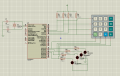
With R1 - R4 connected to +, you will need to pull each column in RD0 - RD3 low to activate. If you want the columns to be active high, connect R1 - R4 to ground instead.
I have created ISR to read four buttons post #60. I am having trouble to make ISR to scan keypad with IOC. I don't understand how to do for matrix keypad?
Would you please help me with matrix keypad scanning. I tried my best level but i'm still struggling. I asked at starting how the matrix keypad works, so now I understand how it works.
as @jpanhalt suggested to use interrupt to scan matrix After that i tried to write code for it. But it was difficult for me, so I used the button instead of the keypad post #60
I hope you will help me to make progress in the thread
You need to show us what you have done before we can help. Before jumping in and presenting code, describe what you are trying to do, including port directions (input or output) and status if output (high or low).
You need to show us what you have done before we can help. Before jumping in and presenting code, describe what you are trying to do, including port directions (input or output) and status if output (high or low).
I want to write program for matrix keypad if I press any key of keypad key number should be display on LCD screen
This was a very difficult task, so I split my work with three tasks
1. Keypad logic
2. program to scan keypad with interrupt and without interrupt
3. LCD programming
First of all I learned how the keypad works post 41 and post 43 shows my efforts
In post #49 you advised that I should use IOC interrupt on change to read keypad so I read about it but I found it difficult to write IOC program for the keypad so I used the switch button instead of the keypad
I shown code and circuit in my post #60 that show I understand IOC, After that i posted the circuit for the keypad post #61
I do not see how the code posted in 60 will read the 4x4 matrix.
The good (from as little C that I can read):
RB is set as input with pull-up resistors;
RD is set as output and low (why are there still LED's?);
IOC is turned on;
RBIF is cleared in the ISR and presumably before exiting; and
You have a 40 ms delay for "switch bounce."
Now assume a key is pressed that makes RB4 low. What I do not see is where you scan/poll each RD<0..3> pin to find which key did it. That may be there, but I simply cannot read C well enough to see it.
For example, in Assembly and given the way you have wired it, I would toggle each pin of RD<0..3> to see which one will make RB4 go high. The the combination of RB4 and RDn could be decoded to determine which key was pressed. There are a couple ways to toggle RDn. One would be to set each of the RD pins high and look for RB4 to go high (either by polling it or interrupt flag). You could also sequentially change each of the RD pins to input and allow the pull ups to do the work. I am not sure which way is best. Whatever method you use, you will need to clear RBIF again after all is done.
This comment also ignores switch bounce. This whole scheme could be done in microseconds, and the switch may bounce for several milliseconds. I do see that you delay resetting RBIF for 40 ms, which is good. I am not sure that delay is in the right place. You may want the button bounce to settle down before testing the RD pins.
This comment also ignores switch bounce. This whole scheme could be done in microseconds, and the switch may bounce for several milliseconds. I do see that you delay resetting RBIF for 40 ms, which is good. I am not sure that delay is in the right place. You may want the button bounce to settle down before testing the RD pins.
A good way to handle debounce IMO is to just scan the keypad at some time interval, 1 ms maybe, until you find a closed button and return a 'scan code' representing that row and column. It doesn't matter what the actual code is at this point as long as it is unique - the bit patterns of the column out and row in (as drawn above) are good enough.
Debounce the scan code like you would a single switch i.e. same code = switch 'closed'.
When you get enough scans with the same scan code, process it to whatever you want to output as the button value and post it with a flag indicating a new button has been pressed.
Finally, continue scanning until you get a scan code of 'NO SWITCH', and debounce that.
The keypad is ready for the next button.
I like generating the 1ms scan in a timer interrupt routine and process the debounce to the scan code there. I post just the raw scan codes and do the actual conversion to something useful in the main routines.
Good luck!
Actually, the code you posted in #43 pretty much does one scan and returns a unique code if it finds a key pressed and 00h if it doesn't.
The schematic you posted in #61 is workable too except the rows (outputs) are vertical and the columns (inputs) are horizontal. That is electrically OK but names are confusing. If you can follow with those names, OK.
The method I describe in #72 allows you to do one scan to get a scan code then debounce it then convert the value to something usable.
Given these 3 things, you should be able to:
Call the keypad scanner in #43 at 1ms intervals and ignore 00h returns - 00h means no key pressed.
When you get a non-zero return, save it and continue to call the keypad scanner at the same 1ms interval and count 25-30 consecutive scan codes to debounce the button.
When you count up enough, copy the scan code to a register and set a flag that says 'New Key Pressed'.
Once the key is debounced, just keep scanning until no keys are detected.
Repeat.
To read the keypad, simply look for the New Key Pressed flag, process the scan code and get on with it.
You should review each step above and think about how it fits into the process. There are many other ways to do this but you can't do them all at once. I've described the way I do it. There's more to it but that's later. I would urge you to first review the code in #43 until you have a solid understanding of what it is doing and how it works.
Since you are using Proteus for this, you should be learning how to debug and monitor your code in that system. You shouldn't be using LEDs to monitor things, Proteus has all kinds of logic monitors, voltmeters, oscilloscopes etc. built in. Learn to use them. Also, learn to use the code debugger in Proteus as well. The problem with adding LEDs to monitor your signals is that they AFFECT your signals - you have to debug your debug indicators. I don't recommend that.
You asked for direct help in #65. What I've described is what I think is the more direct path to a solution based on the work you've done so far. But first, you have to understand the scanning process you show in #43. Do you understand that process?
You asked for direct help in #65. What I've described is what I think is the more direct path to a solution based on the work you've done so far. But first, you have to understand the scanning process you show in #43. Do you understand that process?
Code in #43 reads any button, one at a time, just like you would push them.
#74 describes the process I would use from start to finish and I referenced three other posts that have what you need. I really can’t offer more than that without taking a lot of time that I don’t have.
Sorry to be blunt but you really have to learn how to figure this stuff out on your own.

 Facebook
 Google
 GitHub
 Linkedin