Keyboard Screen Went Black after Frimware upgrade

Thread Starter

heshammhafez

Joined Apr 23, 2025
7
Hello Dears,
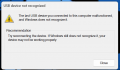
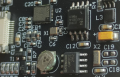
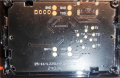
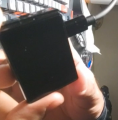
I was upgrading the firmware of an LCD screen of my GK87 PRO keyboard and after the upgrade the screen went black "I think because wrong version was used". Now when I connect the screen to my laptop via USB-C Port I get the message attached. I need a way to force bootloader or rest the controller to be able to connect the screen to my laptop and do firmware update using the correct version. Attached a few pic of the screen and board.
 

Attachments

Thread Starter

heshammhafez

Joined Apr 23, 2025
7
I already disassembled the screen as per srceenshot attached and can't find any reset button, I also double checked the Keyboard itself but can't find it as well.
 

Thread Starter

heshammhafez

Joined Apr 23, 2025
7

Thread Starter

heshammhafez

Joined Apr 23, 2025
7
https://manuals.plus/skyloong/gk87-qmkvia-usb-wired-keyboard-manual

Firmware update: HoId down the ESC key while inserting USB or pressing the RESET button on the keyboard to enter
BOOT mode; when the M indicator light flashes, open qmk_ toolbox. exe, select the corresponding firmware, and click flash to update the firmware.
I tired to enter boot mode by holding ESC but didn't work
this is the one I own
https://manuals.plus/skyloong/gk87-wireless-keyboard-manual#skyloong_gk87_wireless_keyboard
 

Thread Starter

heshammhafez

Joined Apr 23, 2025
7
I sent them and they told me that screen is broken since it cannot shown the logo when you plugin the cable, but I think there should be way to recover it.
 

Thread Starter

heshammhafez

Joined Apr 23, 2025
7
Maybe, maybe not. Is there a repair part available?
No, but I'm searshing for a way to force reset bootloader for example by shorting a capacitor to GND. If windows can detected it normally, I will be able to proceed with firmware update again.
 
Last edited:

nsaspook

Joined Aug 27, 2009
16,249
No, but I'm searshing for a way to force reset bootloader for example by shorting a capacitor to GND. If windows can detected it normal I will be able to proceed with firmware update again.


to be able to downgrade the firmware with working one
Good luck. The display controller package has been ground down to destroy the logo. What looks like a controller OSC input seems to be pin 3 going clockwise from the registration dot. It's clue but not much of a clue of a circuit.
 
Top