Is my circuit good as a Microcontroller development board?

dendad

Joined Feb 20, 2016
4,639
As far as I know, the original circuit will not work without a programming header as mentioned earlier. The chips need to be programmed with a boot loader before the USB or serial programming can work.
So, add the programming header as advised in a previous post.
Then you can program them with the ST programmer to start with, or just use that programmer for the lot and not worry with the boot loader.
 

Thread Starter

Sashvat

Joined Jun 1, 2019
24
As far as I know, the original circuit will not work without a programming header as mentioned earlier. The chips need to be programmed with a boot loader before the USB or serial programming can work.
So, add the programming header as advised in a previous post.
Then you can program them with the ST programmer to start with, or just use that programmer for the lot and not worry with the boot loader.
excluding the addition of a ST Link connector (which I have placed extra pads on my PCB design) is everything else ok?
 

Thread Starter

Sashvat

Joined Jun 1, 2019
24
As far as I know, the original circuit will not work without a programming header as mentioned earlier. The chips need to be programmed with a boot loader before the USB or serial programming can work.
So, add the programming header as advised in a previous post.
Then you can program them with the ST programmer to start with, or just use that programmer for the lot and not worry with the boot loader.
And what boot loader do you mean? I had gone to ST community and there they said no boot loader is required and you can directly apply the code to the MCU
 

dendad

Joined Feb 20, 2016
4,639
I have not used these ST processors myself, so I may be talking rot.
A lot of the development boards you buy have a program built in to allow programming via the serial port, like the Arduinos do.
Occasionally, a cheap Arduino board is supplied that is not programmed with this small program and so does nothing until it is programmed via the ICSP header. It you buy an Atmel processor as used on the Arduino, unless specifically ordered from somewhere that programs the boot loader into it for you, they are blank and will do absolutely nothing.

I am assuming the same goes for the processors you intend to use.
If you have the ST Link programmer, you can program your new chip either with the end program or with a small "boot Loader" program that allows you then to program it over the serial port, usually via a USB to serial adapter.
 

dendad

Joined Feb 20, 2016
4,639
It may be a good idea to submit your full circuit, and not leave anything off. Then you will be able to get a more informed comment.
 

Thread Starter

Sashvat

Joined Jun 1, 2019
24
It may be a good idea to submit your full circuit, and not leave anything off. Then you will be able to get a more informed comment.
will do it, but I havent added the ST Link connectors and though I could connect it on my PCB design tool on Easy Eda would that do?
 

Thread Starter

Sashvat

Joined Jun 1, 2019
24
It may be a good idea to submit your full circuit, and not leave anything off. Then you will be able to get a more informed comment.
So the revised schematic is here and I have also included the PCB which I have designed. There are a total of 29 Pins, out of which 2 will be connected to SWCLK and SWDIO (PA14 and PA13 respectively).

and like the STM32 Blue Pill, do I need some Boot Jumper or something to program it?
 

Attachments

dendad

Joined Feb 20, 2016
4,639
You are getting above my expertise now. I have no idea if the chip will run USB natively or not.
And I still do not see the programming header mentioned a number of times. You WILL need that!
 

Thread Starter

Sashvat

Joined Jun 1, 2019
24
You are getting above my expertise now. I have no idea if the chip will run USB natively or not.
And I still do not see the programming header mentioned a number of times. You WILL need that!
try to understand, I said, I am connecting PA13 and PA14 on the PCB pads that I have made and use the track tool to connect them. I dont want to add more components on the board I am trying to make it as compact as possible.
 
Last edited:

dendad

Joined Feb 20, 2016
4,639
try to understand, I said, I am connecting PA13 and PA14 on the PCB pads that I have made and use the track tool to connect them
That should be displayed on your circuit. A complete circuits shows everything, and does not assume anything.
As mentioned a number of times before, a connector as below is a good idea.
1 - VCC
2 - SWCLK (pin-37) (PA14)
3 - GND
4 - SWDIO (pin-34) (PA13)

I just wonder why you ask for advice and then continually ignore the advice given. That does make it very frustrating when trying to help.

I do wish you well, but I will no longer follow this thread, as it looks like others have given up on you too. that is a pity. I hope you get your board going.
 

Thread Starter

Sashvat

Joined Jun 1, 2019
24
That should be displayed on your circuit. A complete circuits shows everything, and does not assume anything.
As mentioned a number of times before, a connector as below is a good idea.
1 - VCC
2 - SWCLK (pin-37) (PA14)
3 - GND
4 - SWDIO (pin-34) (PA13)

I just wonder why you ask for advice and then continually ignore the advice given. That does make it very frustrating when trying to help.

I do wish you well, but I will no longer follow this thread, as it looks like others have given up on you too. that is a pity. I hope you get your board going.
Its not my fault if you're getting impatient, I dont have a degree in electrical engineering, I am just in 12th grade. and when did I ignore your advice? I gave a plan of doing it in another way. I dont know the conventions and standards of making a schematic, I just know how to build my own circuit, I came here to ask for help, I proposed a different method, you can either say no you shouldn't do It or accept my way. You're not someone to tell me its a pity, who are you? Do you know everything in electronics? You're not a god in electronics
 

jpanhalt

Joined Jan 18, 2008
11,087
So the revised schematic is here and I have also included the PCB which I have designed. There are a total of 29 Pins, out of which 2 will be connected to SWCLK and SWDIO (PA14 and PA13 respectively).
and like the STM32 Blue Pill, do I need some Boot Jumper or something to program it?
What you show is necessary, but not sufficient for a development board. In your original post, you say
I haven't added LED's which I will do soon, but after you have said its fine, I'll be adding it.
Where are they? If you are planning to have the board made, your schematic will need to show the connectors and/or jumpers. Development boards often contain switches, LED's and connections for some sort of display, inputs, and outputs.

"Compactness" may be a goal, but it can also be a deterrent to a useful development board. Why does your development board need to be compact? What is its maximum allowable size?
 

Thread Starter

Sashvat

Joined Jun 1, 2019
24
What you show is necessary, but not sufficient for a development board. In your original post, you say


Where are they? If you are planning to have the board made, your schematic will need to show the connectors and/or jumpers. Development boards often contain switches, LED's and connections for some sort of display, inputs, and outputs.

"Compactness" may be a goal, but it can also be a deterrent to a useful development board. Why does your development board need to be compact? What is its maximum allowable size?
it needs to fit in a base of 4cm x 5.5cm, and for the LED's I am still searching them. I have added a 4 pin header to my board the only part is the LED. I hope you have seen my PCB that I have uploaded here also. You're saying switches, but when I asked MrChips, he said he doesn't put one, so I didn't add one to mine.
 

jpanhalt

Joined Jan 18, 2008
11,087
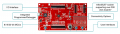
This is a Microchip Curiosity Board for development:
upload_2019-6-4_5-40-5.png

Note: User interfaces. Microchip has been in the business for quite awhile and seems to know what it is doing -- at least most of the time. If you don't see any need for ever adding a MikroBus device/breakout board, then eliminate that.

I virtually always include a debounced switch plug-in with 1 to 6 switches on my breadboards. I use solderable breadboards instead of a fixed "development board."
 

Thread Starter

Sashvat

Joined Jun 1, 2019
24
This is a Microchip Curiosity Board for development:
View attachment 178983

Note: User interfaces. Microchip has been in the business for quite awhile and seems to know what it is doing -- at least most of the time. If you don't see any need for ever adding a MikroBus device/breakout board, then eliminate that.

I virtually always include a debounced switch plug-in with 1 to 6 switches on my breadboards. I use solderable breadboards instead of a fixed "development board."
I still dont understand, please dont get pissed off at me, can you please explain me again as to what you are saying?
 

jpanhalt

Joined Jan 18, 2008
11,087
I still dont understand, please dont get pissed off at me, can you please explain me again as to what you are saying?
Simply put, your design lacks provision for any user input or readable output. If you plan to do ALL of that from a PC keyboard via a USB connection, fine. But I suspect you will have problems.

For example, I almost always include at least one LED to troubleshoot where a program is hanging up. I include switches so I can select menu items, imitate an input, or reset the MCU. If those functions don't make sense, I suggest you buy a development board* and gain some experience with MCU's before trying to design one.

*In fact, I have never bought a development board. I use breadboards and breakout boards for my projects. To me, getting a development board without a project in mind is like getting a cart before the horse. Awhile back, Microchip was giving away a development board for its newest 8-bit MCU. That is the only development board I have.
 

MrChips

Joined Oct 2, 2009
34,826
STM32CubeMX is the previous graphical pin configuration utility.
STM32CubeIDE is the new integrated platform that combines CubeMX into the IDE.

You do not need pull up/down resistors.

Start off with a working design as in an evaluation board before building your own.
 

MrChips

Joined Oct 2, 2009
34,826
You need to moderate your tone if you are to receive more help.

You have been given expert advice which you continue to ignore.

Go figure.
 
Top