
 Facebook
 Google
 GitHub
 Linkedin
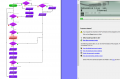
Hello, I am looking for advice and guidance on a small project using a Genie18 Board and Microcontroller and the Circuit Wizard software. I have attached the flowchart here below, I am wondering why when my program reaches the High output command it registers as a stop command?
The system itself is a small barrier simulation where it must detect a person (A1), open using a motor (Q0) , show a green LED (Q7) when safe to enter, wait 5 seconds and then close using a motor (Q1) while showing a Red LED (Q6) when closing, the system also has an emergency stop (D2) that causes the gate to open with a red LED and then remain in a state of open until the emergency stop is released, then a reset button (D6) must be pushed to enable the system to begin again. The system also has a feature that detects if the gate is closed and if not closes the gate.
Any help would be appreciated
The system itself is a small barrier simulation where it must detect a person (A1), open using a motor (Q0) , show a green LED (Q7) when safe to enter, wait 5 seconds and then close using a motor (Q1) while showing a Red LED (Q6) when closing, the system also has an emergency stop (D2) that causes the gate to open with a red LED and then remain in a state of open until the emergency stop is released, then a reset button (D6) must be pushed to enable the system to begin again. The system also has a feature that detects if the gate is closed and if not closes the gate.
Any help would be appreciated





