Is my circuit good as a Microcontroller development board?

Thread Starter

Sashvat

Joined Jun 1, 2019
24
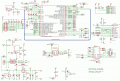
Hi guys, I have made this schematic to make a Microcontroller development board and would want you guys to check it out if everything is fine. I haven't added LED's which I will do soon, but after you have said its fine, I'll be adding it. I haven't attached my USB DP and DM (data + and data - respectively) but will do it.

Also I have other questions which I will ask as you confirm my schematic and give a go to it. This is my first PCB working with a Microcontroller as SMD, so if I have made any mistake please let me know, also I am in 12th grade, so please explain me in simple terms for me to understand If I have got wrong somewhere.

Thank you.
 

Attachments

MrChips

Joined Oct 2, 2009
34,629
Welcome to AAC!

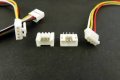
You need a mechanism for programming the MCU using ST-Link.
Create a 4-pin male header, 0.1" pitch with the following connections:

1 - VCC
2 - SWCLK (pin-37) (PA14)
3 - GND
4 - SWDIO (pin-34) (PA13)
 

Thread Starter

Sashvat

Joined Jun 1, 2019
24
Welcome to AAC!

You need a mechanism for programming the MCU using ST-Link.
Create a 4-pin male header, 0.1" pitch with the following connections:

1 - VCC
2 - SWCLK (pin-37) (PA14)
3 - GND
4 - SWDIO (pin-34) (PA13)
I was thinking of adding both methods, FTDI and the ST link also so that it would be easy for other people to use both the methods, would that be fine? And, are the placements of the capacitors all fine? the oscillators, powers supply and other components?
 
Last edited:

MrChips

Joined Oct 2, 2009
34,629
Have you used and programmed an STM32 MCU before?
If not, I would recommend you go and buy an evaluation board such as STM32L100C-DISCO.
This will provide you with a working board and fewer headaches with which begin your journey.
 

MrChips

Joined Oct 2, 2009
34,629
I was thinking of adding both methods, FTDI and the ST link also so that it would be easy for other people to use both the methods, would that be fine?
No. ST-Link is all you need for programming.

If you would like to include a USB-to-UART interface I would recommend Silicon Labs CP2102.
 

Thread Starter

Sashvat

Joined Jun 1, 2019
24
No. ST-Link is all you need for programming.

If you would like to include a USB-to-UART interface I would recommend Silicon Labs CP2102.
I am using the STM32 blue pill, and it works seamlessly with an FTDI tool and Arduino IDE, so why wouldn't it work?
 

Thread Starter

Sashvat

Joined Jun 1, 2019
24
No. ST-Link is all you need for programming.

If you would like to include a USB-to-UART interface I would recommend Silicon Labs CP2102.
also, can I use the Arduino IDE with this board? but I need to change the upload method to ST Link right?
 

dendad

Joined Feb 20, 2016
4,635
Does the reset pin need a pullup?
Also, a 100R between the reset switch (SW1) and C14 may be an idea, just to limit the current as C14 is discharged into a shorted SW1.
Are you extending all the pins to pads so wires can be soldered on later?
It could be an idea to add Grove connectors to some pins where applicable to make it easy to add extras later.
Grove.jpg
http://wiki.seeedstudio.com/Grove_System/

It is hard to stop when adding parts to boards.
But figure out what you want to use it for.
Is this only going to be USB powered? A nice little switch mode regulator is a good addition.
https://au.mouser.com/ProductDetail...=sGAEpiMZZMsF1ODjcwEocIuESINJH25XntreftV5zWI=
 

Thread Starter

Sashvat

Joined Jun 1, 2019
24
Does the reset pin need a pullup?
Also, a 100R between the reset switch (SW1) and C14 may be an idea, just to limit the current as C14 is discharged into a shorted SW1.
Are you extending all the pins to pads so wires can be soldered on later?
It could be an idea to add Grove connectors to some pins where applicable to make it easy to add extras later.
View attachment 178864
http://wiki.seeedstudio.com/Grove_System/

It is hard to stop when adding parts to boards.
But figure out what you want to use it for.
Is this only going to be USB powered? A nice little switch mode regulator is a good addition.
https://au.mouser.com/ProductDetail/TRACO-Power/TSR-1-2433?qs=sGAEpiMZZMsF1ODjcwEocIuESINJH25XntreftV5zWI=
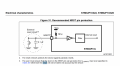
doesn't it need a pull down resistor? What I did was I looked at the data sheet and just copied the diagram down to my schematic. And yes, I will be attaching pads on my PCB design so that I can solder on some male headers to attach to my breadboard.

Also, do you think its a good idea to add a diode to prevent the USB power supply and the battery input I give externally to short the board out? If yes, then what diode should I use to prevent this cross over?
 

dendad

Joined Feb 20, 2016
4,635
I think you need a pullup, like this circuit has.
STM32-P103-sch.gif
It may be of interest to study this circuit too, also Arduinos that show the power switching between USB and external power.
 

Thread Starter

Sashvat

Joined Jun 1, 2019
24
Have you used and programmed an STM32 MCU before?
If not, I would recommend you go and buy an evaluation board such as STM32L100C-DISCO.
This will provide you with a working board and fewer headaches with which begin your journey.
Well I have programmed an STM32 MCU before, the blue pill, but just to read some sensor values and do some tasks given by some tutorials on youtube. But I want to know, how do you program one the "non Arduino" way (I have heard that you use software like Keil-MDK, but I don't know how to send code to my MCU with it)? Can you tell me the detailed way of what software(s) to install, the procedures, how to write the code and upload the code to my MCU?
 

Thread Starter

Sashvat

Joined Jun 1, 2019
24
I think you need a pullup, like this circuit has.
View attachment 178877
It may be of interest to study this circuit too, also Arduinos that show the power switching between USB and external power.
I am getting confused, the data sheet is asking me to use a reset (NRST) circuit, but you're telling me to use a pullup resistor when the switch is set to ground?
 

Attachments

dendad

Joined Feb 20, 2016
4,635
Usually, a pullup resistor is needed to ensure that when the reset switch is open, +V is on the reset pin.
Then it goes to 0V when the button is pressed.
A reset chip is a good idea too as they hold the processor in reset until the power supply stabilizes, and also will drop back into reset if you get a brownout.
But it will mostly work with just a reset button ok.
 

MrChips

Joined Oct 2, 2009
34,629
I have developed many STM32 boards and applications. I have always ignored NRST pin and left it unconnected. There is a weak pullup (40kΩ) built-in the MCU.

The IDE toolset of choice today is STM32CubeIDE. It is free and fully supported by ST.

The easiest way to program any bare metal STM32 MCU is to buy an STM32 Discovery board and use its onboard ST-Link connection. That is why I suggest getting an STM32L100C-DISCO.

Once you get your DISCO kit and download the STM32CubeIDE I can lead the way. It is straight forward and painless.
 

Thread Starter

Sashvat

Joined Jun 1, 2019
24
I have developed many STM32 boards and applications. I have always ignored NRST pin and left it unconnected. There is a weak pullup (40kΩ) built-in the MCU.

The IDE toolset of choice today is STM32CubeIDE. It is free and fully supported by ST.

The easiest way to program any bare metal STM32 MCU is to buy an STM32 Discovery board and use its onboard ST-Link connection. That is why I suggest getting an STM32L100C-DISCO.

Once you get your DISCO kit and download the STM32CubeIDE I can lead the way. It is straight forward and painless.
Thanks for the help, but coming to how to program a bare MCU chip, isn't STM32CUBE a way to initialise the pins of the STM32 MCU instead of writing it down manually?
 

Thread Starter

Sashvat

Joined Jun 1, 2019
24
Welcome to AAC!

You need a mechanism for programming the MCU using ST-Link.
Create a 4-pin male header, 0.1" pitch with the following connections:

1 - VCC
2 - SWCLK (pin-37) (PA14)
3 - GND
4 - SWDIO (pin-34) (PA13)
Also for what you said, do I need a pull up/pull down resistors for my SWCLK and SWDIO pins?
 
Top