Is it possible to try to fix and retrieve data from a cheap, inaccessable M.2 SAT 3 SSD

Thread Starter

oslosl

Joined Jan 13, 2023
270
Is it possible to try to fix and retrieve (irreplaceable, naturally not backed up) data from a Lite-on M.2 SAT 3 SSD (from a HP laptop), that is currently inaccessable ? Drive shows up in Windows, but accessing it just hangs and eventually fails. Recovery partition x: is sometimes accessable when the drive is in the HP laptop (or is this just the bios ?), but can not access main c: partition.
 

Attachments

Last edited:

WBahn

Joined Mar 31, 2012
32,702
Is it possible to try to fix and retrieve (irreplaceable, naturally not backed up) data from a Lite-on M.2 SAT 3 SSD (from a HP laptop), that is currently inaccessable ? Drive shows up in Windows, but accessing it just hangs and eventually fails. Recovery partition x: is sometimes accessable when the drive is in the HP laptop (or is this just the bios ?), but can not access main c: partition.
This is like telling someone telling you that their car's engine won't start and asking you if it's possible to fix it.

Whether it can be recovered, how much can be recovered, and how much it will cost to recover it all depend on exactly why it's not working.

Your best bet is to take it to a drive recovery service, as they have the tools and facilities needed to diagnose the problem and start delving into it at very deep levels, possibly including decapping the ICs. But you can expect that to cost several hundred to a few thousand dollars. Keep in mind that anything and everything you do to the drive in the meantime risks making it more difficult (and hence expensive) for the professionals to recover (and may even make it so that they can't recover it. So spend some time pondering just how valuable this irreplaceable data is to you.

If it's not so valuable that you are unwilling to risk recovery attempts yourself first, then one of the first things to do is to see if you can successfully clone the drive. Again, whether you can or not depends on the nature of the failure. Try not to do anything that actually writes to the drive (such as running CHKDSK). There are a number of disk recovery software tools that you might consider looking at (just Google for it).

FWIW, the X: Partition is a minimal OS partition that HP uses for diagnostic and factory reset operations.
 

Thread Starter

oslosl

Joined Jan 13, 2023
270
You are right. This is for a freind and he is not expecting to pay a lot for it. If it fails, it fails. Is the X partition actually on the drive or in the bios ?
 

WBahn

Joined Mar 31, 2012
32,702
You are right. This is for a freind and he is not expecting to pay a lot for it. If it fails, it fails. Is the X partition actually on the drive or in the bios ?
It's on the SSD itself.

That you can see it, but only some of the time, hints at an intermittent issue. But that issue might be in the computer or in the drive. Have you tried putting the drive into a different machine and seeing if you can access it?
 

Thread Starter

oslosl

Joined Jan 13, 2023
270
It's on the SSD itself.

That you can see it, but only some of the time, hints at an intermittent issue. But that issue might be in the computer or in the drive. Have you tried putting the drive into a different machine and seeing if you can access it?
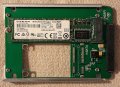
Right now I am attempting to access it via a converter (see photo above)
 
Top