Ideas for "panic" alarm indicators

Reloadron

Joined Jan 15, 2015
7,891
Well now I get emails to every post on the "Projects" forum except nothing from my own thread ??? Also wondering on the list of projects showing all the threads, every one except mine is titled in bold type???. Still no diagram of your circuit, elec_mech but Ron's shows up all the time just fine.
Well I have some more thinking to do as I wait for word about if I get the go-ahead on this matter. Thank you.
On a side note I have no problems seeing Elec Mech's drawing? Using either MSIE or Firefox as well as Chrome. Wonder why it's not cooperating for you. Possibly a browser setting?

Ron
 

Søren

Joined Sep 2, 2006
472
Hi,

A more fail safe system would use NC buttons to signal an "event", as you'll then get an alarm if the wires are cut or the circuit breaks for any other reason.
 

Reloadron

Joined Jan 15, 2015
7,891
Hi,

A more fail safe system would use NC buttons to signal an "event", as you'll then get an alarm if the wires are cut or the circuit breaks for any other reason.
Elec Mech covered that in post #7 where he mentioned:
've chosen normally closed switches only because in my limited exposure to alarm systems, I learned having NC contacts better ensures the system is working. Using NO contacts, you have no feedback - if the wires were to get cut again, you'll never know. With NC contacts, the alarm will sound. Of course, if you're going to turn off all sounds and lights after a preset time, this may be irrelevant. You could leave the LED's on all the time to indicate everything is working properly OR add another LED to indicate power is on but that also flashes if any of the external buttons appears "open" for long length of time.
Pretty much agreed on. :)

Ron
 

Thread Starter

izon

Joined Mar 17, 2013
217
I now can see elec_mech's drawing again so don't know what was up with that.
I did get a go ahead on the alarm system but not using any secondary system such as autodialer.
So If I could get some support on my recent post as to what version of PICAXE I would need and
where is best to purchase it. Also need to know what other options I might need with that PICAXE
such a programming cable or other items
Then if I could get some help on a more detailed circuit. It will be a 24volt DC using NC contacts.
Sorry I'm brief at this time but please ask what details are needed in constructing a wiring diagram
and I will try to fill in the information you may need.
Thanks very much!
 

Reloadron

Joined Jan 15, 2015
7,891
As to PICAXE there was a time when I bought all my PICAXE stuff from SparkFun but it looks like they are getting away from PICAXE, you may want to give them a call. I do see Robotshop USA as a distributor. You really don't need much. The
PICAXE-28X1 USB Starter Pack is more than adequate. Even a 14M2 would be adequate. The PITA with PICAXE is getting a starter kit or building/rolling your own. The actual chips are relatively cheap. The nice part is the chips come with a boot loader already installed and the programming is relatively easy. Additionally PICAXE has a nice and very helpful online community which can be found here. I would buy a few extra chips of whatever you decide on so you have a few programmed spares. Also I would program one pin for a future auto dialer even though it won't be there the future capability will be there. You may want to join the PICAXE Forum I linked to for some suggestions as to a starter kit. Once you program the chips that's it, they can be placed on a board of your own design.

Another option is any of the Arduino family which is Atmega chips and in that case you program in Arduino's C programming language. The beauty of Arduino is you can buy a board relatively inexpensive like the Arduino Uno board from dozens of suppliers.

Again, you only need a few I/O (Input / Output pins for what you need to do. The best approach I believe is to sit down with a pencil and paper and define what you want to happen, step by step. If a button is pushed... Then... do something.

This is just a few of my thoughts. I would wait and see what Elec Mech has for thoughts and ideas.

Ron
 

Thread Starter

izon

Joined Mar 17, 2013
217
Thanks much, Ron. Guess I would like to stay with the Picaxe idea for this project but interesting to know of other ideas. I had found those two possible sources also plus from England. I think the 14M2 seems large enough from what I understand. I will be back and try to go through again step by step what should happen and the sequence of events.
Catch you later.
 

elec_mech

Joined Nov 12, 2008
1,500
I'll add optoisolators to the circuit I drew up to allow you to use 24VDC with the switches.

Sparkfun is currently low on PICAXE supplies, but I'm sure they'll have more soon. Another source is Robotmesh. They offer free shipping on orders over $50 (not sure if you'll need that much though). Another source is PH Anderson.

If you want to keep things dirt cheap, you can buy a USB to UART converter and add an inverter to make a PICAXE programmer. I can show this in the schematic if you'd like. Otherwise you can purchase the dedicated PICAXE USB programming cable and a stereo adapter. Roughly $5 vs. $25.

How do you envision this operating? In other words, what do you want the circuit to do beside blink an LED and buzzer corresponding to a button press? Do you just want a single knob to adjust the LED blink rate or other knobs/buttons at the dispatch station to do things like change the buzzer pitch, length, reset, etc.? I know you don't want it too complicated, but we'll need to know everything you want up front to give you a robust design (and save shipping costs on ordering extra parts later).
 

Thread Starter

izon

Joined Mar 17, 2013
217
After much searching and thinking, I have a modified system that I need much help with in completing the wiring diagram and creating
the circuitry.

I now plan on starting with much of the diagram that elec_mech suggested earlier. (Post 7) It would have 3 NC "panic" buttons as before.
Pressing any one button would start the uC (PICAXE) on it's job.

Now instead of 3 indicator lights and one sounding device, I am going to use one (either steady of flashing based on programming) RED
alert light no matter which button has been pressed. This may have to be programmed to operate for a fixed period of time and then turn off.

It is by Patlite, uses 24vdc and draws 52ma. The unit consists of a short base and one RED LED module. See this link for model LU7-E-R:
http://www.patlite.com/product/detail0000000089.html (open the catalog with PDF file)

Instead of one sounder/buzzer, I would like to use this product by Patlite: Model BSV-24 Voice Annunciator. See the link:
http://www.patlite.com/product/detail0000000199.html
It uses 24vdc draws 15ma and can play multiple messages. I would be able to record a very short siren or other alarm sound and then
announce which of the 3 rooms had initiated the call for help. Please check the wiring diagrams in their literature as I'm not quite
sure how this would interface with the uC. (can connect with either PNP or NPN transistor). I think the uC would have to be programmed
to keep it "on" through 3 readings of the alert and then stop.

After discussions with the "authorities" this is the sort of system they all agreed upon with maybe some tweaking here and there.
The light and sounder (sounder is only 3" square and very shallow) would be mounted probably on a nearby wall.
It might be desirable to have a "test" switch, NC, in series with each "panic" button to check the functioning periodically and a reset
button but not sure as to best place for it (in 24v supply or ground line ?).

Also a recommendation on a power supply unit would be appreciated. I assume it should be regulated, I found a web site with several possibilities.
http://www.trcelectronics.com/24-volt-power-supplies-on-board-1.shtml Guess I'd like it to be attached on or next to whatever circuit board
would be built up for the uC and put in an out-of-the-way place with the necessary cabling to light and sounder.

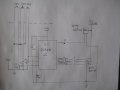
Guess that is the main overview for right now. I will try to attach a drawing. Sorry it is only my pencil version and a photo
but don't have a program or know just how to use one yet to make a more professional one like most of you fellows.

Thanks very much.... sorry if I've left out a lot... I will save some detail questions till a bit later when you are ready.

IMG_3830.JPG
 

elec_mech

Joined Nov 12, 2008
1,500
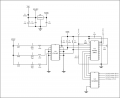
Here's another crack at it:

Ideas for panic alarm indicators, Rev2.png

I just picked a PICAXE 20M2 as they often don't cost much more if any than a 14M2 (depending on where you buy them). I can switch it out with a 14M2 if you'd prefer.

Dropping 24V to 5V can create some heat on the regulator (U1) so may need a heat sink and a vent or two in the enclosure. You could spend some more money and get a DC-DC converter which will produce, I believe, very little heat.

For a power supply, could you make something like this work?
 

Reloadron

Joined Jan 15, 2015
7,891
For your power supply I would give some thought to a couple of DIN Rail mounted 24 and a 5 volt supply. Easy to mount on a short piece of DIN Rail. Sola and others make them, just snap them on the rail in your project box. Here is an example and just an example, not to say you need that supply as I have not seen any mention of budget.

Ron
 

Thread Starter

izon

Joined Mar 17, 2013
217
Hi Ron, just a quick reply to thank you for the idea. I guess I haven't mentioned budget but it would be a matter of trying to do an effective and quality job without spending
excessively. Hope that makes sense. Guess I'm saying do a very adequate job of it and yet keep costs on the lower side.
I wasn't aware of that type of power supply..... never been exposed to them. Thanks for the information but that would be going a bit overboard.

Guess I would be leaning toward the ones I linked to or what elec_mech asked about such as a "wall wart" or two.
Will follow up as I get time to think this all though and get organized. Thanks again!
 

Thread Starter

izon

Joined Mar 17, 2013
217
I've put together some information now that should bring us closer to a complete plan.
Once again to review.....
elec_mech, I will be using your last drawing to refer to. You may have to modify it after I give you new details.

Guess I'm fine with everything up through the Picaxe PLC and then I have questions.

I will be now using a Patlite LME-102-R (simple single red LED light) which uses 24vdc and draws about 60ma.
Can this be switched on by direct connection to the PLC or is the "driver" IC preferable? (ULN2003)
For later.... I would like to program the PLC to have the LED flash about once a second for a yet to be determined time.

I will still be using the annunciator Patlite BSV-24 (24Vdc) to "play" one of 3 possible messages to indicate the
origin of the alarm.
Here I need your help in clarifying how to order (configuration) the BSV in regard to it turning on via a PNP or NPN
transistor or maybe it can just turn on as if there were "dry" contacts. Please look at what I will try to post here
or with a link regarding what the manufacturer shows how this can be done.

This annunciator will be recorded with the same brief message and repeated a couple times. This would mean the
PLC or however connected, would have to keep it turned on for the completion of the message with 2 repeats.
I would record something like: "Alert, alert ....help needed in clerk's office", Alert, alert, ...help needed in clerk's office,
Alert, alert... help needed in clerk's office" after which time it would be off and ready for a future alarm.

Couldn't get copy & paste to pick it up right so to see the "Electrical" wiring, go to this link and open either the Quick
Manual or downloadable one. From this you can probably tell me if this would work directly from the PLC or again,
is it best to use the driver chip you have indicated.... maybe your schematic could indicate how the BSV would
connect to your circuit. http://www.patlite.com/product/detail0000000199.html

I will leave with this information posted and again, thanks for your help!

P.S. I would likely be using two separate power supplies (24vdc & 5Vdc) ... see below.

P/N: IRM-20-24
24 VDC Power Supply

Approx Power: 20 Watts
Max Current: 0.9 Amps
AC/DC extremely miniature encapsulated on-board power supply. Isolation Class II, low no load power consumption, and universal AC input range 85~264VAC.
Dimensions: 52.4x27.2x24mm

$9.90 ea.


P/N: IRM-05-5
5 VDC Power Supply

Approx Power: 5 Watts
Max Current: 1 Amps
AC/DC extremely miniature encapsulated on-board power supply. Isolation Class II, low no load power consumption, and universal AC input range 85~264VAC.
Dimensions: 45.7x25.4x21.5mm
$7.20 ea.
 

elec_mech

Joined Nov 12, 2008
1,500
izon said:

Guess I'm fine with everything up through the Picaxe PLC and then I have questions.
The PICAXE is more accurately referred to as a microcontroller. A PLC is a programmable logic controllerswhich often contain a microcontroller, but use their own special programming language ("ladder logic") and are suited dominantly for industrial controls.

izon said:

I will be now using a Patlite LME-102-R (simple single red LED light) which uses 24vdc and draws about 60ma.
Can this be switched on by direct connection to the PLC or is the "driver" IC preferable? (ULN2003)
Most microcontrollers can't source or sink more than about 30mA max, so we'll need the ULN2003. Additionally, the microcontroller can't directly interface with anything higher than 5V. For this reason, we'll need it for the MP3 module, so you aren't adding any extra parts unnecessarily.

izon said:

This annunciator will be recorded with the same brief message and repeated a couple times. This would mean the
PLC or however connected, would have to keep it turned on for the completion of the message with 2 repeats.
I would record something like: "Alert, alert ....help needed in clerk's office", Alert, alert, ...help needed in clerk's office,
Alert, alert... help needed in clerk's office" after which time it would be off and ready for a future alarm.
You can either create one long recording and have the PICAXE just play it once or you can easily make a shorter file and have the PICAXE play it multiple times. As I understand the module, we'd just trip the appropriate channel, wait for the message to play, then trip again and repeat until we played it the desired number of times.

izon said:

Couldn't get copy & paste to pick it up right so to see the "Electrical" wiring, go to this link and open either the Quick
Manual or downloadable one. From this you can probably tell me if this would work directly from the PLC or again,
is it best to use the driver chip you have indicated.... maybe your schematic could indicate how the BSV would
connect to your circuit. http://www.patlite.com/product/detail0000000199.html
Being a bit busy at the moment, just refer to page 11 in the manual under the NPN example circuit then look at the circuit in post #30.

izon said:

P.S. I would likely be using two separate power supplies (24vdc & 5Vdc) ...
The power supplies you listed will work, however, note that you'll have to run live AC power onto your board then into the power supplies. You'll need to add some type of protection so if there is a short, the user doesn't get electrocuted. Personally, I strongly suggest the 24VDC wall wart I mentioned earlier or something similar as this keeps AC power out of your circuit altogether. You can then add something like this to get 5V to the logic portion which should keep heat to a minimum.
 

Thread Starter

izon

Joined Mar 17, 2013
217
Excellent ! I like your ideas and thanks for explaining the dif on PLC vs. uC.... I'm green on this so continue to bear with me, ha.
Yes I guess it would be better to use the type of power supply setup you suggest. I will try to look at this a little closer as I get time
also but at least I can begin to order a couple things.

Oh, BTW I've been looking at this for a programming cable (see link) if you think that
is what I need. Guess I'd rather spend a little more and keep it simple in my case. Suppose I will need to install a 3.5mm stereo jack on
the board for easy programming connection. Are there 3 wires to be connected for programming?
Also might get the uC there and anything else that I have to have from them.
http://www.robotmesh.com/microcontrollers/picaxe/picaxe-usb-download-cable

Best regards..
 

Thread Starter

izon

Joined Mar 17, 2013
217
Ron, Thanks... a LOT of material there but will try to scan it and then read more carefully as time permits.
 

elec_mech

Joined Nov 12, 2008
1,500
Are you going to breadboard a prototype circuit first or go bold and make a PCB at the start? If the former, I'd suggest the cable you mentioned and a 3.5mm breadboard adapter like this. I don't know if this would be helpful or not, but here is a kit with the programming cable and a board that can accept 8-, 14-, or 20-pin PICAXE's (not 18-pin, those have a different pinout). The board also has a ULN2803 with it which will work the same as a ULN2003. It might save a little prototyping setup time. Also includes a battery pack so you wouldn't need to worry about a 5V power supply for testing.

izon said:

Are there 3 wires to be connected for programming?
Yes, the programmer connects to GND, serial in, and serial out. You'll have to provide power to the PICAXE otherwise the programmer won't work.

The PICAXE manuals are large and can be a bit intimidating. I agree it is helpful to know any IC and system in more detail, but don't fret if you don't have time to go through them all in detail. I'd suggest perusing the first manual. The second covers commands in detail, the third is examples of circuits to give you ideas and the fourth covers flowcharts which are a visual representation of the code. Since we're helping design the circuit and writing code to get you started, we'll effectively be covering the last three (very briefly, but enough to get the project off the ground). I'll write some code soon - I think once you see the code, you'll pick up on it very quickly. You won't be an expert on PICAXE programming by the end, but you'll be able to modify the code to do what you want with relative ease.
 

Thread Starter

izon

Joined Mar 17, 2013
217
I would really like the entire circuitry (excluding light and MP3 player devices) to be built on one board if that is possible or practical. I don't think I would need to first prototype or breadboard the project. When plans are finalized
It would be awesome to have a board layout and maybe plan of copper traces to remove, etc. as you did on my previous project ! (Including placement of DC to DC converter) I suppose in this scenario, I would be needing to pick up the individual parts that would have been in the kit leaving out unneeded items).

Now things have improved a bit with the sheriff regarding his earlier position. So I will be building most everything into a plastic or metal enclosure and will have a place for the three test buttons, a steady power LED, a reset button,
( where is best place for it?) and possibly internal LEDs on each on the three lines going to the BSV MP 3, as a troubleshooting aid to prove signal is getting that far if MP3 player isn't working. Maybe the power indicating LED could be on output of 5VDC converter which would verify both parts of power are functioning.

I've started to make a list of materials but need to clarify regarding using a single circuit board, etc.

Thanks very much !
 

Thread Starter

izon

Joined Mar 17, 2013
217
.... additional thoughts... Guess I could place the 3 LEDs going to the MP3 player where they are visible as it would be another indicator as to which room is calling for the help.

Is there a need to be concerned if power should go out in the building? They do have a standby generator that is automatically started up in this event but would that in any way
create a false triggering of this alarm system?

Thanks again.
 
Top