I need to understand the VGA wiring of a LG CRT Monitor, model LG 710-E, Chassis CA-136

Thread Starter

spikespiegelbebop

Joined Nov 30, 2021
163
Just bought a LG CRT Monitor, model LG 710-E, Chassis CA-136, Service Manual, and I need to understand the VGA wiring. This is for retrogaming.

Let me break it into two parts:

First I need to know which wire does what, for example, "Red wire goes for Red (RGB)".
Secondly: Since it does not come with a female DB-15 connector (it comes with a cable with a male DB-15 connector), I've cut its cable to solder one, but first I tried to connect a HDMI do VGA adapter, and it didn't work, the device goes into protection mode everytime I try to connect something. I tried connecting a blueray player, a PlayStation 2 set to output VGA signal and even a raspberry pi, my PC, nothing works.

I've opened this thread because it's being hard to understand the schematics, I can't identify the VGA cable wires.
 

MisterBill2

Joined Jan 23, 2018
27,287
FIRST, the VGA signals are not the same as the HDMI signals. HDMI is the cheapened version of the DVI connector arrangement. Smaller and much cheaper. There is a published specification as to what signals are on which pins of the VGA connector.
There are traditions, but no rules, as to what color is assigned to which signal. Often the three coaxial cables are red, blue, and green,, as are the analog signals they carry. The colors of the other wires used for the synchronising signals are not so obvious.
BY hacking off the VGA connector you make that more difficult to know AND remove any option of returning the monitor because it is not usable for your application.
There is also a published specification for the signals on each of the 24 pins on that HDMI connector.
I have found those specifications available on line.
 

ronsimpson

Joined Oct 7, 2019
4,660
VBA cable should have three coax shielded cables for R, G, B. An ohm meter will read 75 ohms or some like that.
H sync and V sync could be shielded or not. An ohm meter will read 10k ohms. (more or less)
There are two I2C wires that might look much like the sync wires. They probably will read +5 Volts.
There is a +5 Volts power out.

VGA is not compatible with TV signals. Most DVD players do not put out VGA. Many game boxes were built for TV.
 

panic mode

Joined Oct 10, 2011
4,923
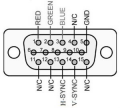
VGA HD15 pinout is like this. center row (pins 6-10) are GND (this is where shields connect to).
if you already cut the cable, you can trace them back using continuity check.

1751730611819.png
btw to drive this you need suitable signal source. this means not just correct signal levels but also correct timing (resolution that your monitor supports) although CRTs were more forgiving than LCD
 

MisterBill2

Joined Jan 23, 2018
27,287
OK, now you have the VGA connections and signal names. From the use of the words " This is for retrogaming. " it may be that the TS is intending to use this to either restore an old CRT video game, or to duplicate one. For that sort of application you need to know those signals, and be able to convert them to what duplicates a VGA output. OR, use a PC motherboard with a VGA output to drive the display.
 

panic mode

Joined Oct 10, 2011
4,923
many retro video games operate at low resolution and low refresh rate. by low i mean resolution like 320x200.

as a baseline check specs of classic arcade monitors like the trusty old Hantarex MTC 9000.
horizontal scan was 15, 24 or 31kHz, vertical scan was flexible 45-65Hz.

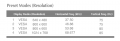
your monitor (if working) specs are much higher to connect to retro video game board:
1751750321166.png
but... most of retro gaming today does not use original hardware either. they are almost always using simulators like MAME which runs on some different hardware (PC or RPI or whatever). so the specs you are trying to match the monitor with are for platform that you run game on.
 
Last edited:

MisterBill2

Joined Jan 23, 2018
27,287
Based on post #6, it will be very useful for the TS to let us know just what sort of computer OR game console they want to interface with the display. Without that information the best responses will be random guesses.
 

Thread Starter

spikespiegelbebop

Joined Nov 30, 2021
163
First things first, I know how a VGA cable works. Maybe I haven't expressed myself right. What I said is that I used a HDMI to VGA adapter to input a VGA signal, I also used the Playstation 2 own matrix infinity mod chip VGA signal, which I believe it's around 30khz, 480p, but funny enough doesn't have h/v sync, it just passes the RGB colors thought the componen cable (probably using lumina y for syncing). Used different resolutions and frequencies, the CRT always got into protection mode. What I'm trying to understand is how the CRT wiring works, not "what is VGA". The closest thing I have here for an actual VGA cable is my HDMI to VGA adapter, which I have managed before to use Custom Resolution Utility with different resolutions and frequency to even get a PC signal in a consumer SD CRT TV, which basically only supports 480i. I know I need to learn more about the subject, but it's not like I have no clue of what I'm doing. I just need to understand the schematic, the part where the wiring is, that's what I'm asking, can anyone give me a hand with that?
 
Last edited:

panic mode

Joined Oct 10, 2011
4,923
in the old days CRTs had no protection. if you convince your graphic card to produce signals that are not compatible (faster sync) you would hear whine from the monitor indicating that is suffering. in such case solution was to immediately kill the power to save the monitor. then newer monitors with protection began to appear. the protection was using MCU to check if signals are in tolerable range before letting monitor sync to them, if out of range monitor would display little message such as "unsupported mode" or "out of sync". then LCD monitors became the norm and annoyance that fewer modes were supported and even supported one looked bad. and some would reject mode because of ridiculously small difference in sync such as 0.1Hz.

anyway, some 45 years ago i was making money by repairing video games and pinball machines. and quite often game owners would bring another game board that would need to be installed. they did this to rotate games while keeping the same cabinet (much easier to transport). this was easy money... then JAMMA connector became wide spread standard. so i ended converting bunch of cabinets and game boards to support JAMMA. then poker machines (and clones) became even more lucrative and so much fun. miss those days...

so how did process to connect unknown board without any documentation look like? it is simple really:
1. identify power rails for logic (GND and +5V). they are always wider then signals and TTL chips are easily revealing polarity.
2. identify power rail for audio amp. this was also easy to do do as mentioned above and audio amp was the only thing surrounded by large caps.
3. connect speaker. for that i had IC books and collection of datasheets so no problem. but this was simple since one speaker wire goes to GND. the other side goes to whatever pin is able to drive the speaker.
4. identify monitor connections - that is total of five wires R,G,B,H,V. for RGB it was trial and error until correct colors were displayed. without sync image was seriously distorted (diagonal or scrolling fast). a
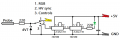
5. now that image and sound are working, one only had to identify the controls. just pull low any of remaining free contacts till you get coin inserted, then 1P/2P, etc. all of the inputs were simply TTL inputs so pulling them low would activate them. and just in case (to avoid surprises) i used series resistor 220 Ohm. but to keep competition at bay, i quickly fashioned simple probe which made things easier. put it in a small box, spray painted, then made a labels using Letraset and clear coated it. looked fancy. many were offering good money for it or to reveal source where to buy one. hehe, good times...

1751850632167.png
 
Top