I lost the ability to go to local IP addresses.

Thread Starter

ronsimpson

Joined Oct 7, 2019
4,894
A year ago (+/-) I lost the ability to go to local IP addresses. Before I could, in a browser, type in an address like 198.168.12.xxx and see cameras, HA computes, smart switches, phones, routers, etc. But now all three browsers block local IP addresses. Two, give instructions on how to fix that but the instructions are bad. (push a button that is not there)

I have been told to go to my router and check on security, but I can't go there. LOL xxx.xxx.xxx.1 = no response.
I know the cameras are there because they respond to PING. All devices are working. Network tools tell me that there are 100 devices and they all reply.

How do I get to any smart devices on the network? I am not keeping up with technology.
 

joeyd999

Joined Jun 6, 2011
6,548
A router can't block local network traffic. All it can do is assign local IPs and direct traffic between your devices and the internet.

ARP manages local traffic, and that occurs on each device.

Are you sure your local subnet is 192.168.12.0/24? If you changed your router, updated its firmware, or did a factory reset at some point, the subnet may have changed (i.e. 192.168.0.0/24, 10.0.0.0/24, etc.).
 

eetech00

Joined Jun 8, 2013
4,751
A year ago (+/-) I lost the ability to go to local IP addresses. Before I could, in a browser, type in an address like 198.168.12.xxx and see cameras, HA computes, smart switches, phones, routers, etc. But now all three browsers block local IP addresses. Two, give instructions on how to fix that but the instructions are bad. (push a button that is not there)

I have been told to go to my router and check on security, but I can't go there. LOL xxx.xxx.xxx.1 = no response.
I know the cameras are there because they respond to PING. All devices are working. Network tools tell me that there are 100 devices and they all reply.

How do I get to any smart devices on the network? I am not keeping up with technology.

How is the router and the devices connected to the local network? Are they connected via a separate switch? Wireless?
A router is not required to connect to local network devices from a local computer, unless it has a built in switch and the switch ports are being used for local devices. It may be the router DNS has failed.
1. First clear the browser cache on you computers, reboot, then try again using the IP address.
2. Next, reboot the router and switches, then try again.
 
Last edited:

Thread Starter

ronsimpson

Joined Oct 7, 2019
4,894
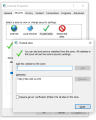
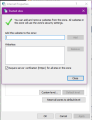
More news. MS said I need to add each device to the "trusted sight" list. This computer is Win10 and the Win11 machine appears to be the same.
Internet Properties, Security, Trusted Sights,
Now I can get to 192.168.12.254 from Edge.
1795139260347.png
 

Thread Starter

ronsimpson

Joined Oct 7, 2019
4,894
I can get to my router from MS Edge and didn't need to have it added to Trusted sites:
I wonder why. I think "Norton" pushed my security up to the top.
MS said that it is possible to hide a program in a web page that goes out and finds cameras and somehow from their does damage back to the computer. I don't understand how we built such a house of cards.
 

meth

Joined May 21, 2016
328
if YOU are on different subnet from the pinged device, you CAN (or might) ping it and get a response but you CANT (or might not) be able to open it with software/browser.

But since it seems you already solved the problem, it is good to know that MS are implementing that level of security. I know our company network blocks almost everything but for personal use i did not know this is default now.
 
More news. MS said I need to add each device to the "trusted sight" list. This computer is Win10 and the Win11 machine appears to be the same.
FWIW I'm using Win 11 now and was using Win 10 before upgrading from 10 to 11. I normally use Firefox to access devices on the local WiFi network. I've never changed any Windows settings for local network access and it's worked fine for a few years. I just tried MS Edge and that works fine too. I do get an "insecure" warning because my home made devices use http rather than https, but it still works without me having to override anything
 
Since Norton is the one that pushed the security up, I'd test that first. Pause Norton's web protection or its browser extension for a few minutes and try the router page again. If it opens, it's Norton blocking local addresses rather than Windows or the browsers, and you can add the whole 192.168.12.x range as an exception in Norton instead of adding every device one by one to trusted sites.
It would also explain why Dave and others get through fine with Edge or Firefox on a plain Windows install
 

dl324

Joined Mar 30, 2015
18,523
I don't understand how we built such a house of cards.
All Microsoft software is full of bugs. Apparently they're not alone.

I never wrote programs larger than 10's of thousands of lines of code, but I found all of the bugs during testing. In the decades they were used at the company, no one ever reported a bug (in the programs I wrote).

I'm still using Win10 on my main computer. I have Win11 on an Ultrabook, but I rarely use it. When the Win10 security update coverage expires next October, I'll probably switch to Linux.
 
Top