Facebook
 Google
 GitHub
 Linkedin

Hi, I was repairing a Bluetooth in-ear headphones (small for sport), and when I soldered the battery to the little PCB and tried to put it in, it would not fit exactly flat, so I pushed a little bit and finally all became flat. However, the headphone was not turning on. I disassembled it again and noticed the battery negative pin was with the PCB pad. Jesus NO! The PCB had its pad removed...
The battery was perfectly in place, it has one spot and there's barely any room for movement. Barely... but apparently the manufacturer though it was a nice idea to make the battery fit only in one exact position for no reason at all with a lot of precision. I am talking here about way, way less than 1mm.
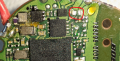
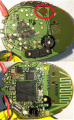
So to sum up, I put the battery very slightly to the right and when I pushed it into it's place, the force broke the pad off the PCB. Now, I'm having trouble finding another pad or spot that's connected directly to that pad, may be you can help me. Here are the pictures of the front and back of the PCB, correctly mirrored so it's easier for you to analyze the PCB and check for other spots/pads.
I would say it's the golden circle pad in the back side (down pic) just at the other side of the pad that broke. Above the number 7.
I guess now it's time to solder one little cable from the negative of the battery to that circle pad, correct?
Problem is find enough space... but I will try first with the things out of the case to check it works.
THANK YOU!
The battery was perfectly in place, it has one spot and there's barely any room for movement. Barely... but apparently the manufacturer though it was a nice idea to make the battery fit only in one exact position for no reason at all with a lot of precision. I am talking here about way, way less than 1mm.
So to sum up, I put the battery very slightly to the right and when I pushed it into it's place, the force broke the pad off the PCB. Now, I'm having trouble finding another pad or spot that's connected directly to that pad, may be you can help me. Here are the pictures of the front and back of the PCB, correctly mirrored so it's easier for you to analyze the PCB and check for other spots/pads.
I would say it's the golden circle pad in the back side (down pic) just at the other side of the pad that broke. Above the number 7.
I guess now it's time to solder one little cable from the negative of the battery to that circle pad, correct?
Problem is find enough space... but I will try first with the things out of the case to check it works.
THANK YOU!