HW 8 channel SERVO/MOTOR output on 18F4431 (Oshonsoft)

Thread Starter

camerart

Joined Feb 25, 2013
3,853
The main principle function of the 8pin PIC is to generate the 20Hz so I use a low enough clock accordingly.
https://www.micro-examples.com//public/microex-navig/doc/097-pwm-calculator.html
Hi M,
Thanks for the link, interesting!
The clock frequency in #20 32mHz is not fixed, it's set up fast in case it needs to do lots of stuff quickly, but at the moment it could be any speed, as it's only doing this job.
Does it need to be fast to cover 5x or more PWMs?

EDIT: I've just noticed "8 PIN PIC" can you clarify please?
C.
 

MaxHeadRoom

Joined Jul 18, 2013
30,871
8 pin pic as I only needed one PWM signal at 20Hz, I used the code creating link in Post #17
You can use it to calc the various values for yours.
 

Thread Starter

camerart

Joined Feb 25, 2013
3,853
8 pin pic as I only needed one PWM signal at 20Hz, I used the code creating link in Post #17
You can use it to calc the various values for yours.
Hi M,
I follow.
I now need to have a closer look, to see how to adapt it all into Oshonsoft BASIC.

EDIT: Just had a look at your link again, and noticed it uses the CCP section, you realise that I can't use these, and I'm guessing the link is just for example calcs. (just clarifying)
C
 
Last edited:

John P

Joined Oct 14, 2008
2,068
I've been a little slow--Camerart, of course you've mentioned this project before, and I should have remembered that these outputs are to control DC motors, not hobby servos. I also recall that I was very skeptical that an 8-bit PIC processor can operate a multi-rotor flying device! The PWM outputs are only part of the problem.

But anyway, maybe there's a way to deal with the PWM issue. Suppose you have some kind of timer setup, where all 5 outputs go high at the same time at a 20KHz rate. Then in the course of that 50usec period, you have as many as 5 other interrupts, each of which turns off one of the 5 outputs. Or if two of them need the same duty cycle, change them both simultaneously. As part of those 5 interrupts, set a value for the timer to run the correct length of time to the next one. In fact if you do it right, the 20KHz wouldn't need its own timer, but it would occur as a sixth interrupt after all 5 of the motor outputs have gone low. Obviously, there would be a limit on how close together these interrupts could be, depending on how rapidly the processing can be done. But if two occurrences are very close together, maybe the procedure could be different and the processor would change one output, wait some small delay time, and then change the other. And maybe a third one after that.

There are possibilities, but I can't help thinking that this is just trying to figure out ways to use the wrong component for the task!
 

Thread Starter

camerart

Joined Feb 25, 2013
3,853
I've been a little slow--Camerart, of course you've mentioned this project before, and I should have remembered that these outputs are to control DC motors, not hobby servos. I also recall that I was very skeptical that an 8-bit PIC processor can operate a multi-rotor flying device! The PWM outputs are only part of the problem.

But anyway, maybe there's a way to deal with the PWM issue. Suppose you have some kind of timer setup, where all 5 outputs go high at the same time at a 20KHz rate. Then in the course of that 50usec period, you have as many as 5 other interrupts, each of which turns off one of the 5 outputs. Or if two of them need the same duty cycle, change them both simultaneously. As part of those 5 interrupts, set a value for the timer to run the correct length of time to the next one. In fact if you do it right, the 20KHz wouldn't need its own timer, but it would occur as a sixth interrupt after all 5 of the motor outputs have gone low. Obviously, there would be a limit on how close together these interrupts could be, depending on how rapidly the processing can be done. But if two occurrences are very close together, maybe the procedure could be different and the processor would change one output, wait some small delay time, and then change the other. And maybe a third one after that.

There are possibilities, but I can't help thinking that this is just trying to figure out ways to use the wrong component for the task!
Hi J,
Yes, to me this seems something like I was imagining.
I'm guessing that the 32mHz speed can cope with this type of thing, if worked out, but htis is beyond my skills. Would this use the PWMs as shown in the D/S?

There may be better components for this task, but the project I'm working on has this spare 18F4431.
C
C.
 

John P

Joined Oct 14, 2008
2,068
No, I'm suggesting generating your own PWM using a timer interrupt. Well, you could use the 2 PWM channels that are built into hardware, but as you say, there aren't enough of them. In fact it probably would be best to start with the two that are there, because it would reduce the number that you'd have to create in software!
 

MaxHeadRoom

Joined Jul 18, 2013
30,871
I don't get it, if you only need single ended PWM, (i,e, one output per) there are 8 on this micro.
What style of motors are you using?
 

Thread Starter

camerart

Joined Feb 25, 2013
3,853
Hi,
Let's not go round in circles! I think we all have some idea of what's needed, from the D/S.
I tried to figure this out before on this forum, and my last comment was I'll leave it till later, and here we are.

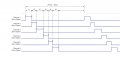
Here is a representaltion of how 6x channels work:
There seems to be plenty of time after CH6 to LOOP round to the beginning again.

The difficulty is, that I use Oshonsoft BASIC and converting the D/S to CODE is not easy, but I'll try and post results, thanks.

Cheers, C.
 

Attachments

ericgibbs

Joined Jan 29, 2010
21,623
hi C,
Why is so difficult to tell us what type of motors you have or intend buying.

Otherwise, this discussion will get us nowhere.:(

E
 

Thread Starter

camerart

Joined Feb 25, 2013
3,853
hi C,
Why is so difficult to tell us what type of motors you have or intend buying.

Otherwise, this discussion will get us nowhere.:(

E
Hi E,
Sorry, It's not difficult.
MOTORS: All brushless- RCX 1804 2400KV-Emax MT1806 2280KV-Angel sunny sky A2212 980Kv-iBM3506Q 530Kv all running from ESCs (Electronic speed controller)

SERVO:HitecFutaba S3003- HS300-EmaxAX3030-Pi-Protec B305-Futaba Fp514B-E-skydigital EDIT: Servos have there own inbuilt controller

All of the ESCs are general no name Chinese type of different power to suit.
C.
 
Last edited:

Thread Starter

camerart

Joined Feb 25, 2013
3,853
Hi,
I'm working through the D/S, it's quite complicated.
1/ Looking at the modes 18.3.1-3 I think 'Single-shot Mode' is most likely.

Looking at my example #30 it shows each CH switching on in turn, for a certain length of time.

Each CH is switched ON for between 1-2ms, all within a 20ms LOOP, so for 'say' 6x channels, at minimum time for all channels e,g, 6x1ms = 6ms, then OFF for 14ms. At maximum 6x2ms = 12ms, then OFF for 8ms within the LOOP.

I think Timer 2 is used for timing, and if the above is correct then:

Set timer for CH1, switch ON CH1 for that period, then OFF.
Set timer for CH2, switch ON CH2 for that period, then OFF.
and so on.
What do you think?

P.S, so far when I mention D/S, I mean the 18F4431 one.
C.
 

jjw

Joined Dec 24, 2013
823
Hi,
Let's not go round in circles! I think we all have some idea of what's needed, from the D/S.
I tried to figure this out before on this forum, and my last comment was I'll leave it till later, and here we are.

Here is a representaltion of how 6x channels work:
There seems to be plenty of time after CH6 to LOOP round to the beginning again.

The difficulty is, that I use Oshonsoft BASIC and converting the D/S to CODE is not easy, but I'll try and post results, thanks.

Cheers, C.
This was discussed almost four years ago.
Software pwm with interrupts using timer1.
https://forum.allaboutcircuits.com/...location-pic-in-oshonsoft.148795/post-1291488
 

Thread Starter

camerart

Joined Feb 25, 2013
3,853
This was discussed almost four years ago.
Software pwm with interrupts using timer1.
https://forum.allaboutcircuits.com/...location-pic-in-oshonsoft.148795/post-1291488
Hi J,
Yes, thanks for finding that, it's possible that I got that program to work, but the PWM section wasn't used at that time. I think I said that I would leave it till later, and now is later :)

I have searched for example programs as guides, and am going through the D/S looking at key words, registers etc.
Here is the program so far, so not a proper program! :
(It's not easy)
C
Code:
'18f4431 32mhz XTL REMOTE PWM 050522 0801
Define CONFIG1L = 0x00
Define CONFIG1H = 0x06  '8mHz x4 =32
Define CONFIG2L = 0x0c
Define CONFIG2H = 0x20
Define CONFIG3L = 0x04
Define CONFIG3H = 0x80
Define CONFIG4L = 0x80  'Set for HVP
Define CONFIG4H = 0x00
Define CONFIG5L = 0x0f
Define CONFIG5H = 0xc0
Define CONFIG6L = 0x0f
Define CONFIG6H = 0xe0
Define CONFIG7L = 0x0f
Define CONFIG7H = 0x40

Define SIMULATION_WAITMS_VALUE = 1  'Comment in for SIM out for PIC
'Define CLOCK_FREQUENCY = 32
'Define SINGLE_DECIMAL_PLACES = 2

'At 20MHz, to figure a PWM frequency of 19.455kHz

'For calc tpwm = time period of PWM frequency
'For CALC ptper = 12-bit period register PTPERL and PTPERH
'For calc PTMRPS = PWM time base prescaler

'(PTPER+1)*PTMRPS         257
'TPWM = ----------------  =  ------------ = 0.0000514
'Fosc/4            5000000

'Frequency = 1/TPWM = 1/0.0000514 = 19.455kHz

'PWM resolution (bits resolution for duty cycle)

'log(20MHz/19.455kHz)    3.01
'Resolution = ------------------ = ----------- = 10 bits
'.301              .301

Dim duty As Word

PORTB = 0  'clear port latch
TRISB = %11000000  'PWM0,1,2,3,4,5 outputs

TRISC = 2  'RC1 = FLTA input (ground RC1 to halt PWM)
'RC1 should be pulled high for normal PWM operation
'when fault A is enabled.
'PCPWM init
DTCON = %00000101  'CHANGE  ~500nS dead-time (for complementary outputs only) &

PTCON0 = %00000000  'Sets 'postscale-prescalemode
'PTCON0 = %00000100 would give 19.45kHz/4
'PTMOD0 'For Setting MODE 'continuous-Single-free'
'PTMOD1

PTPERL = 0  'PWM period
PTPERH = 1  'PWM period PTPER = $0100 or 256d for ~19.45kHz
  

PWMCON0 = %01010100  'PWM[5:0] outputs enabled
PWMCON1 = 1  'updates enabled, overrides sync w/timebase
PTCON1 = %10000000  'PWM time base is ON, counts up
FLTCONFIG = %00000011  'enable fault A, cycle-by-cycle mode

duty = 800  '£ ~50%

PDC2L = duty.LB
PDC2H = duty.HB

Main:

PDC0L = duty.LB
PDC0H = duty.HB
PDC1L = duty.LB
PDC1H = duty.HB

WaitMs 5

Goto Main

End
 
Last edited:

Tinine

Joined May 5, 2022
3
Just an FYI:
The PicoMite is an RPi Pico with onboard MMBasic interpreter. Up to 16 channels of hardware PWMs are available. Not sure whether an interpreter is up to whatever else you have going on, though.

Pimoroni offer several shapes/sizes if the standard RPi Pico proves to be too large.
User manual attached. :)
 

Attachments

Thread Starter

camerart

Joined Feb 25, 2013
3,853
Just an FYI:
The PicoMite is an RPi Pico with onboard MMBasic interpreter. Up to 16 channels of hardware PWMs are available. Not sure whether an interpreter is up to whatever else you have going on, though.

Pimoroni offer several shapes/sizes if the standard RPi Pico proves to be too large.
User manual attached. :)
Hi T,
Thanks for the suggestion and manual, it does look good.

I have limited skills in programming, and use Oshosoft BASIC exclusively.

I've been wring on a project for years, here: https://forum.allaboutcircuits.com/threads/remote-control-by-location-pic-in-oshonsoft.148795/
and working through my ideas as I go along, I'm at the stage of motor control, which will be on my existing PCB.
Cheers, C
 

jjw

Joined Dec 24, 2013
823
Hi J,
Yes, thanks for finding that, it's possible that I got that program to work, but the PWM section wasn't used at that time. I think I said that I would leave it till later, and now is later :)

I have searched for example programs as guides, and am going through the D/S looking at key words, registers etc.
Here is the program so far, so not a proper program! :
(It's not easy)
C
Code:
'18f4431 32mhz XTL REMOTE PWM 050522 0801
Define CONFIG1L = 0x00
Define CONFIG1H = 0x06  '8mHz x4 =32
Define CONFIG2L = 0x0c
Define CONFIG2H = 0x20
Define CONFIG3L = 0x04
Define CONFIG3H = 0x80
Define CONFIG4L = 0x80  'Set for HVP
Define CONFIG4H = 0x00
Define CONFIG5L = 0x0f
Define CONFIG5H = 0xc0
Define CONFIG6L = 0x0f
Define CONFIG6H = 0xe0
Define CONFIG7L = 0x0f
Define CONFIG7H = 0x40

Define SIMULATION_WAITMS_VALUE = 1  'Comment in for SIM out for PIC
'Define CLOCK_FREQUENCY = 32
'Define SINGLE_DECIMAL_PLACES = 2

'At 20MHz, to figure a PWM frequency of 19.455kHz

'For calc tpwm = time period of PWM frequency
'For CALC ptper = 12-bit period register PTPERL and PTPERH
'For calc PTMRPS = PWM time base prescaler

'(PTPER+1)*PTMRPS         257
'TPWM = ----------------  =  ------------ = 0.0000514
'Fosc/4            5000000

'Frequency = 1/TPWM = 1/0.0000514 = 19.455kHz

'PWM resolution (bits resolution for duty cycle)

'log(20MHz/19.455kHz)    3.01
'Resolution = ------------------ = ----------- = 10 bits
'.301              .301

Dim duty As Word

PORTB = 0  'clear port latch
TRISB = %11000000  'PWM0,1,2,3,4,5 outputs

TRISC = 2  'RC1 = FLTA input (ground RC1 to halt PWM)
'RC1 should be pulled high for normal PWM operation
'when fault A is enabled.
'PCPWM init
DTCON = %00000101  'CHANGE  ~500nS dead-time (for complementary outputs only) &

PTCON0 = %00000000  'Sets 'postscale-prescalemode
'PTCON0 = %00000100 would give 19.45kHz/4
'PTMOD0 'For Setting MODE 'continuous-Single-free'
'PTMOD1

PTPERL = 0  'PWM period
PTPERH = 1  'PWM period PTPER = $0100 or 256d for ~19.45kHz
  

PWMCON0 = %01010100  'PWM[5:0] outputs enabled
PWMCON1 = 1  'updates enabled, overrides sync w/timebase
PTCON1 = %10000000  'PWM time base is ON, counts up
FLTCONFIG = %00000011  'enable fault A, cycle-by-cycle mode

duty = 800  '£ ~50%

PDC2L = duty.LB
PDC2H = duty.HB

Main:

PDC0L = duty.LB
PDC0H = duty.HB
PDC1L = duty.LB
PDC1H = duty.HB

WaitMs 5

Goto Main

End
The Pwm was tested in the simulator and with couple of your servos and was working.
...
The servo loop is about 20ms -> 50Hz
~ 19KHz is too high.
 

Tinine

Joined May 5, 2022
3
Hi T,
Thanks for the suggestion and manual, it does look good.

I have limited skills in programming, and use Oshosoft BASIC exclusively.

I've been wring on a project for years, here: https://forum.allaboutcircuits.com/threads/remote-control-by-location-pic-in-oshonsoft.148795/
and working through my ideas as I go along, I'm at the stage of motor control, which will be on my existing PCB.
Cheers, C
Interesting stuff!

I have only just joined so I'm not fully up to speed. I gather that you are driving ESCs and outrunner motors(?)

Are you closing the loop on these motors (QEI) ?

I have used the 18F2331 version as supplied by <Mod Deleted link> on some CNC machines. This chip is able to close the loops and can even directly commutate BLDC motors via LMD18200s. Their NMC (networked machine control) serial protocol is nice :)
 

Thread Starter

camerart

Joined Feb 25, 2013
3,853
The Pwm was tested in the simulator and with couple of your servos and was working.
...
The servo loop is about 20ms -> 50Hz
~ 19KHz is too high.
Hi J,
Yes, I'm sure that is a good program and works, but correct me if I'm wrong! Wouldn't it be better to use the 18F4431 dedicated PWM hardware? Which I'm trying to do.

Regarding:
[The servo loop is about 20ms -> 50Hz
~ 19KHz is too high.]
This is from the program I'm working on which is cobbled from searched for examples, and not a proper program, I've only got as far as checking registers etc. Then I'll look at how it works.
C
 
Top