Facebook
 Google
 GitHub
 Linkedin

On July 11 @Exjay asked in an PM:
{quote] Hello Wendy,
How are you? I saw some of your threads that you attached a breadboard diagram. I was impressed with the neat breadboard illustration. Can you please tell me the software you used for drawing them?[/quote]
I replied:
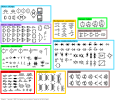
Note: you do not have to use Ms. paint to use these tablets they will work on any graphic software such as GIMP, I prefer M$ paint because it is on every windows computer that is out there even windows 11. After downloading the template package, to draw the schematics look for the symbols. PNG , this paint template sheet has all the electronic symbols I need to draw a schematic I frequently make modifications to this sheet and when I do I upload it later revision of paint CAD. A blank sheet for me is 960px x720px which is a sheet of paper when printed. If you look at the drawings you will notice a very small dot on the upper left hand corner of the component this allows me to copy exactly the component and nothing else. 4 dense schematics I use the smaller drawings, for simple schematics I use the large drawings. Like so:

you can also enlarge D schematics using these graphics programs to a viewable level. Typically use copy/paste to pick the components from this sheet. After you have the schematic drawn, copy the protoboard 63 columns. PNG file and place it below your schematic. Open the component proto board shapes file and copy/ paste to the working file that now has this schematic and the protoboard image on it. I will answer any questions about M$ paint you may have but Google has a lot of tutorials on how to use paint. Making these images is very labor intensive but I have found over the years if I diagram exactly what I want to do before I do it the results usually turn out much better.
..
{quote] Hello Wendy,
How are you? I saw some of your threads that you attached a breadboard diagram. I was impressed with the neat breadboard illustration. Can you please tell me the software you used for drawing them?[/quote]
I replied:
The answer is my open source program paint as CAD downloads for that can be found on my one and only official blog here. I am going to explain how to use this package which can be downloaded from the blog.Start a new thread asking the same question and tag me with a @Wendy and I will read I will get a notification to go there. Why am I doing this? Read my tagline.
Note: you do not have to use Ms. paint to use these tablets they will work on any graphic software such as GIMP, I prefer M$ paint because it is on every windows computer that is out there even windows 11. After downloading the template package, to draw the schematics look for the symbols. PNG , this paint template sheet has all the electronic symbols I need to draw a schematic I frequently make modifications to this sheet and when I do I upload it later revision of paint CAD. A blank sheet for me is 960px x720px which is a sheet of paper when printed. If you look at the drawings you will notice a very small dot on the upper left hand corner of the component this allows me to copy exactly the component and nothing else. 4 dense schematics I use the smaller drawings, for simple schematics I use the large drawings. Like so:
you can also enlarge D schematics using these graphics programs to a viewable level. Typically use copy/paste to pick the components from this sheet. After you have the schematic drawn, copy the protoboard 63 columns. PNG file and place it below your schematic. Open the component proto board shapes file and copy/ paste to the working file that now has this schematic and the protoboard image on it. I will answer any questions about M$ paint you may have but Google has a lot of tutorials on how to use paint. Making these images is very labor intensive but I have found over the years if I diagram exactly what I want to do before I do it the results usually turn out much better.
..
Last edited: