i realised that i havent yet set the configuration bits.. can i ask you a quick question.. do i need to configure bits which i need or do i have to configure every bits??
what are the internal bits?? i know few bits which i need to configure. can it be possible for you to point me the bits which i will need to configure for my programme?
Take a look at the "18f4520.html" file in the "C:\Program Files\HI-TECH Software\PICC-18\9.80\docs" that will give you some directions. If you are in doubt on a function do not turn it on. That is my thumb rule
Take a look at the "18f4520.html" file in the "C:\Program Files\HI-TECH Software\PICC-18\9.80\docs" that will give you some directions. If you are in doubt on a function do not turn it on. That is my thumb rule
sorry but i dont have that file on the location you gave me. this might be because i downloaded a trail version. if possible could you upload that file for me please!!
obviously this is part of Hi-Tech compiler. If you use other C compiler you may not have such file. All information about configuring target MCU should be in the datasheet for that MCU. configuring oscillator is one of top priorities and each datasheet will have that covered in detail.
obviously this is part of Hi-Tech compiler. If you use other C compiler you may not have such file. All information about configuring target MCU should be in the datasheet for that MCU. configuring oscillator is one of top priorities and each datasheet will have that covered in detail.
sorry but i dont have that file on the location you gave me. this might be because i downloaded a trail version. if possible could you upload that file for me please!!
Ok let Us cheat somewhat. Go to the MPLAB toolbar select configure, then select configuration bits. Leave everything that has to do with code protection as is. Do NOT enable watchdog timer. If you are unsure of any function just disable it.
what are the internal bits?? i know few bits which i need to configure. can it be possible for you to point me the bits which i will need to configure for my programme?
i told you.. look at that part of the datasheet i told you in a previous post, and it will tell you all the config bits, then what you have to do, is define them like i showed you, #pragma config... and if you look at the datasheet and use google, you can figure out what each bit does
Ok let Us cheat somewhat. Go to the MPLAB toolbar select configure, then select configuration bits. Leave everything that has to do with code protection as is. Do NOT enable watchdog timer. If you are unsure of any function just disable it.
thank you for your help but i have already configured the bits in the configure bits setting. however i havent written them on the programme as chrisw1990 showed on example. even if i have configured as you mentioned, do i still have to write them in my code as chrisw1990 mentioned??
thank you for your help but i have already configured the bits in the configure bits setting. however i havent written them on the programme as chrisw1990 showed on example. even if i have configured as you mentioned, do i still have to write them in my code as chrisw1990 mentioned??
No doing it one place is good enough. However it is poor very poor for documentation not place this in the code, and also a general bad practice. And I also noticed that in the MPLAB (not MPLABX) project you posted the bits was not set in any place. But I take your word for that this issue is taken care of now
thank you for your help but i have already configured the bits in the configure bits setting. however i havent written them on the programme as chrisw1990 showed on example. even if i have configured as you mentioned, do i still have to write them in my code as chrisw1990 mentioned??
Harami, why are you using mplab x? not 8.84?
<edit>
see uploaded workspace, uses 8.84 with C18 compiler free version.
when you have put your config settings in, compile it and run it, should pulse your RB0
Harami, why are you using mplab x? not 8.84?
<edit>
see uploaded workspace, uses 8.84 with C18 compiler free version.
when you have put your config settings in, compile it and run it, should pulse your RB0
as i mentioned at the beginning, i was having problem programming the pic.. using pickit 3 you suggested me to build a ICSP circuit which i am trying to do now. however i also got picstart plus programming kit. i used this kit on my previous project and i was able to programme my pic using picstart plus kit. but i did my last project in assembly language and now i am using c language. therefore do u know if i will be able to programme my pic using picstart plus kit??
you can write code in any language as long as you have compiler for it.
for asm is assmebler
for c is c compiler
for basic is basic compiler
for pascal is pascal compiler etc.
regardless what language or compiler you use, result is HEX file.
you can use any method you want to transfer that HEX file into pic.
I have not used the PICSTART plus for many years. It could be that you you need to reinstall MPLAB. In order to to install the PICSTART driver. But then that is done and the PICSTART is connected to MPLAB. The steps should be first compile, after success here, use the programming menu/toolbar in MPLAB and then program away.
what i think is happening harami, is that the mplab x you are using is not functioning right because its buggy. i had a look at it a while back and decided it has a long way to go. i think you would be best to use the mplab 8.84. especially as most people on here know 8.84 not X
what i think is happening harami, is that the mplab x you are using is not functioning right because its buggy. i had a look at it a while back and decided it has a long way to go. i think you would be best to use the mplab 8.84. especially as most people on here know 8.84 not X
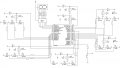
i am using mplab 8.84 and i programmed my pic using Pucstart plus kit. however when i tested my circuit, it did not worked. i found out some errors on the circuit diagram therefore i have corrected it. can u please have a look at the attachment. also i hope you have tested my programme at some stage and you should know if it works or not. so do you think my programme and this circuit diagram should give me an positive result??
yes, arrow represent power. i wanted to ask about the button because when i tested my circuit, the voltmeter showed 0V when i supply the power to the circuit however when i disconnect the button from the circuit, voltmeter shows 5V. so have i connected the button wrongly?

 Facebook
 Google
 GitHub
 Linkedin