how to programme using pickit 3

panic mode

Joined Oct 10, 2011
5,197
Rich (BB code):
im programming it using pickit 3 if thats what you are asking
no, this is not what i was asking. my question is how exactly you program it? (what is the hardware connection before you initiate download from MPLabX)

schematic shows no ICSP hence I'm not sure how you do it. i can see two possibilities:
1. this is simply omission on the schematic but you do try to use ICSP
2. you are removing chip from circuit to program it elsewhere


if it is lack of ICSP in schematic but you do use ICSP then you have a problem - you cannot program the chip while in circuit, because surrounding components make it impossible (in THIS circuit). to program chip using ICSP, there are number of conditions that need to be met (read the manual).

if you are removing chip from circuit and inserting it into some sort of adapter to program it, then what kind of adapter you are using and what are connections? (same conditions as for ICSP apply, only circuit is no longer interfering).
 

t06afre

Joined May 11, 2009
5,934
Another issue are. I can not see any setting of configuration bits in your code. It could be that you set them in MPLAB. That is kind of OK. But it is important that you have given the configuration bits some thought? If not your PIC will hevave like dead after programming
 

Thread Starter

harami

Joined Jun 20, 2011
66
In recent time Microchip has done big changes to its software structure. Like a new compiler that handle both PIC16 and PIC18F series. This compiler (XC8) is more less or the HI-Tech PIC18 and PIC16 compiler merged into 1 compiler. In MPLAB (not MPLABX), select toolbar and "Set Language Tool Locations" then do as shown in the picture
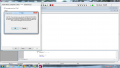
thank you for your help.. now i have managed to build my project successfully.. but there is one more problem which im not being able to solve. when ever i connect pickit 3, it gives me this error. (see attached picture)
 

Attachments

panic mode

Joined Oct 10, 2011
5,197
when you connect pickit and target device to computer, MPLab tries to identify chip (each has ID). if the ID does not match you get this message. since obtained ID is zero, it means it could not read the ID (for whatever reason).

there could be several reasons:
- chip was not powered
- chip is not connected correctly
- other components in the circuit interfere (if using ICSP)
etc
 

chrisw1990

Joined Oct 22, 2011
551
can i put a quick comment on the schematic front here...
your schematic is very difficult to read, in future, whenever using power pins (ground or VCC indicators) point them down and up respectively, not sideways as the majority of yours do. it makes for clearer reading and in more complicated schematics this helps greatly.
I am not sure how you are driving your seven segment display, but it has only 4 pins connected to it, so maybe youre multiplexing some way im not thinking of?
your component values need putting on the schematic.. your LDRs have no resistance values? you should be able to look at a schematic and completely recreate the circuit.. i.e. send to anyone and they build the circuit! your \MCLR could do with a pull up on it..
if you aren't programming the chip in the circuit then id say put a small (10nF) cap across the switch.. and use 100k pull up, this will use less power.
as someone has mentioned earlier, you have no resistors on the LEDs at all, not even on the seven segment display.... they NEED them. i believe that if you drive a single led from this lot, enough current would be passed through to destroy the led, and if you drive an entire PORT of LEDs, you will destroy the chip due to the current out of the chip.
I'm sure someone will correct if theres any mistakes here, but the hardware needs sorting or youll go through pics like i do sweeties.
 

t06afre

Joined May 11, 2009
5,934
We have also asked how you have connected your chip for programming. After several requests. you have replied "a socket". Yes that is fine but WHAT socket and how is it connected. And also I mentioned the configuration bits. But that was completely ignored. A microcontroller project contains a chain of events that have to be done correct or you will fail.
So start with the schematics, and correct the missing resistor on the LEDs. Or else you may fry your chip.
The next point will be a reply regarding my questions about the configuration bit
Then you tell us about your programming setup. Feel free to use any picture/drawing to document. In fact I would say it is essential.
 

Thread Starter

harami

Joined Jun 20, 2011
66
Then you tell us about your programming setup. Feel free to use any picture/drawing to document. In fact I would say it is essential.
im using pickit 3 to programme my pic. http://cgi.ebay.co.uk/ws/eBayISAPI.dll?VISuperSize&item=370599905783
about the configuration bits, i have modified the include file itself. i tried every way to upload the modified include file but it does not let me upload. and about the resistors for led i will first measure the output voltage of each pins and place a resistor as necessary.
 

chrisw1990

Joined Oct 22, 2011
551
measure the output voltaGE? whats your supply voltage. use that.
When t06afre asked about programming set up.. do you use the PICKit3 to program the chip in the circuit? or do you take it out? how about uploading an image of your hardware, and programming hardware. i suspect its different setups.
why are you modifying the include? why not copy the code up here? use code tags, theres a little button at the top of the reply box.
you should be setting config bits in your files.
if your using C, it will look like #pragma config UPLLEN=OFF for example.. i cant remember what it is in Assembler.
 

Thread Starter

harami

Joined Jun 20, 2011
66
- chip is not connected correctly
etc
i always keep getting message.. what voltage should i choose, 3.3 V or 5 V from the power setting.. on the datasheet it says 2V to 5.5 V is acceptable. i dont want to burn my chip again so what should be a suitable power.
 

Attachments

chrisw1990

Joined Oct 22, 2011
551
i always keep getting message.. what voltage should i choose, 3.3 V or 5 V from the power setting.. on the datasheet it says 2V to 5.5 V is acceptable. i dont want to burn my chip again so what should be a suitable power.
not to be rude, but why arent you answering our questions?
if our questions are answered we might discover the problem and why youre having such issues, or we might be able to start making progress towards a solution!
 

t06afre

Joined May 11, 2009
5,934
i always keep getting message.. what voltage should i choose, 3.3 V or 5 V from the power setting.. on the datasheet it says 2V to 5.5 V is acceptable. i dont want to burn my chip again so what should be a suitable power.
If your device can handle voltages from 2 to 5.5 volt. You will not fry it in any way then powering it from PICKIT3. This is just a warning for those who use 3.3 volt max devices
 

panic mode

Joined Oct 10, 2011
5,197
1. please try answering asked questions. this is going nowhere if you don't communicate.

2. read documents supplied by manufacturers. I bet you never read this:
http://ww1.microchip.com/downloads/en/DeviceDoc/PICkit_3_User_Guide_51795A.pdf
also your pickit3 came with a poster to hang on your wall (short version of above guide):
http://www.kamami.pl/dl/pg164130_set_up_poster.pdf

3. i know you are itching to click on "download" but you cannot skip steps. you have to PROPERLY connect target to programmer. all the messages tell you that ("target not connected" "invalid target" etc.) so why don't you forget about MPLab for a moment and start looking into hardware connections? (i keep repeating this but the message just does not get through, it is like talking to a wall...)

4. why are you so panicky about one simple chip? it does not cost an arm or leg and if you can't buy another one, just contact Microchip and get free sample. how hard is that?

5. sigh, i give up...
 

Thread Starter

harami

Joined Jun 20, 2011
66
1. please try answering asked questions. this is going nowhere if you don't communicate.
Sorry if i have not been able to communicate properly and not making myself clear. i have attached my main.c file, full circuit diagram and modified include file. when i build my project, it was build successfully without any errors. so i dont think the problem is on the code.. only problem im having is programming the pic. however i have attached my files.
 

Attachments

panic mode

Joined Oct 10, 2011
5,197
:(:rolleyes::p

forum: how did you connect pickit3 to target?
harami: i am using pickit3

forum: how did you connect pickit3 to target?
harami: i am writing c code

forum: how did you connect pickit3 to target?
harami: i use mplab but it gives error

forum: how did you connect pickit3 to target?
harami: i managed to compile hex file, do you want to see?

forum: how did you connect pickit3 to target?
harami: i posted all project files, anything else?

....
one more question:
how did you connect pickit3 to target?
 

Thread Starter

harami

Joined Jun 20, 2011
66
:(:rolleyes::p

one more question:
how did you connect pickit3 to target?
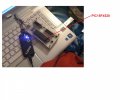
I dont know how i can make u understand. i have attached a picture of how i connect my pic onto pickit 3. i dont know if this answers your question but this is how i connect. when i programme my pic, i will disconnect it from pickit 3 and connect it onto my circuit as shown in second attached picture.
 

Attachments

t06afre

Joined May 11, 2009
5,934
One thing Harami. You do not need any programming socket in order to program your PIC. With the PICKIT 3 (or clone) it is just a matter of connecting 5 or 6 wires from the PICKIT to the chip. This is something you can do on a bread-board. In fact you can connect the programmer in circuit. If you take some precautions. You have not done so in your project. But that is no big deal. The problem is that your PICKIT can not. For some reason detect any PIC.
As for now forget the programmer socket. And just setup your PIC in an empty bread-board. With the needed 5 or 6 wires connect from your PICKIT to your PIC.
 

chrisw1990

Joined Oct 22, 2011
551
hi Harami!
Glad were getting somewhere now! i guess youll be learning for next time you have problems.. is it possible for you to zip up your whole project? the mcp mcw etc too?
i assume you have those?
 
Top