How to link 2x MCP23017 together ?

Thread Starter

q12x

Joined Sep 25, 2015
2,227
Wait, what exactly only works for the first one?
If Im writing mcp1.begin(); it only works for the first IC. The second IC, remains dead.
If Im writing mcp1.begin(0x20) or mcp1.begin(32) nothing works.
In both cases I get no errors from the compiler.
 

Ya’akov

Joined Jan 27, 2019
10,258
If Im writing mcp1.begin(); it only works for the first IC. The second IC, remains dead.
If Im writing mcp1.begin(0x20) or mcp1.begin(32) nothing works.
In both cases I get no errors from the compiler.
The object you named mcp1 can access the 16 ports on the first chip. The object you named mcp2 allows to access its ports. You have to use the object that corresponds to the chip whose address it was given to get to that chips ports.

Do you understand?
 

Ya’akov

Joined Jan 27, 2019
10,258
Post the code, but also check that your addressing is properly set.
If you have the code right something else is wrong.

In a while I will set up a couple of MCP chips and try it but I am busy today so it might take a while.
 

Ian0

Joined Aug 7, 2020
13,158
A casual observation here. I program in assembler, I didn't quite start before C was invented but certainly before ANSI C was invented. Nowadays, I program ARMs in assembler. I've never found C to be that helpful, generally it seems to make what I want to do more complicated; although there must be applications where C does the job better than assembler they just aren't the applications that I am writing.
When I want to get a external IC to do something. I look it its datasheet, and find what data has to go in what register. Then I look in the manual for the microprocessor I am using and write the data to the register in the I2C peripheral, to cause it to send the appropriate data to the external device, and I generally get it working quite quickly.
I see an awful lot of posts on these fora where people can't get peripherals to work, and it generally seems to be a problem with something called a "driver".
My observations on drivers suggests that they are badly written and atrociously documented, and often from dubious sources, and it doesn't surprise me that they don't work.
I've used the MCP23017 before, controlled by some Microchip part - I forget which, and it seemed to work quite readily - the difference was I didn't employ a "driver".
 

Ya’akov

Joined Jan 27, 2019
10,258
A casual observation here. I program in assembler, I didn't quite start before C was invented but certainly before ANSI C was invented. Nowadays, I program ARMs in assembler. I've never found C to be that helpful, generally it seems to make what I want to do more complicated; although there must be applications where C does the job better than assembler they just aren't the applications that I am writing.
When I want to get a external IC to do something. I look it its datasheet, and find what data has to go in what register. Then I look in the manual for the microprocessor I am using and write the data to the register in the I2C peripheral, to cause it to send the appropriate data to the external device, and I generally get it working quite quickly.
I see an awful lot of posts on these fora where people can't get peripherals to work, and it generally seems to be a problem with something called a "driver".
My observations on drivers suggests that they are badly written and atrociously documented, and often from dubious sources, and it doesn't surprise me that they don't work.
I've used the MCP23017 before, controlled by some Microchip part - I forget which, and it seemed to work quite readily - the difference was I didn't employ a "driver".
In this case he is using a library provided by Adafruit. Most of the documentation for many libraries consists of examples and the source. A neophytes often has a lot of difficulty doing things that stray from the examples.

The assembler-like activity is encapsulated in the library. For some things the C layer makes things much easier, for some it can be confusing.

I think this is a simple case but there are so many moving parts it is going to require trying it myself so I can see what might be missing.
 

Thread Starter

q12x

Joined Sep 25, 2015
2,227
In a while I will set up a couple of MCP chips and try it but I am busy today so it might take a while.
Thank you, I am very happy we push it until here, to be honest. I knew this will be a long day.
...it generally seems to be a problem with something called a "driver"...
I mentioned already, that when I FIRST open and install the latest driver for MCP23017 in arduino,
the newest versions 2.0.3 or 2.1.0, throw me big red error and nothing worked.
It didnt recognised "#include "Adafruit_MCP23017.h"" which was very bad.
My solution: I installed an older version 1.3.0, and is working fine now.
You are right, its always a driver problem... I have plenty experience with them as well, for diverse things along the years.
Hmmmm you give me an idea, maybe I have to revert further back in driver versions? until something gives?
 

Thread Starter

q12x

Joined Sep 25, 2015
2,227
Post the code, but also check that your addressing is properly set.
If you have the code right something else is wrong.
Code:
#include "Adafruit_MCP23017.h"
Adafruit_MCP23017 mcp1; //Instantiate mcp1 object
Adafruit_MCP23017 mcp2; //Instantiate mcp2 object

void setup()
{
  Serial.begin(19200);
  mcp1.begin(0x20);
  mcp2.begin(0x21);
 
 /* configuring ALL GPIO as output. */
  for(int i = 0; i <= 15; i++)
  {
    mcp1.pinMode(i, OUTPUT);
    mcp2.pinMode(i, OUTPUT);
  }
}


//this code should make both IC's drive their leds in the same time for the same pins.
int dly = 100;
void loop()
{
  for(int i = 8; i <=31; i++)
  {
    mcp1.digitalWrite(i, HIGH);
    mcp2.digitalWrite(i, HIGH);
    delay(dly);
    mcp1.digitalWrite(i, LOW);
    mcp2.digitalWrite(i, LOW);
    delay(dly);
  }
}
 

Thread Starter

q12x

Joined Sep 25, 2015
2,227
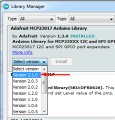
Just for demonstration, I reinstalled the "latest and bravest" version:
1657284977219.png
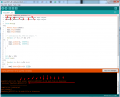
and.... VOILA: (Ca Va, Ca Va?)
1657285075348.png
Now I will revert back to my 1.3.0 !!!!!!!!
 

Ya’akov

Joined Jan 27, 2019
10,258
Thank you, I am very happy we push it until here, to be honest. I knew this will be a long day.

I mentioned already, that when I FIRST open and install the latest driver for MCP23017 in arduino,
the newest versions 2.0.3 or 2.1.0, throw me big red error and nothing worked.
It didnt recognised "#include "Adafruit_MCP23017.h"" which was very bad.
My solution: I installed an older version 1.3.0, and is working fine now.
You are right, its always a driver problem... I have plenty experience with them as well, for diverse things along the years.
Hmmmm you give me an idea, maybe I have to revert further back in driver versions? until something gives?
That is not a driver, it's a library. You need to install the latest and use the right name for the constructor which will be in the example code. The older version will have unpatched bugs and potentially other problems. Always use the latest unless you know there is a bug or incompatibility.
 

Thread Starter

q12x

Joined Sep 25, 2015
2,227
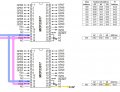
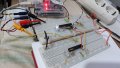
And as a reminder, here is the circuit Im currently using:
with exactly 3.3V on A0 as in the diagram here
zzzbad  MCP23017-series connections.jpg
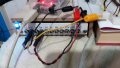
Also, you can see in the image 2 pull up(to+5V) 4.7k resistors on both serial lines, on the bottom board.
20220708_160739.jpgThe yellow wire is 3.3V going to A0 pin.
20220708_160757.jpg
And when I mention the first IC works, I mean the top one in the picture, with 8leds on it
while the second IC, in the bottom has 4leds
Both ICs have the leds on their portB.
 

AlbertHall

Joined Jun 4, 2014
12,629
The version 2.1.0 library example uses "#include <Adafruit_MCP23X17.h>" in the example code.
Perhaps start with the LED Blink example and work out from there?
 

Thread Starter

q12x

Joined Sep 25, 2015
2,227
The version 2.1.0 library example uses "#include <Adafruit_MCP23X17.h>" in the example code.
Perhaps start with the LED Blink example and work out from there?
Where can I find this library example code that you mention? Can you give me your root to it?
 

Thread Starter

q12x

Joined Sep 25, 2015
2,227
I went on github examples numerous times, and this little detail with "#include <Adafruit_MCP23X17.h>" escape me totally.
I will try it now and see what will do.
 

Ya’akov

Joined Jan 27, 2019
10,258
I started to put together a test setup here but I am going to have to wait until Sunday to do more.

I hope it works without needing me to test but if not, I will be around on Sunday.
 
Top