How to drive manually HT1621B LCD driver IC?

Thread Starter

q12x

Joined Sep 25, 2015
2,227
- Im trying to figure out how to drive (manually-bitbang) a HT1621B LCD driver IC. It is capable of driving multiplexed LCDs. They are very cheap, but only in smd form, which is a bit of a challenge to solder all its tiny 48 pins. See youtu.be/xwRXpbxjLcw - you can skip through the movie since it's a long one. I actually managed to drive them using a special library in arduino, and they work beautifully but...I want manual drive. Why? because I can use only logic ICs like nand gates,multiplexers, FF's, etc 40 and 74 series, and also my favorite very easy to drive 12F508 PIC, and why not even an EEPROM. And I can also add custom characters or shapes or symbols.
- I read their datasheet a couple of times and STILL, I can not decipher the real way of driving them. I also find 2 AN's (AppNotes) AN2343-Cypress and AN0468e HT162x Application Guidelines -HOLTEK. They helped a little but not completely.
- Here is a list with all my LCD movies I made so far: https://www.youtube.com/playlist?list=PL6NJF1kQFOAI0-AstwH5YHuOHenjLtkbS, including this HT1621B IC. Again, skip through their content since Im showing you what I tried and how high I could reach.
Thank you very much.
 

Attachments

Last edited:

Ian0

Joined Aug 7, 2020
13,097
It would seem that you have to assert CS then clock in 0b11000000 to get it started , followed by 4-bit data. Achievable with a shift register, but what is the providing the data that you need to clock in?
 

Thread Starter

q12x

Joined Sep 25, 2015
2,227
what is the providing the data that you need to clock in
Hello @Ian0
ideally, using only buttons and counting while pressing the button.
If its a limit time to switch between states on specific pins, like 100ns (usually/or as an example) then... I will use an arduino to fill in.
Again, ideally only pressing buttons and clocking manually everything.
No matter how complex the operation it would appear now, it will make sense after actually getting the correct result.
This is called manual bit bangging and it is VERY practical - on the long run, because it can be adapted to practically anything, like I enumerated already, an Arduino, PIC, EEPROM, even logic ICs or even mechanical logic switches like the very old logic devices before IC's. 1734690079929.png
Remember, the refreshing of the LCD at usually 100Hz, is done by this HT1621B driver IC, so theoretically, I can input bits on its pins as slow as I please.
-All that Im after is the OOO (Order Of Operation), line by line, what to input and how many times, and what lines to switch on and off while input the code-
 
Last edited:

Thread Starter

q12x

Joined Sep 25, 2015
2,227
but what is the providing the data that you need to clock in?
Actually, this is the more correct answer to your question: -Right now I put back as it was, the same setup as before, using Arduino Uno R3 and the breadboard wiring and setup exactly as it was in my : #255 movie. So now, I reprogrammed with the same working program as before, and it worked like a charm. So everything is working perfectly as before. Now we are back in time, with this setup that is working. Ok? So this is our start. With a mystery library that is doing some misterious function inside it and that mechanism is what Im after actually. To be more than clear. Haha.
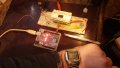
So here is a picture of my very dusty setup that waited for ~1year and I didn't touch it but I was thinking on it for many-many times.
How to make it work as I want.
20241220_125758.jpg
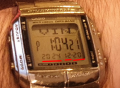
I put my watch to see the today date as year-month-day in this order. (Its a CASIO watch, very dear to me.)
1734692412696.png
To prove it is the actual setup and not a picture from the past.
Because it is the same thing as in the movie, and you may think Im making some strange jokes. So to be clear, it is the real deal now.
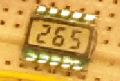
So the idea is that we are starting from a --working-- point , where the IC is actually driving correctly that multiplexed LCD 1734692628811.png from 000 up to 999 and then resetting and starting again as a test program I made in arduino - but this is thanks to a very obscure library that Im making use of. Now we have to "disassemble" the working mechanism, to hack it if we can, to imagine how to bitbang that IC pins, --without-- that misterious library, so totally independent of it.
Clear as mud? haha.
I know is hard, I know is over the ears, I know is impossible, but ANY ideas, any suggestions, any direction, like "do that" or "try that" and it will be more than good for me, because I am BLANK - I have no idea what to try and how to try it.
I actually tried to hack -a couple!!!- 3or4 different libraries from arduino and I was unssuccesful - I made it to a choke point in one, and another point on other and I couldnt link the logic between them, but I made a small progress and then stopped and give up for a loooong time.
One very important thing I noticed while I was hacking (unsuccesfully) those libraries, is that partially some core code from them I managed to drive the IC and display on LCD. But...sometimes it worked sometimes it didnt. I made hundreds of permutations, and in the end I realized that the original library, if loaded and compiled, -open up- something inside the IC, and the IC remained open, and the hacked code I was sending was doing its job correctly. Good. The bad part, until I discover it, was that if I didnt load and compiled the original library --first-, to open up the IC, the same hacked code did nothing, the display remained blank. So I clearly didnt find some setting reggisters in those hacked headers libraries, and I specifically looked for them and I couldnt find them. So, you can not say I didnt try - hahaha. Worth noting it.
Now is time to try again. Im nothing if not perseverent in my goal to achieve greatness !
 
Last edited:

Thread Starter

q12x

Joined Sep 25, 2015
2,227
I don't want to scare you off with my (desperate) hardcore hacking attempts.
Right now, we will use the same arduino setup and ONLY send some bytes or bits, on the input pins of HT1621B as suggested in the datasheet and in those military AN (Application Notes).
We know everything is working correctly, because I have this setup that is telling us everything is connected correctly.
So in the future if something will not work we will not wonder if its a connection problem since it is already resolved.
That's the most important idea with all this setup here.
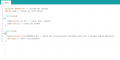
This is the --entire-- program that is correctly running this 0-999 program. Is that short. Because all the majik is inside that HT1621.h library/header.
1734694086011.png
From this code we can observe the IC 3 most important pin names(cs,wr,data) I used and the pins on the arduino board.
lcd.begin(0, 2, 3); // (cs=0, wr=2, Data=3)
where, cs=0 means that IC cs pin is linked to pin0 on arduino. , The same logic applies for the other pins.
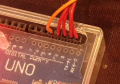
I do have 5 wires linked to the first 5 arduino pins...I have no idea what they are doing there, they remained there from testing stuff 1year ago. So I linked everything exactly as it was, no questions asked. Now we know that to function correctly we need only 3 pins/wires, so make abstraction they are 5 wires there. Only those 3 are really important. Ok? Good.
1734694345218.png
 
Last edited:

Thread Starter

q12x

Joined Sep 25, 2015
2,227
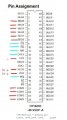
If it helps, these are the 5 links in the image:
//HT1621B pin = Arduino pin
//dt=2, wr=3,rd=4, cs=5, ,irq=6
HT1621B Pin Assignment .jpg
The red links in the image, were the easy wiring I made the first thing after I soldered the IC.
The harder links are the cyan ones that needs programming data.
 
Last edited:

Thread Starter

q12x

Joined Sep 25, 2015
2,227
I managed to make it work !!!
If you want to see some awesome code and some advanced programming discussion, then check this link: https://forum.arduino.cc/t/how-to-drive-manually-ht1621b-lcd-driver-ic/1334073/54
You will not understand everything I made there, but reading through it, you will get something + that I give some essential explanations from time to time. You will get the feel of it better than before.
Yes, Im quite happy now about it ! Very cool, and Im battling with this problem for years !!!! I couldnt do shait alone. Friends matters!
Hope you like it.
 
Top