How do you make sure that your pcb design will work?

Thread Starter

gaber2611

Joined Mar 14, 2013
321
Hello everyone,

I'm beginner in pcb design, and Ive watched so many online YouTube channels in this category, and noticed that most of them take the steps from schematic to pcb layout, and then prototype and test
Is this the way, how you proceed with your projects?, this the way how you make sure your circuit will function right or no?
Or is there anything else you do for make sure that the design will work?
Regards
 

BobTPH

Joined Jun 5, 2013
11,463
Linking the schematic to the PCB can verify that the connections in the PCB are the same as those in the schematic. This eliminates one source of error.
 

Sensacell

Joined Jun 19, 2012
3,768
Build a hand-wired breadboard prototype BEFORE you do any layout.

Get that breadboard working- make changes as needed - THEN layout a PCB.

This increases the chances that things will work, by a large margin.
 

Ian0

Joined Aug 7, 2020
13,097
Linking the schematic to the PCB can verify that the connections in the PCB are the same as those in the schematic. This eliminates one source of error.
I would say it eliminates the biggest source of error.
Most pcb software gives the number connections still missing. Don't stop until it reaches zero.
Changing from software that just did layout to one that works with a schematic was the biggest reduction in errors, even thought at the time it looked like a lot of work.
 

MrChips

Joined Oct 2, 2009
34,628
It depends on the complexity of the project and PCB. It is easier to spot errors on a small project.

In summary, what everyone is saying, is to use an integrated design platform, or one that allows you to import and export files in the following steps:

1) Schematic capture, where you enter the circuit diagram and component values (including PCB footprints).

2) Simulation. Complete simulation will depend on the circuit and the simulator. Is the circuit entirely analog, entirely digital, or a mixed signal application? Can the simulation suite perform both code simulation as well as analog and digital simulation?

3) From schematic capture to PCB layout on the same CAD app. During the schematic capture stage, every connection will be assigned to a named net. The PCB layout stage will capture all circuit connections. It will check and ensure that all PCB tracks are consistent with the schematic as drawn. There is ERC (electrical rule check) to check for layout errors. There is also DRC (design rule check) to check for track and pad spacing violations.

The PCB app will use component footprints already selected from its component library. Here is a source of error that is often overlooked. Did you choose the correct IC variant? Do the pinouts match the real device selected? Are the dimensions and layout of the footprint correct? On a rare occasion, even the library component data is in error.

4) Gerber viewer. Don’t skip this step. The PCB CAD suite will generate all the required Gerber and CAD files, including tool racks and drill sizes. Import the files into a Gerber viewer. Examine everything, all layers of the PCB layout, solder masks, silk screens, drill holes, board edges, etc. Unexpected surprises often reveal themselves here.

5) PCB test. After all is said and done, you still have to come to the moment of truth when the board is populated and functionally tested.

PS - Will the board and circuit perform as required? You still don’t know until the board is tested. Are there frequency and power limitations? Are there reflections, noise, crosstalk on the signals? Are there power rail glitches? Are there signals and components sensitive to noise, EMI, temperature fluctuations, etc.? Do the board and component dimensions match the enclosure and package or physical constraints? Is power dissipation and temperature rise within acceptable range?

PPS - So your creation is working. But does it meet all the design and environmental criteria?
I design boards and systems for the nuclear reactor industry. Boards and systems have to endure rugged environmental testing, temperature, humidity, and power cycling and fluctuations, along with EMI, radiation and shaker table testing.
 

panic mode

Joined Oct 10, 2011
4,866
use modular approach. big circuits are collections of smaller circuits - each of them could and should be designed and tested independently (like a module). how much testing is needed depends on comfort level. it is much easier to avoid mistakes when design is small. so start small, make own modules.

be prepared to do substitutions to get overall design working. even if several modules are on the same board (as a system) you may want to expose some test points or pads to connect your test gear or substitutes.

i usually limit how much of "experimental" design is on the board because i prefer to make use of the prototype even if it has some patches. getting things perfect may take couple of iterations so do not make your first design as 5000 boards. do few pieces and debug them, then use what you find to design new and improved board version. repeat as needed. mistakes are not trash- they are valuable opportunities to learn and improve. once you get everything working well, it may be time for larger volume.

prototypes may use mostly through hole components if plan is to use breadboard to try different parts or circuits. once the design is refined, most of the parts are SMD for cost and space saving.

as for workflow, you got it...

first you need to choose circuit. this may require simulation or building test version (soldered or on a breadboard). if needed correct the schematics and run design rule checks.

then confirm or adapt package type for all parts. for example 1k resistor can be in many shapes and forms. many ICs may be obtainable in different packages, etc.

after that one can focus on PCB design. this means choosing overall layout, shape and size of the boards, choose number of layers, sizes of tracks, routing etc. then run checks again to find any mistakes.

when you get design you like it is time to make the board(s). some may do this themselves but most of the times one would order the boards from some PCB shop. that requires to generate correct output so that manufacturing can take place. different formats exist but the standard is gerber format.

if you are ordering not just boards, but you want them populated with parts, you need to generate additional files, including centroid (parts placement and orientation) and part list (bill of material). depending where you are ordering from, you may need to supply the parts yourself...
 

Ian0

Joined Aug 7, 2020
13,097
Hello everyone,

I'm beginner in pcb design, and Ive watched so many online YouTube channels in this category, and noticed that most of them take the steps from schematic to pcb layout, and then prototype and test
Is this the way, how you proceed with your projects?, this the way how you make sure your circuit will function right or no?
Or is there anything else you do for make sure that the design will work?
Regards
First, you have to make a lot of circuits that don't work. When you have done that for a few years, you will develop some intuition about what works and what doesn't. The circuits that don't work will teach you far more than those that do.
So, if it doesn't work, don't worry about it, find out why it doesn't work. If it fails spectacularly, keep it in a box as a reminder!
 

schmitt trigger

Joined Jul 12, 2010
2,027
Both panic mode and MrChips have given a very thorough advice.
The only thing I would add is thermal analysis. I have seen many “designs” where they add, to put a trivial example, a 100 ohm, 1/4W resistor across 12 volts. If the person “designing” the circuit would have bothered to do a simple calculation, he would have realized that the poor resistor is dissipating almost 6 times its maximum power.

Another common thermal mistake is excessive power dissipation on a transistor, without calculating its actual power dissipation, leading to a wholly inadequate heatsink. Or no heat sinking at all.

Or not have been bothered to read the datasheet and understanding the operational limits, with the circuit then exceeding a certain parameter, even if it is only a transient event.

Other common mistakes for ICs, is not understanding what to do with unused pins. Some can be left open, but others MUST BE terminated to a proper logic level or connected somewhere.
 

Ian0

Joined Aug 7, 2020
13,097
Another common thermal mistake is excessive power dissipation on a transistor, without calculating its actual power dissipation, leading to a wholly inadequate heatsink. Or no heat sinking at all.
Also don’t forget that the worst case may not correspond to the maximum. For instance the hottest that an audio amplifier runs doesn’t happen when it is delivering the maximum output power.
 

Thread Starter

gaber2611

Joined Mar 14, 2013
321
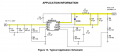
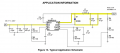
For example, this circuit
A buck converter circuit in this datasheet
How can I be sure that the output voltage will be true 3.3v?
Screenshot_20251022_231506_com_android_chrome_ChromeTabbedActivity.jpgI thought about proteus software, but I think proteus don't have tps54331 for simulation, maybe LTspice?, does it has tps54331?, or I will have to add it to library?, will it work that time for simulation?
How you think?
Regards
 

Attachments

panic mode

Joined Oct 10, 2011
4,866
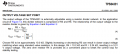
pin5 is voltage sense input. it reads voltage from resistors forming voltage divider and compares that to voltage at input SS (normally 0.8V through internal reverence). and datasheet tells you how to calculate them yourself.

lets assume output is 3.3V. then Vsense will be:
Vout*R6/(R5+R6)
=3.3V * 3.24k/13.26k = 0.806334841628959 Volt.

so yes, everything matches even though i chose to ignore input current (which is small).
and even if you change mind and want to trim it to some specific value, use trimmer potentiometer (make sure it is CERMET).
for once-only trimming, you can replace one of resistors. i think this is why they left R4, to allow easy way to increase voltage and - keep it fixed (without knobs that may tempt users).
 

panic mode

Joined Oct 10, 2011
4,866
voltage reference is not exactly 0.8V on each and every chip - slight differences are unavoidable.
also resistor values are not exact - everything has tolerance. if you need exact value you will need to adjust it on each unit you make.

this explains how to choose resistors and reason for R4.

1761166823084.png
 

panic mode

Joined Oct 10, 2011
4,866
and as a designer, you need to take care of part selection and sizing etc. that also means reading datasheet to make sure there are no surprises.

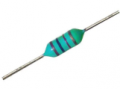
for example image in #13 shows that output os 3A. guess where the high current passes through, so L1,D1 and PCB traces highlighted need to be chosen to handle that current.
you do not want inductor to be like this:

1761167635731.png or this 1761167651109.png

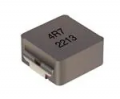
you would want something rated for that current and with low resistance, something like
1761167823007.png

Also output capacitors C8,C9 need to have low ESR.
input capacitors C1,C2,C3 need to have sufficiently high voltage rating (at least 35V, preferably 50V).

1761167380986.png
 

Attachments

panic mode

Joined Oct 10, 2011
4,866
why not... not sure if there is a LTSpice model but could make one or modify similar one. and TI Tina will probably have it.
but what is the point? all values are shown. what are you trying to uncover that datasheet does not explain?
 

MisterBill2

Joined Jan 23, 2018
27,182
First, you have to make a lot of circuits that don't work. When you have done that for a few years, you will develop some intuition about what works and what doesn't. The circuits that don't work will teach you far more than those that do.
So, if it doesn't work, don't worry about it, find out why it doesn't work. If it fails spectacularly, keep it in a box as a reminder!
I NEVER HAD the luxury of being able to design a circuit that did not work. There was never time or budget to do things over.
The solution was to use a circuit that works, and then manually check every line of the artwork against the circuit. NOW there is software that can do that much faster. Sothe manual inspection is for dumb errors like getting a trace on the wrong layer.
 

Thread Starter

gaber2611

Joined Mar 14, 2013
321
why not... not sure if there is a LTSpice model but could make one or modify similar one. and TI Tina will probably have it.
but what is the point? all values are shown. what are you trying to uncover that datasheet does not explain?
The datasheet explain everything, for such a project, you would not simulate?, how would be your plan to manufacture circuit like this?, how you make sure that everything will work?
 
Top