How do I tell if a PIC is working?

Picbuster

Joined Dec 2, 2013
1,059
Hi,
I've made a PCB with a PIC controller.
I've added two LEDs as indicators, but they don't flash as expected. Voltage applied to the PIN turns LEDs ON.
The PIC programs and verifies ok.
How can I tell if the PIC is working?

Camerart
Set interrupt TMR1 For one second or so and enable the int's. and make sure that pin is set to output.
Invoke in the TMR1 interrupt Led = !Led; // connect led or scope to pin x
// link led to a pin. example #define led PORTFbits.RF2 output is now RF2

power-up
when led pin is switching cpu is running.
if not control the MCLR , power lines and grounds and interrupt enable's
Picbuster
 

Thread Starter

camerart

Joined Feb 25, 2013
3,842
Hmm - the '2431 should have the same configuration bits as the '4431...

What I would have is something like this as a start:

CONFIG1H => 0b00001001/ 0x09 (IESO, FCMEN disabled, INTOSC enabled, with CLKOUT on RA6, and IO on RA7)
CONFIG2L => 0b00001000 / 0x08 (VBOR = 2.7V, BOREN disabled, PWRTE enabled)
CONFIG2H => 0b00000000 / 0x00 (WDT window disabled, WDT disabled)
CONFIG3L => 0b00000000 / 0x00 (All configuration bits are unlikely to cause problems)
CONFIG3H => 0b00000000 / 0x00 (Set any pin swaps so they aren't using RCx; MCLR is disabled, and an input instead)

These look like what you had before, but are unlikely to cause any problems. I've also described what they really mean.

CONFIG4L => 0b10000000 / 0x80 (Debug, LVP and STVREN are disabled)
CONFIG5L => 0b00001111 / 0x0f (Disable code protection)
CONFIG5H => 0b11000000 / 0xc0 (Disable other code protection)
CONFIG6L => 0b00001111 / 0x0f (Disable write protection)
CONFIG6H => 0b11100000 / 0xe0 (Disable other write protection)
CONFIG7L => 0b00001111 / 0x0f (Disable table reads from other tables)
CONFIG7H => 0b0100000 / 0x40 (Disable table reads to boot block)

Another thing I would be tempted to do is to alternate I/O values, so instead of writing them all with 0x00, waiting, and then writing with 0xff, I would use 0xaa and then 0x55. This means that if it's freezing in the 'wait' stage, you'll know it's got at least that far.

And finally, what voltage are you powering the PIC from?
Hi T,
Success:)
What you have done in an hour or so, would have taken me days, if at all, thanks very much.
C.
 

Thread Starter

camerart

Joined Feb 25, 2013
3,842
Set interrupt TMR1 For one second or so and enable the int's. and make sure that pin is set to output.
Invoke in the TMR1 interrupt Led = !Led; // connect led or scope to pin x
// link led to a pin. example #define led PORTFbits.RF2 output is now RF2

power-up
when led pin is switching cpu is running.
if not control the MCLR , power lines and grounds and interrupt enable's
Picbuster
Hi P,
Thanks but T has got it going.
C.
 

be80be

Joined Jul 5, 2008
2,395
You don't have the OSCCON set your chip is more then likely running at 32khz and it may take a long time for the hardware to change
PORT setting
 

tribbles

Joined Jun 19, 2015
37
Hi T,
Success:)
What you have done in an hour or so, would have taken me days, if at all, thanks very much.
C.
That's no problem - the first thing I always do when working out the configuration bits is to disable anything that is likely to cause any kind of reset. It was probably the undefined VBOR that was giving you grief.

I would've also removed any waits and attach a logic probe with pulse detection, but luckily you didn't have to go down to that level :)
 

Thread Starter

camerart

Joined Feb 25, 2013
3,842
Hi again,
I'm not sure if this is allowed, but I am testing all of the PORTs with this:
main:
LATA = 0xff
LATB = 0xff
LATC = 0xff
LATD = 0xff
LATE = 0xff
WaitMs 1000
LATA = 0x00
LATB = 0x00
LATC = 0x00
LATD = 0x00
LATE = 0x00
WaitMs 1000
Goto main

Many PINs are toggling ok, but many aren't.

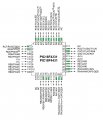
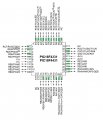
GREEN PINS = TOGGLING, is there a pattern?
C
 

Attachments

tribbles

Joined Jun 19, 2015
37
GREEN PINS = TOGGLING, is there a pattern?
C
They're all PWM pins (PWM0 to PWM7). Note that RB5 is working, because the config bits I gave you set RD5 as PWM4.

Although PWM should be disabled by default, from what I can tell (CCP1CON and CCP2CON are 0 after a reset)...

You might want to just set them both to zero and see what happens (in case something weird is happening)
 

Thread Starter

camerart

Joined Feb 25, 2013
3,842
They're all PWM pins (PWM0 to PWM7). Note that RB5 is working, because the config bits I gave you set RD5 as PWM4.

Although PWM should be disabled by default, from what I can tell (CCP1CON and CCP2CON are 0 after a reset)...

You might want to just set them both to zero and see what happens (in case something weird is happening)
Hi T,
Why didn't I spot that!
From what I recall, there are two methods of PWM. 1/ Where two channels are used to drive an Hbridge/motor, and 2/ The simpler method that controls RC Servos, shown here:
I need 6x type '2' RB0-5
I'll try to get the PIC to work first then look into this farther a bit later.
C.
 

Attachments

Last edited:

Thread Starter

camerart

Joined Feb 25, 2013
3,842
Hi,
I added: PWMCON0 = %01000000 'PWM0-5 as PWM
and now the Toggling PINs look like this:

EDIT: I can't quite follow section 18.11 of the D/S. It looks to me that the PWMPIN should be set LOW, is this correct. As for HPOL and LPOL, they're a complete mystery:eek: but I will look again later.

C
 

Attachments

Last edited:

tribbles

Joined Jun 19, 2015
37
Why are you setting it to 0x40? This ENABLES the PWM0 to 5, so they'd be under PWM control (which is exactly what you're seeing).

Set PWMCON0 to 0x00, which will disable all PWM activity.

For reference, PWMEN is bits 6:4, and from the datasheet

...
100 = PWM0, PWM1, PWM2, PWM3, PWM4 and PWM5 pins are enabled for PWM output
...
000 = PWM module is disabled; all PWM I/O pins are general purpose I/O
 

Thread Starter

camerart

Joined Feb 25, 2013
3,842
Actually - I've just realised that maybe this is what you wanted to achieve :)

Will have another look...
Hi T,
Correct! This PCB is the Receiver RX of a Radio control experiment I'm trying: https://forum.allaboutcircuits.com/threads/hc-12-radio-module-tx-rx-in-oshonsoft.147865/

It will receiver DATA, calculate, then control SERVOs or MOTORs on a model.

NOTE: Sorry about my project management skills. I get an idea, and stumble through it making building blocks as I go along, and hope that they build into a worthwhile project.

C.
 

tribbles

Joined Jun 19, 2015
37
I never really got to play with the PWM on PICs, so I'm going on intuition here....

HPOL and LPOL are the high and low polarity - i.e. whether the signal needs to be high or low to turn on a transistor/MOSFET. Figure 18-2 shows that it's used to select the normal or inverted output of the PWM block.

PWMPIN I think needs to be '1' to indicate that you want the pin to use the PWM block. Figure 18-23 shows that "PWM Pin Enable" switches between the LAT output for the pin, and the output from the PWM block. It looks like the PWM Pin Enable signal also overrides the TRIS configuration as well.

And I've just read 18.11.3 which confirms my understanding of the PWM Pin Enable signal.

Now looking into it a bit more, the PWMPIN configuration bit drives the default setting for the PWMEN register - so if you're manually setting PWMEN in your code (which you are - the 0x40 value in PWMCON0), then it doesn't matter what you set the PWMPIN configuration bit :) The only two values that it'll default to is 0x50 or 0x70 - so you can't configure it to 0x40 by this bit, and you'll have to override it anyway.
 

Thread Starter

camerart

Joined Feb 25, 2013
3,842
I never really got to play with the PWM on PICs, so I'm going on intuition here....

HPOL and LPOL are the high and low polarity - i.e. whether the signal needs to be high or low to turn on a transistor/MOSFET. Figure 18-2 shows that it's used to select the normal or inverted output of the PWM block.

PWMPIN I think needs to be '1' to indicate that you want the pin to use the PWM block. Figure 18-23 shows that "PWM Pin Enable" switches between the LAT output for the pin, and the output from the PWM block. It looks like the PWM Pin Enable signal also overrides the TRIS configuration as well.

And I've just read 18.11.3 which confirms my understanding of the PWM Pin Enable signal.

Now looking into it a bit more, the PWMPIN configuration bit drives the default setting for the PWMEN register - so if you're manually setting PWMEN in your code (which you are - the 0x40 value in PWMCON0), then it doesn't matter what you set the PWMPIN configuration bit :) The only two values that it'll default to is 0x50 or 0x70 - so you can't configure it to 0x40 by this bit, and you'll have to override it anyway.
Hi T,
Ok, thanks. I'll be working more closely on the PWM inputs later, so remind me if I forget this post please.

At the moment I'm stuck on this: https://forum.allaboutcircuits.com/threads/pic-18lf4431-rx-not-receiving.148632/
It uses another way of reciveing, other than HSERIN. Today I'm going to try an HSERIN, as a test.
C.
 
Top