How DFPlayer finds the mp3 file ?

Thread Starter

Xenon02

Joined Feb 24, 2021
504
gnore what is on the disk at any time/state. When you write to disk (or any memory) you will overwrite what was there before.
You need to remember, "Have I already written to this sector before?"

How much information do you need as a reminder?
The answer is one bit.

bit = 0 = something is not done
bit = 1 = something is done
O okey, so I was a bit right then? Making a sector that hold information of a sector if it's used or not ?
Usually first bits would be already used. Like this sector that hold information would already be flagged as bit = 1 because it holds information of other sectors ;D Joking aside sounds like perpetum mobile when I say sector that says about if sector is used or not ;D

Then there is a sector/s of Data that is meant for data that the user wants to store.
 

MrChips

Joined Oct 2, 2009
34,839
O okey, so I was a bit right then? Making a sector that hold information of a sector if it's used or not ?
Usually first bits would be already used. Like this sector that hold information would already be flagged as bit = 1 because it holds information of other sectors ;D Joking aside sounds like perpetum mobile when I say sector that says about if sector is used or not ;D

Then there is a sector/s of Data that is meant for data that the user wants to store.

No.
You haven't got it correct as yet.
You don't read the sector to find out if it is used or not because you don't want to have to examine every sector.

Look up the purpose of FAT.
 

Thread Starter

Xenon02

Joined Feb 24, 2021
504
No.
You haven't got it correct as yet.
You don't read the sector to find out if it is used or not because you don't want to have to examine every sector.

Look up the purpose of FAT.
No no, what I mean is that I make a sector that hold the information of other sectors. At initialization most of the sectors would be unused. And instead of checking on every single sector, we could only have a special sector/sectors that has 512 bytes, each bit will represent one sector. So if I used a specific sector then I have to write into the table that 1 bit that will indicated that I've used that sector.


Also I've read a bit about FAT, especially FAT12 like in this link :
- didn't want to write it before, because I didn't want to annoy anybody here and decided to follow the questions.
1701453927682.png

It had like 4 big sectors, Reserved is for booting as I remember it's 512 bytes, File allocation table is used to point which data to read next in Data sector, and Root directory hold the info of what is the name of the file, the size, and the first part of where the data is the rest of the parts is in File Allocation Tables.

So I understood it that first part of the data is in let's say 1002 pointed by Root Directory, after this first part it goes to the File allocation and checks what is next he read from 1002 so it goes to the location 1002 of that table and sees that next part is in 1003 lets say so it goes there reads data and goes back again to File allocation tables.

The FAT32 though was a bit difficult for me to understand. because the Root directory was in Data sector and in File Allocation table, The Root Directory didn't have the special sector like in FAT12.
 

BobTPH

Joined Jun 5, 2013
11,543
No, as a user, you do not have to understand any of that. You use an API to create / open / read / write / close files.
 

Thread Starter

Xenon02

Joined Feb 24, 2021
504
Now you are getting closer.

There will be a sector (or more) at a know address that contains 1 bit for each sector on the disk. So, in you example, 4096 sectors, it takes 512 bytes to encode the status of all sectors.

Not saying this is actually how it is done, just that it is a way of doing it.
No, you do not do any of that. Flash drives cime from the factory already formatted. Disk drives are formatted by the OS.
I was just giving suggestion like before ;D And in one sentence you said I am getting closer and in another that it is formatted. I am not saying it is like that, I just answered the question how I would do to say which sector is used and which not ;D Like the question.


No, as a user, you do not have to understand any of that. You use an API to create / open / read / write / close files.
Okey, these commands were somehow written understanding the format, so to use write commands, there must be an algorythm that checks the free sectors in Data sector. I know I can use already made up libraries with commands I am aware of that. I just gave a suggestion not an actual implementation. Like to write the command Write inside of this function, it will check the values of the tables that stores the information about used and not used sectors etc.
 

MrChips

Joined Oct 2, 2009
34,839
I think that you have this part of the puzzle correct this time. 4096 sectors would require 4096 bits in a sector usage map. This can be contained in 512 bytes. Hence by reading two 256-byte sectors you can see the sector usage of the entire 1MB storage.

The next part of the puzzle is a linked list to record which sectors belong to a specific file.
 

Thread Starter

Xenon02

Joined Feb 24, 2021
504
I think that you have this part of the puzzle correct this time. 4096 sectors would require 4096 bits in a sector usage map. This can be contained in 512 bytes. Hence by reading two 256-byte sectors you can see the sector usage of the entire 1MB storage.

The next part of the puzzle is a linked list to record which sectors belong to a specific file.
Cool ;> Atleast something good I said.

About the linked list maybe it would be similar to the table that is indicating used and unused sectors.
What do I mean by that ?
12 bits is required to have number in decimal 4096 (which is the maximal value for 12 bit integer). So we have 4096 sectors and 1 sector will take 2 bytes for, so in total we have 4096x2 = 8192 bytes. Now each 2 bytes represents 1 sector. So if the first sector we read data was sector 1000 then we go to this table and see what sector 1000 has inside for example 1005 then we go to 1005 and take data and go back again to this table and see what 1005 hold inside to the moment when the table will no longer point to another sector but to EOF which will be value "FFF".

I think this is not a bad idea.
 

Thread Starter

Xenon02

Joined Feb 24, 2021
504
Well if what I said above is true is it already finished if all the sectors are made ?
From this I can create functions like read(), write() ?? I don't know what about open(), but judging by understanding of those sectors if I know where is everything stored I can create read() function of a specific file like text.txt, in which first it has to find it in Root Directory sector from first 11 bytes if not skip (the rest of 32 bytes) to another 11 bytes to see if it's name is text.txt, then the directory to a sector in Data Sector, and returns after first data to the Table Sector which he checks in which sector he has been and which he has to go next till the last sector is 0xFFF. And this algorithm would be an example of it could be implemented to read() ??? Probably it is implemented differently but wanted to handle the basics.

It looks intuitive for FAT12 but I don't understand the FAT32 though.
 

Thread Starter

Xenon02

Joined Feb 24, 2021
504
I would not try to write this code if you can find libraries to do it.
I know, just theoretically saying that I can with this information and if my algorithm isn't that wrong.
I know there are already made libraries and DFPlayer for sure uses one of these libraries, but also tried to understand how it works as well.
 

Thread Starter

Xenon02

Joined Feb 24, 2021
504
Although I wonder if I somehow understood a bit how it works with all the sections ;>
The FAT12 of a concept I think I understood and with FAT32 I am a bit struggling. And I don't know if the link table I said above is somehow right, and a proposed algorithm ;>

There are some good FAT source code examples out there.
http://elm-chan.org/fsw/ff/00index_p.html
I'll check it out as soon as I understood the subject because I am not sure and many times I usually say nonsense ;> I don't want to mix everything at the same time.
 

nsaspook

Joined Aug 27, 2009
16,330
Although I wonder if I somehow understood a bit how it works with all the sections ;>
The FAT12 of a concept I think I understood and with FAT32 I am a bit struggling. And I don't know if the link table I said above is somehow right, and a proposed algorithm ;>


I'll check it out as soon as I understood the subject because I am not sure and many times I usually say nonsense ;> I don't want to mix everything at the same time.
You will get it if you write code for it and use it at the block access level.

The WIKI info about FAT is pretty good but it is complicated by back compatibility with old devices.
https://en.wikipedia.org/wiki/Design_of_the_FAT_file_system
 

Thread Starter

Xenon02

Joined Feb 24, 2021
504
You will get it if you write code for it and use it at the block access level.

The WIKI info about FAT is pretty good but it is complicated by back compatibility with old devices.
https://en.wikipedia.org/wiki/Design_of_the_FAT_file_system
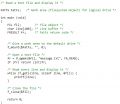
I've been reading the code like for example for f_open.
And I've imagined it differently like the argument would be only the name of the file : "text.txt", so that if it knows that this is specifically for FAT12 it know where is the Directory sector and checks where is this text.txt and prints the data it would give in a for loop. But here it requires something like FIL object and Return code which wasn't clear for me.

Maybe it's perhaps of my weak programming skills I haven't mentioned. Well also asking about specifics might be an overkill for my low skills. But at least I know something about FAT and tried to understand how it could be executed with only a small part of knowledge. Also I might be wrong but I also assumed that FIL fil in which FIL is a structure as I understand as well as FRESULT and FATFS, I don't know why it need File object and what it exactly means but that's a new thing to explore.

About the wiki, I tried to learn from it how FAT32 works, or rather how Directory works, because I don't know how it exactly works due to lack of this sector in FAT32, and there is first part in FAT sector and the rest in Data Sector, so I wondered what the first part of Directory hold to identify the file like "super long name of a file yeya super long.txt" (FAT12 and FAT16) had a fixed size of the name of a file, in FAT32 there could be a very long file name so I wondered what first part which is in FAT sector holds to identify a file and a pointer to the next directory part in Data sector.

Cheers and thanks.
 

nsaspook

Joined Aug 27, 2009
16,330
I've been reading the code like for example for f_open.
And I've imagined it differently like the argument would be only the name of the file : "text.txt", so that if it knows that this is specifically for FAT12 it know where is the Directory sector and checks where is this text.txt and prints the data it would give in a for loop. But here it requires something like FIL object and Return code which wasn't clear for me.

Maybe it's perhaps of my weak programming skills I haven't mentioned. Well also asking about specifics might be an overkill for my low skills. But at least I know something about FAT and tried to understand how it could be executed with only a small part of knowledge. Also I might be wrong but I also assumed that FIL fil in which FIL is a structure as I understand as well as FRESULT and FATFS, I don't know why it need File object and what it exactly means but that's a new thing to explore.

About the wiki, I tried to learn from it how FAT32 works, or rather how Directory works, because I don't know how it exactly works due to lack of this sector in FAT32, and there is first part in FAT sector and the rest in Data Sector, so I wondered what the first part of Directory hold to identify the file like "super long name of a file yeya super long.txt" (FAT12 and FAT16) had a fixed size of the name of a file, in FAT32 there could be a very long file name so I wondered what first part which is in FAT sector holds to identify a file and a pointer to the next directory part in Data sector.

Cheers and thanks.
It's not a matter of low skills IMO, just lack of experience in your case.

Build things, program things, understand things, repeat.

Once you get going it's becomes an exponential process of learning.
 

Thread Starter

Xenon02

Joined Feb 24, 2021
504
It's not a matter of low skills IMO, just lack of experience in your case.

Build things, program things, understand things, repeat.

Once you get going it's becomes an exponential process of learning.
Perhaps you are right.
Although it still mixes me what is written in the website and I wonder why it is made like that, the objects etc. I thought it would be more simple or rather with many for loops like "Directory sector = 512 (bytes after Booting) + offset (which file to read)" and the offset from a loop like "for" statement etc.
But rather it says how to use the already made functions, but with some structures (I guess they are structures but if it's objective programming then I am doomed ;D ), why it was necessery then if all the information is in the disk in specific sectors, and things like file open then file read, what does open mean then ;>

Many things to learn, thanks again.
 

BobTPH

Joined Jun 5, 2013
11,543
But here it requires something like FIL object and Return code which wasn't clear for me.
f_open gives back an object representing the file it opened. The object contains information about where to find the data, and where we are in the data — offset 0 after the open.

Then you pass that object to f_read, to read, say 10 bytes if data. It gives you back the data and updates the offset in the file object to say the next data is at offset 10.

If you didn’t use a file object to store this info, you would have to pass the file name and offset to each read. And the code would have to look up the file name each time you read, being very inefficient.
 

nsaspook

Joined Aug 27, 2009
16,330
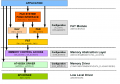
As was said, this is a 'handle', a software abstraction (that makes writing and understanding software easier for humans) for a more complicated thing like the actual data a driver might need to access X sector of physical media data when you read a file (which is another software abstraction to access a memory object).

1701534241189.png

A typical abstraction layer 'tree' for a file system.
 

Thread Starter

Xenon02

Joined Feb 24, 2021
504
f_open gives back an object representing the file it opened. The object contains information about where to find the data, and where we are in the data — offset 0 after the open.

Then you pass that object to f_read, to read, say 10 bytes if data. It gives you back the data and updates the offset in the file object to say the next data is at offset 10.

If you didn’t use a file object to store this info, you would have to pass the file name and offset to each read. And the code would have to look up the file name each time you read, being very inefficient.
I thought that giving the name of a file would be enough only once, because it is stored in Root Directory, why repeatedly there has to be passed the same name if the Directory only contains the info of the first data cluster (so name + first data + more metadata), But I understand the logic of giving a template to the f_open to fill that template with all the information.

1701534215687.png

The fr which has this object of a result although the f_open is a bigger structure. Hmmm not really sure what happens here when fr is not used in getting the content of that file.


As was said, this is a 'handle', a software abstraction (that makes writing and understanding software easier for humans) for a more complicated thing like the actual data a driver might need to access X sector of physical media data when you read a file (which is another software abstraction to access a memory object).

1701534241189.png
Hmmmmm I thought that FAT is managing the Files so something like FILE isn't needed hmmmm.

Well I will ask then maybe 3 more questions and finish this because this is a forum and not a tutorial site so to not annoy here anymore people.

- FAT32 - how does the directory work in a context of what the first data stores in FAT sector and how long can it be maximally (it is used to identify the file as I know). I hope this question won't escalate.

- How to start in this subject ? What do I mean is good to start with first because reading the codes I was given didn't explain me alot but rather complicated my view of how FAT works with those structures like FIL, FRESULT, FRESULT structure taking data from different structure of f_open etc.

- It's a bit weird in fact that to implement FAT I have to use libraries like f_open, although FAT should be the thing open the file and not outside library (I saw it here if you ask me :
) it's a bit mixing thus I didn't know where to start though, so this question is rather about why it is done a bit different ? It requires things I thought it wouldn't require looking that the FAT has 4 major sectors.

I also think that maybe I ask for to specific questions, also I am not trying to all the time be spoon-feeded, but couldn't find a good starting point. It also started from having fun with MP3 DFPlayer module but at some point I wondered how it works if I don't send commands from microcontroller but use only button, maybe it has a way to read data so maybe if I was a programmer and if I had a similar situation to make an mp3 player, I should know how to make an algorithm to read data which would include of how the structure works. Because for mp3 file I need to know how the structure works but the storage structure I thought it would be also important. Then I see I lack a lot of knowledge and didn't know how to start reading these codes so maybe I just asked for to much and it is more complex than I thought and my simple thought of using for loops and knowing the offsets wouldn't be enough although I thought it is enough because I had only 4 sectors and it always starts with reading data from Root Directory so the starting point is there. So yea I got a bit confused here :D Also tried to start making own libraries or own modules, that's what I atleast heard that people write own libraries.
 
Top