How cheap it's possible to a build an LCD Clock Now?

KeithWalker

Joined Jul 10, 2017
3,610
"if you want to use C++, you can but your into a much stepper learning curve than sticking with arduino"
Interesting and ready for the same.. My current setback is How to connect an electronic device with a PC... So that I can use visual studio to program the same...
If you start off with an Arduino Uno, You simply connect is to the computer USB port using a standard male USB to male USB printer cable but I have no idea how you could program it using visual studio. I use the Arduino Software (IDE) which makes interfacing and uploading very simple.
If you choose to just use the ATMega328 microcontroller, you will need to make or purchase a USB programmer and programming module along with the programming ribbon cables. You will then need to add the programmer software driver and hope it works with the version of operating system and programming software that you plan on using.
NOTE: The ATMega 328 and the one on a UNo both use a 16MHz crystal or ceramic resonator, so the accuracy will be quite reasonable for a domestic clock project.
 
Last edited:

Danko

Joined Nov 22, 2017
2,199

Thread Starter

Shafty

Joined Apr 25, 2023
350
If you start off with an Arduino Uno, You simply connect is to the computer USB port using a standard male USB to male USB printer cable but I have no idea how you could program it using visual studio. I use the Arduino Software (IDE) which makes interfacing and uploading very simple.
If you choose to just use the ATMega328 microcontroller, you will need to make or purchase a USB programmer and programming module along with the programming ribbon cables. You will then need to add the programmer software driver and hope it works with the version of operating system and programming software that you plan on using.
NOTE: The ATMega 328 and the one on a UNo both use a 16MHz crystal or ceramic resonator, so the accuracy will be quite reasonable for a domestic clock project.
Decided to go with the Arduino only... Nano? or UNO? Let's wait for the answer for the above Question (BobTPH)
 

Thread Starter

Shafty

Joined Apr 25, 2023
350

Thread Starter

Shafty

Joined Apr 25, 2023
350
Ordering UNO in 2 Hours until otherwise suggested. Thank you all for your participation and guidance. Waiting for my friend's arrival to get my laptop back. will start programming immediately after assuming some sample inputs from the Device...
 

KeithWalker

Joined Jul 10, 2017
3,610
Decided to go with the Arduino only... Nano? or UNO? Let's wait for the answer for the above Question (BobTPH)
I recommend you go with the Uno. Just make sure it has the DIP ATMega chip rather than the small surface mount one. The reason is that once you have developed your program, you can unplug the micrcontroller chip from the Uno and plug in a blank ATMega328 chip. Then you can burn the bootloader onto the chip and upload the program. Then you have a fully programmed microprocessor chip to plug into you final product and you still have a working Uno that you can reprogram for future projects.
 

Thread Starter

Shafty

Joined Apr 25, 2023
350
I recommend you go with the Uno. Just make sure it has the DIP ATMega chip rather than the small surface mount one. The reason is that once you have developed your program, you can unplug the micrcontroller chip from the Uno and plug in a blank ATMega328 chip. Then you can burn the bootloader onto the chip and upload the program. Then you have a fully programmed microprocessor chip to plug into you final product and you still have a working Uno that you can reprogram for future projects.
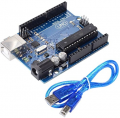
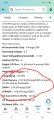
More About Uno
Microcontroller Chip - ATmega328P

Operating Voltage - 5 V

Input Voltage(Recommended) - 7-12V

Analog I/O Pins - 6

Digital I/O Pins - 14 (of which 6 provide PWM output)

PWM Digital I/O Pins - 6

Clock Speed - 16 MHz

Flash Memory - 32 KB (ATmega328P) of which 0.5 KB used by bootloader

SRAM - 2 KB (ATmega328P)

EEPROM - 1 KB (ATmega328P)

DC Current for 3.3V Pin - 50 mA

DC Current per I/O Pin - 20 mA

On Board LEDs - Yes

Operating Temperature (°C) : -10 to 60

Weight (gm) - 25

Length (mm) - 68.6

Width (mm) - 53.4

Height (mm) - 12.5

Uno Specifications
Operating Voltage - 5V.
Input Voltage (recommended) : 7-12V.
Digital I/O Pins - 14 (of which 6 provide PWM output).
Analog Input Pins - 6
 

Attachments

MrChips

Joined Oct 2, 2009
34,972
Another way of looking at it. Learn to work with Arduino and you learn how to use the Arduino ecosystem.
Learn to program any generic MCU and you can migrate to any other MCU.
 

KeithWalker

Joined Jul 10, 2017
3,610
Another way of looking at it. Learn to work with Arduino and you learn how to use the Arduino ecosystem.
Learn to program any generic MCU and you can migrate to any other MCU.
MCUs used to be relatively simple. I wrote programs for Z80, 6502, 6509, 8502, etc, back in the 80s using 4 bit commands in a single pass compiler, then the PIC and Basic Stamp in the 90s.. Modern MCUs are very complex and versatile devices. To set the fuses and registers for all the various functions and features and to design and install a bootloader is quite a long and daunting task task for a beginner (and that's before you even start thinking of programming it). Once you have done it for one device, you have acquired a very general knowledge of what must be done but if you then want to use a different type, you have to learn its architecture all over again. Now they have so many built-in functions and features that each is very different from the next. For my projects I have found that the Atmel devices meet all my usual needs and the Arduino IDE makes it very easy to configure and program them.
 

bidrohini

Joined Jul 29, 2022
190
Hi All,

One of my friend built an LCD clock for me before 5 years for just an 100 Rupee then (Just a 1$ roughly) Now I want to build the same LCD Clock for just 30 Rupees? Possible? (Always On is the only requirement) Railway Time is okay (No AM/PM required) (However tiny or dull it is Okay). I don't need any functionalities. I repeat: "Only clock. Nothing else"

Members please suggest. Thank you.

How about 50 Rupees? Possible?
If you want to build a microcontroller-based LCD clock, 50 rupees won't be sufficient. Here is a simple design of low-power LCD clock.

https://www.pcbway.com/project/shareproject/Low_Power_LCD_Clock.html

It has a 2 Layers PCB .It is based on an AVR128DA48, capable of running for over three years from a CR2032 button cell, or from a solar cell.
 
Top