how can i filter my computer's 5V usb port?

Thread Starter

abdelrahman k.

Joined Mar 16, 2024
15
I'm working on a project that requires a 5V supply, I cut a cable and connected it to my computer's USB. I was having too much noise in the circuit so I replaced the supply to a 5V battery and the noise went away.

my question is how can I filter the noise coming out of the computer? because using a battery isn't practical.
 

Papabravo

Joined Feb 24, 2006
22,082
I'm working on a project that requires a 5V supply, I cut a cable and connected it to my computer's USB. I was having too much noise in the circuit so I replaced the supply to a 5V battery and the noise went away.

my question is how can I filter the noise coming out of the computer? because using a battery isn't practical.
The answer is that you can't do much of anything until you understand the problem. This means you have to identify the noise source and characterize the properties of the noise.
 

Audioguru again

Joined Oct 21, 2019
6,826
Try connecting a capacitor from +5V to 0V (ground). 1000uF might take too long to charge causing the USB to turn off.
100uF might not reduce the noise enough.
 

Jerry-Hat-Trick

Joined Aug 31, 2022
822
Try connecting a capacitor from +5V to 0V (ground). 1000uF might take too long to charge causing the USB to turn off.
100uF might not reduce the noise enough.
You may be right, but I've never done this as I'd be concerned about the inrush current when first connected exceeding the 500mA limit, and what would happen? In other words, how does the USB 5V respond when asked to supply too much current and will it damage the port? So if I wanted to clean up the voltage I'd look to limit the inrush. Maybe this can be done by putting a 10R resistor in series with the smoothing capacitor although I think it will affect the smoothing and introduce an output voltage which will vary with the changes in current demand of the device being powered.

Hopefully, I'm wrong!
 

Pyrex

Joined Feb 16, 2022
502
Hi
first of all, what kind of a project? Audio device or an audio amplifier? Is the noise audible? It's a noise or a hum?
More info needed to advice
 

Thread Starter

abdelrahman k.

Joined Mar 16, 2024
15
Hi
first of all, what kind of a project? Audio device or an audio amplifier? Is the noise audible? It's a noise or a hum?
More info needed to advice
hi, it's an audio amplifier for a mic, and the noise is very audible, I don't know how to describe it but it's closer to a hum than a hiss I guess...
 

Thread Starter

abdelrahman k.

Joined Mar 16, 2024
15
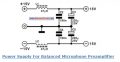
i was looking on the internet and found this, i was wondering if i could use the upper part to see if it makes any difference
edit: it didn't do anything.
1711391578161.png
 
Last edited:

Alec_t

Joined Sep 17, 2013
15,117
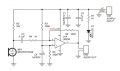
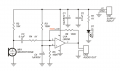
Try inserting a resistor (something in the 200-500 Ohm range) in series in the 5V supply rail, between the tops of C2 and R1.
How far is your mic from the amp input components?
Are you using screened cable for the mic/amp?
 

LadySpark

Joined Feb 7, 2024
194
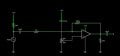
R3 and R5 should equal the same source impedance if you really want to offset the signal by 1/2V+. Also, there should be a 10-22 uf cap on the output or the resistive load branch if its DC coupled. But the non inverting input I think doesn't really need the voltage divider branch as it could just equal the source resistance (10K with C4 ) or grounded directly.

Other things to try, since you have noise, is to cancel it with the non-inverting input. But changing R3 and R5 should solve it if the power supply isn't too noisy.

Here is one with using R3/R5 branch as a noise nulling circuit. Also included the standard capacitor output circuit.Screenshot_2024-03-26_06-21-29.jpg
 

LadySpark

Joined Feb 7, 2024
194
I’d suggest replacing the LM358 with something like a TL071. The LM358 is versatile and low cost but not good for audio
Its not like a pro audio application. LM358 is a single supply op amp. OPA376 would be the high end replacement. TL071 is a dual power supply op amp, and its high end replacement is a TLE2071.
 

Audioguru again

Joined Oct 21, 2019
6,826
1) An LM358 is never used as a mic preamp because it is noisy, produces crossover distortion, and its poor slew rate cannot produce high audio frequencies. Use an opamp made to be a mic preamp instead. Most of them do not work well with a power supply as low as 5VDC.

2) The datasheets for most electret mics say that thier Fet has a current of 0.5mA and a minimum operating voltage of 2VDC.
Then your R1 resistance of 10k is too high for a 5V supply because 0.5mA x 10k= 5V on R1 then the mic has zero VDC.
I use 10k with a 9V supply.

3) Your opamp is inverting with an input impedance that is much too low. Then R1 and R4 form a voltage divider that reduces the mic signal to 1/11 times.
Also, then the low capacitance of C3 cuts all low audio frequencies.

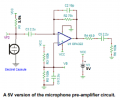
Here is the mic preamp circuit recommended by Texas Instruments:
 

Attachments

Top