High-Power LED Flasher

SgtWookie

Joined Jul 17, 2007
22,230
Tj,
Soldering takes some practice before you get good at it.

Remember the old saying, "Cleanliness is next to..."

Well, it really does apply to soldering. Isopropyl alcohol is your friend. 99% pure or better is "the good stuff"; you may be able to get some at work. Ace Hardware sells it in small cans, but it's expensive. If you're desperate, Wal-mart sells 90% isopropyl near the pharmacy. Don't use anything less than 90%, as it contains too much water.

It's a good idea to wear gloves while soldering. It protects your hands, and also keeps your finger oils off the solder and parts. If that feels too clumsy, then skip the gloves - but make sure your hands are clean.

Use an acid brush (black nylon bristles, rolled metal handle, available at auto parts stores) to apply the isopropyl alcohol with. It will take off finger oils, etc. that prevent the solder from sticking. It won't do a darn thing about corrosion though.

If there is any corrosion on the leads of the parts or on the PCB, you can use a green Scotch-brite pad (available at any grocery store in the cleaning section) to remove it. Cheap, convenient and effective.

If your parts and solder are really clean, you really shouldn't need flux. If you DO use flux, just use a little bit of rosin flux.

Solder: Sn63/Pb37 solder is the easiest to use. It is called "eutectic" solder because it has no plastic state; it goes right from a liquid to a solid. It's mostly referred to as 63/37. If you can't get that easily, 60/40 is the next best thing.

The soldering iron tip needs to be clean, bright, tinned, and at the right temp. 25 Watts is decent for general purpose electronic soldering, but a controlled temp tip is much better.

Use small amounts of solder. Apply heat to the junction of the wire and the board. Then apply solder to the wire/board junction, not the iron.

Don't move the connection while it's cooling.

If the joint looks like a big grey wrinkled blob, you need to re-do it.

Solder-wick is a braided copper strip that aids greatly in removing excess solder. You place the wick on the junction, and apply heat to the wick. It sucks the solder right up.
 

Thread Starter

turnertj

Joined Nov 4, 2009
78
Hey guys...

I built it up on a PCB. My soldering is UGLY. When I plugged it in and threw the switch...both LEDs were constant on! So I started de-bugging with the volatges Bill posted back on page 15. It looks all right, except that there is no voltage drop across R1. I may have screwed up mounting the pot as well...

So here's my embarassing question. How is that pot supposed to be mounted? I mean, there are three leads, one is the wiper, right? Where do I hook the wiper up to (R1 or pin 2/6), and where do I hook the other two leads up to (R1 of pin 2/6)?

I got two pots at the electronic store, and the guy there twisted two of the leads together for me and told me those went to R1. But somehow I untwisted them and now I don't know which configuration it was in!

Thanks!

Tj
 

SgtWookie

Joined Jul 17, 2007
22,230
Hey guys...
Hey TJ,
Got a package from OH today with little square thingies inside. ;) Thankya!

I built it up on a PCB. My soldering is UGLY.
Post photos - we demand evidence! :D

Seriously though, bad solder joints will cause lots of problems. Soder-Wik (solder wick) will be a big help in getting the excess solder off. Your solder joints should be clean, bright and silvery, with little more than absolutely has to be there.
When I plugged it in and threw the switch...both LEDs were constant on! So I started de-bugging with the voltages Bill posted back on page 15. It looks all right, except that there is no voltage drop across R1. I may have screwed up mounting the pot as well...

So here's my embarassing question. How is that pot supposed to be mounted? I mean, there are three leads, one is the wiper, right? Where do I hook the wiper up to (R1 or pin 2/6), and where do I hook the other two leads up to (R1 of pin 2/6)?
If the pot has three leads, generally the middle one is the wiper.
You can tell by using a multimeter set to read Ohms on the 200k scale.
Connect one probe to the middle pot terminal, the other to one end. Then turn the knob/screw/shaft of the pot. If it changes resistance, you've found the wiper and one end. Then measure across the two end terminals, and move the knob/screw/shaft of the pot. If it doesn't move, you've confirmed that you have found the ends.

I got two pots at the electronic store, and the guy there twisted two of the leads together for me and told me those went to R1. But somehow I untwisted them and now I don't know which configuration it was in!
[/QUOTE]
Easy to do when you're new at it. ;)

Don't panic, it's OK. Find the two terminals that don't change in resistance, and measure about 100k when you measure across them.
 

Thread Starter

turnertj

Joined Nov 4, 2009
78
Cool...thanks. My soldering may be pointless. But, just to check. I can find the two terminals that don't change in resistance. Now where do I put them? Does the wiper just hang out in space? The guy in the electronics store had two twisted together for me, so I put those two in the same place on the breadboard connected to R1. But which two were those?

Thanks.
Tj
 

SgtWookie

Joined Jul 17, 2007
22,230
Cool...thanks. My soldering may be pointless. But, just to check. I can find the two terminals that don't change in resistance. Now where do I put them?
OK.
One of the end terminals connects to the end of R1 that isn't connected to anything at the moment.

The other end terminal connects to the junction of pins 2, 6, and C1.

The wiper is shown as connecting to the end of R1, but in reality you could connect it to either R1, or the junction of pins 2,6, and C1 and it would still work.
Does the wiper just hang out in space?
Nope - I jes' 'splained it. ;)
The guy in the electronics store had two twisted together for me, so I put those two in the same place on the breadboard connected to R1. But which two were those?
He'd twisted one end and the wiper together. No big deal. ;)
 

Wendy

Joined Mar 24, 2008
23,798
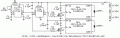
Are you using this schematic?


***************

OK, I know how and where this is going to be used, and I'm volunteering to make one for TJ. I'll modify the schematic a bit to adapt it to the board.

I'm starting the layout on a board 1.75" X 1.45", and I'm thinking of using sockets for the Puck Bucks on the side. Will this work for you? I can lay out a custom board if it will help.


I've started the barest beginning of a layout. If you need something circular this is not a problem.

When I was in college I used to make a do nothing circuit, nice to make a do something for a change.
 

Attachments

Last edited:

Thread Starter

turnertj

Joined Nov 4, 2009
78
Bill...

That would be great. I don't need it round. We're planning a 5"x3"x1"-ish dimension case for it all. A socket for the buckpucks would be fine. That is the schematic I am using, except that R1 was switched to a 10K resistor and I'll use 3 CR123 batteries. It worked great on the breadboard!

Tj
 

Wendy

Joined Mar 24, 2008
23,798
Wookie, I think your PM box is full. Do you still have those logic level MOSFETs, or could you recommend a part? PM me please.
 

Wendy

Joined Mar 24, 2008
23,798
I haven't forgot you, I'm going to build with the parts I have first, then with the ones I don't. Like everyone else, I've been busy with Christmas and work (still have two days to go).

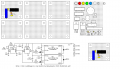
Since we will have more than one schematic floating around due to the variance in parts, I'm going to refer to this one as Schematic N.


............................................................................Schematic N

The other attachment is the breadboard I will be designing. This has a lot work to do, but it simplifies the actual construction.

Why did you drop R1 to 10KΩ? This would bring up the max freq to 70Hz, which would seem to be contra-indicated. For the moment I'm putting it back until I understand the reasoning better. R3 and R4 were purely arbitrary values, if Wookie thinks they should be different I'll be glad to tweak them.

BTW, I got a gift card for Christmas, so I used it as a partial payment for this.

http://www.vellemanusa.com/us/enu/product/view/?id=522797


It was just under $80 from a local distributer. I've had my eye on it for a while.
 

Attachments

Last edited:

Thread Starter

turnertj

Joined Nov 4, 2009
78
Bill,

That looks like a totally new circuit...what are the Q things? Are those still transistors? I guess I won't have to use the reference and the control lines any more huh?

I first breadboarded up the circuit with R1 being 68K, and the max fequency wan't quite high enough when we tested. Wookie told me to drop it to a 20K resistor, and I went with a 10K because I couldn't find a 20K (bad reason, huh?). Then when we ran it it seemed like we had the frequency we wanted, so I just kept it at 10K. A 20K might be better though, so I might try to go get one.

Tj
 

SgtWookie

Joined Jul 17, 2007
22,230
Well, I'm wondering why not just use one BuckPuck?

If you don't need to adjust the current, and it's the same for both LEDs, then just switch the ground side of the individual LEDs on and off.

It's just fine if the MOSFETs overlap being ON. It won't hurt a thing.

Better to switch the load than switch the power to the BuckPucks.

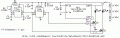
Here's what I'm thinking:


Oh, I bumped the MOSFET gate resistors up to 1k. The CMOS 555's just don't have much current source ability - but in this instance, driving the MOSFET gates fast really isn't very important.

There really should be pull-down resistors on the gates in case the 555 timer fails.
 

Attachments

Thread Starter

turnertj

Joined Nov 4, 2009
78
Cool...

That looks even simpler. But another dumb question...what are these new Q things? Are they transistors like before? The symbols look different.

Thanks!

Tj
 

SgtWookie

Joined Jul 17, 2007
22,230
Sorry TJ, I missed your question about that.

The Q's in these last couple of schematics are N-channel enhanced MOSFETs.

More specifically, I'm going to be sending a few IRLR7807Z N-ch logic level power MOSFETs to Bill for this.
Datasheet: http://www.irf.com/product-info/datasheets/data/irlr7807z.pdf
These little MOSFETs have a max Vdss (drain to source) of 30v, an ON resistance of 13.8mOhm, and are rated for 30A current. They are also rated for operation at logic levels; ie: Vgs=4.5v. They also have a low 7nC gate charge requirement. They're really maximum overkill for this project, but that's OK - we like that kind of thing ;)
 

Thread Starter

turnertj

Joined Nov 4, 2009
78
Hey guys...

I got a few MOSFETS from a friend in town who said that although they weren't overkill like Wookie planned, they should work. Another dumb question here--I'm looking at this thing and it has a metal tab and a plastic black piece, and then three leads...which one is the G, D, and S?

Thanks!
 

SgtWookie

Joined Jul 17, 2007
22,230
OK, first we need to know their part number.
Then we have to find a datasheet for them.
Although there are standard layouts for such things, you will get "bitten" if you don't look in the datasheet for the part in question.

I would not recommend trying to use them with your now-working prototype.
 

Wendy

Joined Mar 24, 2008
23,798
The only reason I'm using MOSFETs is the puck bucks I'm using. I've been meaning to reply more in depth, still will, but I have one last day of work (then over a week off).

I'm going to try your schematic Wook. I don't trust it since we don't know what is in the puck buck schematic wise, but it is worth a shot.

These are unusual MOSFETs, they use a lot less voltage than most. These aren't off the shelf parts.
 

SgtWookie

Joined Jul 17, 2007
22,230
The only reason I'm using MOSFETs is the puck bucks I'm using. I've been meaning to reply more in depth, still will, but I have one last day of work (then over a week off).
Yippeeee! :D

I'm going to try your schematic Wook. I don't trust it...
It's nice to know I'm a trustworthy type. ;)
...since we don't know what is in the puck buck schematic wise, but it is worth a shot.
The VIN(-) or ground wire is connected directly to the LED(-) wire. There is less than 1/10 Ohm resistance between the two.

A report from another member's post recently confirms this; they were trying to switch the LED+ instead of the LED- because their LEDs were mounted on a common heat sink; thus not insulated from one another.

So, the schematic I modified will definitely need to have separate heatsinks for the LEDs, or at least electrically isolated.

These are unusual MOSFETs, they use a lot less voltage than most. These aren't off the shelf parts.
Actually, logic level MOSFETs are getting to be quite a bit more common nowadays. It takes much less energy to charge a gate to 4.5v or 5v than it does to charge it to 10v. We're being green and all that. :D
 

Thread Starter

turnertj

Joined Nov 4, 2009
78
Hey...I tried it out on my breadboard (I still suck at soldering!)

I'm using a IRF640...don't know if that's an equivalent MOSFET Wookie. I asked the guy in the electronics shop, he looked at what you sent and handed me these things. I think I have them plugged in right...downloaded a data sheet.

One LED is very dim but flashes...the other is very bright and does not appear to flash. In actuality, I think it may be strobing, but at a much higher rate...

Any ideas? Did I hook something up wrong?

TJ
 
Top