Hi :wave: a simple Audio PreAmp using TL072

Thread Starter

KEYHAN_A

Joined Aug 23, 2024
4
Hi there everybody

this is my first post here and I'm so happy to find this community (which feels more like the real internet that we used to know),
I had worked on some Robotic projects when I was a kid, then work life took me to programming for the past 15 years, and now I've got some time to come back to the electronics world and I wanna make some simple audio components for my home studio (for the sake of doing some electronic projects again)

so with my limited electronic knowledge and the internet I've been trying to design a simple PreAmp circuit with gain control using TL072 OpAmp.
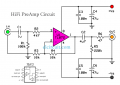
here is the schematics I could come up with, and I wanted to check this with some expert before sending signals through this and damage my other gears,
so I would really appreciate if someone checks my schematics and guide me through my mistakes and give me some resources to learn more (which I'm really eager to :) )

here is my first try simple (beginner) schematics:
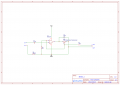
Schematic_PreAmp_2024-08-23 (1).png

Thanks in advance,
Keyhan

 

Thread Starter

KEYHAN_A

Joined Aug 23, 2024
4
or should I just go with schematics like this which I find on the internet!:rolleyes::)but I really want to learn basics and how I can amplify and shape signals (later, with more synthesis stuff (in 5 years maybe) )
:D

and for example in this schematic where can I put a potentiometer to control the gain? R2 or R6?
1724438976820.png

or should I just go try, make, tweak, learn and don't bother you here! :D


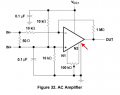
or how about this one:
which some connections aren't clear!
1724439607243.png
 
Last edited:

ronsimpson

Joined Oct 7, 2019
4,664
Post #1 will not work.
Post #2A will work.
Post #2B is strange. Will work. Probably not an audio amplifier.
What do you want the amplifier to do? Gain? Power? What power supply do you have?
 

Ian0

Joined Aug 7, 2020
13,117
The circuit labelled "HiFi Preamp Circuit" is the best one. It has no problems.
Do you really want to control the gain? or do you just want to control the volume? If it's just the volume then put the potentiometer on the preamp output before the power amplifier. That's where the volume control usually goes.

The second circuit on Post #2 is a specialist circuit, looks like it is designed to amplify the output from a current transformer.

Your circuit (post #1) has some problems. . .
For hi-fi, a split supply ±12V is normally used. pin 4 connects to -12V.
You need a DC Path to earth on pin 3, especially for a JFET input amplifier. Put a resistor between pin 3 and ground.
If you take the output from the potentiometer wiper, then, because it is connected to the inverting input, the signal would always be the same magnitude as the input. There would be no gain.
 

Thread Starter

KEYHAN_A

Joined Aug 23, 2024
4
Thank you so much for the quick answers guys,
I'm definitely sure that my first ever circuit design attempt wouldn't work and thank you Ian0 for the detailed explanations, I appreciate it so much, and ronsimpson thanks for the verification on the schematics,

I have two line inputs on my "Focusrite 4i4" audio interface which I wanna connect my synthesizers and get some fat signals through them, and the volume thing is gonna be enough I think, I was thinking wrong when I was saying "gain" :)

then I'm gonna go with #2A and try to control the volume with some potentiometer on the output,
and also I will tweak and make the first schematics fixes based on your guidance Ian0 and try it out to learn more,

thank you so much again :)
 

sparky 1

Joined Nov 3, 2018
1,218
From an electronics view, loading the TL072 schematic on LTspice you might like the modification offset null
but in 5 years or so when you explore shaping and amplifying, if you set aside
simulations of interest and make notation, later you can pick up where you left off.
The sim ability to view a wave in time domain (oscilloscope) and frequency domain FFT or spectrum is fundamental to
understanding wave shaping. Plugging hundreds of wires between modules has been, and may be necessary later however
software is doing amazing things digital some analog will remain.
 
Last edited:

Thread Starter

KEYHAN_A

Joined Aug 23, 2024
4
From an electronics view, loading the TL072 schematic on LTspice you might like the modification offset null
but in 5 years or so when you explore shaping and amplifying, if you set aside
simulations of interest and make notation, later you can pick up where you left off.
The sim ability to view a wave in time domain (oscilloscope) and frequency domain FFT or spectrum is fundamental to
understanding wave shaping. Plugging hundreds of wires between modules has been, and may be necessary later however
software is doing amazing things digital some analog will remain.
Thanks I was looking for a simulator but all of them look so advanced to just tackle in!! I'll check out LTSpice.
I've been working with Analog/Digital synthesizers and oscilloscope for years,
and I have some ideas about what's going on under the hood, but using it and learning the science behind it, is so much different than designing one from scratch ofcourse, which I'm trying to learn now
:)and I'll keep learning

in other note I've got a big backlog of projects and their details and everything related in Notion, to both keep my mind clean for new stuff and also don't lose the details. you guys responses are definitely in this projects Notion :)

Thanks again everybody,
I'll keep coming back with questions
 

sparky 1

Joined Nov 3, 2018
1,218
An Ltspice example might need changing parts or knowing an equivalent op amp. Looking for something like a CA3130
Here is an audio example file from Analog.com it uses the AD822 op amp circuit. It works, rename it with a "save as" then change it around.
 

Attachments

Last edited:

LowQCab

Joined Nov 6, 2012
5,101
Keeping in mind the rules of Op-Amps,
The above LTSpice Schematic has a Gain of 2X, as shown.

I forgot that I installed LTSpice over a year ago,
I should probably get around to learning how to use it since it is so popular.
.
.
.
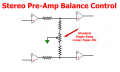
Balance Control .png
.
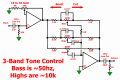
3 Band Tone Control 2 .png.
 
Last edited:
Top