Help With School Project!!

Thread Starter

compnerd4

Joined May 21, 2008
4
Ok so im working on a project for class and now im stuck and am now seeking your help!

I have a circuit with 6 LED's and 1 Switch what i need help with is i want to be able to push the switch and only LED 1 comes on then i let go and it goes off then i push the same switch again and only LED 2 comes one then off once i release the switch... and so on.

Any help is help and i need it so thanks!!

Matt

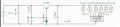
**image attached of what i have already**
 

Attachments

mik3

Joined Feb 4, 2008
4,843
Ok so im working on a project for class and now im stuck and am now seeking your help!

I have a circuit with 6 LED's and 1 Switch what i need help with is i want to be able to push the switch and only LED 1 comes on then i let go and it goes off then i push the same switch again and only LED 2 comes one then off once i release the switch... and so on.

Any help is help and i need it so thanks!!

Matt

**image attached of what i have already**
You can use a cmos 4017 decade counter. This device, every time you give it a pulse, activates the next output and turns off the previous output which was activated. The outputs are numbered from Q0 to Q9.

http://www.kpsec.freeuk.com/components/cmos.htm
 

mik3

Joined Feb 4, 2008
4,843
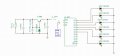
this is the best i can do...

sorry its a bit messy

opps forgot pin 8 is my ground?
You forgot to connect pin 8 to ground and you forgot to put current limiting resistors for the diodes as Audioguru said. Also you have to connect pin 13 (clock enable) to ground and your reset to Q6 (pin 5) and not Q5 (pin 1) because your last led wont light. The chip will reset instantlly.
 

SgtWookie

Joined Jul 17, 2007
22,230
I've seen lots messier! ;)

What is the current @ voltage rating of your LEDs?

Have you looked at the "electrical characteristics" in the 4017 datasheet, in particular the "output drive current" portion?

Have a look, and tell us how much current your 4017 will be able to source (output) running at the voltage that you're considering operating with.
 

JoeJester

Joined Apr 26, 2005
4,390
Have you looked at the timing diagrams in the datasheet?

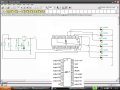
When you use TINA, the pin numbers will be on the lower left of your screen as your mouse hovers over the connection.

See attachment:
 

Attachments

Top