Help with programming my ATTINY85 with the USBasp

Thread Starter

ErnieM

Joined Apr 24, 2011
8,415
I have a single ATTINY85 to program for a build to print project I'm playing with. I've attempted several ways to get my sketch uploaded into the ATTINY with no luck.

My latest attempt was to try the Microchip Studio and the Arduino IDE. I'm just lost using either tool.

Any help or direction would be appreciated.
 

be80be

Joined Jul 5, 2008
2,394
USBasp if you got the programmer it probably not work because of it firmware lot of people sale these that because the driver not show up its name right and the arduino ide will not use it.
I had to flash mine with known working firmware.
 

KeithWalker

Joined Jul 10, 2017
3,603
Is the ATtiny85 just an 8 pin DIP or is it mounted on a small circuit board? There is a different way to program each version.
Does your version of the downloaded Arduino IDE have the ATtiny85 listed as a choice for microprocessor? If not, you will need to add it.
If you can answer both of those questions, I can help you to get your program loaded into it.
This site should help:
Programming Microcontrollers With a USBasp Programmer in Atmel Studio : 7 Steps - Instructables
 
Last edited:

be80be

Joined Jul 5, 2008
2,394
I found putting firmware from the Guy who came up with the USBasp was the best way to get those cheap USBasp programmers to work every one making clones that avrdude didn't find because of vendor string shows up wrong
Its never been a problem for windows 10 or 11 or Linux finding the USBasp its always been AvrDude seeing its as not a programmer on the programmer list .
 

Thread Starter

ErnieM

Joined Apr 24, 2011
8,415
Nope. I don't have any arduinos. But thanks.

This been the problem people changed the vendor string and avrdude wouldn't see it as a programmer
check out this site http://www.fischl.de if you have a non working USBasp
https://www.fischl.de/usbasp/
AVRdude only runs as a DOS app, and Ive had no luck setting the options

Is the ATtiny85 just an 8 pin DIP or is it mounted on a small circuit board? There is a different way to program each version.
Does your version of the downloaded Arduino IDE have the ATtiny85 listed as a choice for microprocessor? If not, you will need to add it.
If you can answer both of those questions, I can help you to get your program loaded into it.
This site should help:
Programming Microcontrollers With a USBasp Programmer in Atmel Studio : 7 Steps - Instructables
The instructions direct you to TOOLS | EXTERNAL TOOLS which is not on my IDE. I can set the device, select USBasp as the programmer, but uploading fails with:
Arduino Build Window said:
An error occurred while uploading the sketch
avrdude: error: program enable: target doesn't answer. 1
avrdude: initialization failed, rc=-1
Double check connections and try again, or use -F to override this check.
There's that dang avrdude again.
 
Last edited:

be80be

Joined Jul 5, 2008
2,394
An error occurred while uploading the sketch
avrdude: error: program enable: target doesn't answer. 1
avrdude: initialization failed, rc=-1
Double check connections and try again, or use -F to override this check.
That’s because like I said the programmer shows up
But avrdude can’t use it it’s not on the programmer list because some nut that sold you your USBasp
Changed the firmware to say something different
 

Thread Starter

ErnieM

Joined Apr 24, 2011
8,415
That’s because like I said the programmer shows up
But avrdude can’t use it it’s not on the programmer list because some nut that sold you your USBasp
Changed the firmware to say something different
Yep, I see that, but you can adjust the PID and VID of the target programmer in the AVRdude config file. Alas, this yields no joy.

Would anyone have a suggestion for a programmer? Low cost of course as I'm only using this for one project.
 

Thread Starter

ErnieM

Joined Apr 24, 2011
8,415
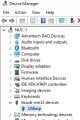
Why yes, yes it does.

usbasp.jpg

My latest attempt yields:

Code:
C:\Users\em4Xb>avrdude -c usbasp -p t85 -B 125kHz -F
Set SCK frequency to 750000 Hz
Error: program enable: target does not answer (0x01)
Error: initialization failed  (rc = -1)
- double check the connections and try again
- use -B to set lower the bit clock frequency, e.g. -B 125kHz
Device signature = 00 00 00 (retrying)
Device signature = 00 00 00
Error: invalid device signature
Warning: expected signature for ATtiny85 is 1E 93 0B

Avrdude done.  Thank you.
.
I am unsure if "target does not answer" means the USBasp or the ATTINY85.
 
Last edited:

Thread Starter

ErnieM

Joined Apr 24, 2011
8,415
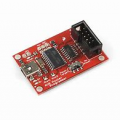
OK, I bit the bullet and bought myself a Tiny AVR Programmer off Amazon for 17 bucks. Install went flawlessly, as did the compile and upload of some test code.

I now have a blinky LED !!!

No bricked chip, no muss, no fuss. Jeeze, this is the first thing on this extended build to print toy that actually went perfectly the first time I tried it.
 

BobaMosfet

Joined Jul 1, 2009
2,211
Is the ATtiny85 just an 8 pin DIP or is it mounted on a small circuit board? There is a different way to program each version.
Does your version of the downloaded Arduino IDE have the ATtiny85 listed as a choice for microprocessor? If not, you will need to add it.
If you can answer both of those questions, I can help you to get your program loaded into it.
This site should help:
Programming Microcontrollers With a USBasp Programmer in Atmel Studio : 7 Steps - Instructables
It's an 8-pin IC, whether DIP or surface mount.
 

be80be

Joined Jul 5, 2008
2,394
Tiny AVR ISP. I have one and the USBasp The Usbasp was pain to get working. People sale stuff online mine they changed the jumpers so it took a little figuring to set to change firmware
 
Top