Help with Constant Q Graphical Equalizer Design

MrAl

Joined Jun 17, 2014
13,704
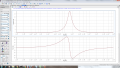
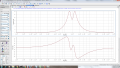
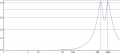
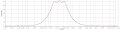
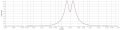
I get the same result:

View attachment 162933

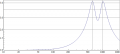
It looks somewhat better on the more usual LogLog plot:

View attachment 162934

Hi,

Just realized that log log plot does not look right, unless i misunderstand the intent there.
I say this because 1 on an amplitude plot should come out to 0 on a log amplitude plot.
Also, 5 on an amplitude plot should come out different on a log amplitude plot too.
Maybe a dB amplitude plot instead.
 

MrAl

Joined Jun 17, 2014
13,704
Having some problems with the plots...maple keeps crashing on me...will try to do it on matlab instead.
Either way they should result in the same thing as yours.
Q=2 seems to give a nice response with 3 filters since the ripple is almost gone.

Why would we consider q=1 as not usable?...is it because its response is too wide? The gain seems to be a bit large too
Hello again,

When you ask a question like, "What is wrong with using a Q of 1", it may take some basic reasoning to answer that.

I think we have to remember that we are dealing with a response that is somewhat subjective. Is there such a thing as an 'ideal' graphic equalizer? In digital form yes but not in analog form, so perhaps we can use the digital form as a guide in deciding what kind of measure would be used in determining what a 'best' design would be.

An ideal GE would have band start and stop points that are well defined and they would have no influence outside of their respective band and they would have the same boost and cut over the entire range of that band. For example, if we had a band that went from 100Hz to 200Hz, then the response with full boost at 99.9 Hz would be 1 and at 100.1Hz would be 4 (or whatever is wanted for the boost amplitude for a band) up to 199.9Hz, then at 200.1Hz it would be back to 1. So the gain would be constant over the band, but the potentiometer responsible for that band would only adjust the gain for that band alone and nothing outside of that band, and it would adjust the band such that for a setting of full boost would boost the gain by 4 over that band alone and if set for 2 would boost by 2 over that band alone and if set for -2 would cut over that one band, etc. So we'd see flat response over any band, and the next band would do the same but have independent adjustment from any other band. So adjusting the different bands to different gains would make the response look like a series of steps, possibly both a step up or a step down, and we could make it look like a staircase by adjusting each gain slightly higher than the next.

Now back to analog.
An analog GE shows overlap and some interdependence, so a measure of just how good it is would required an optimizing algorithm that takes band independence and overlap into account, something that we are allowing to be subjective at the moment. The measure would be against a digital GE so we'd be looking at the response at the center and at the band ends, and finding a metric that could be used to adjust perhaps Q and maybe the bandwidth itself.

Now looking back at the current subjective analysis, we see that we can analyze various responses and get some idea what is happening and how it might affect music or voice in the real world. We dont want too much dip between bands, but yet we want band independence, and selectivity. What i see is that with a certain Q and a certain band width we see a certain dip between bands at full boost, and if that dip isnt too much it's probably OK. If the dip is too much, then perhaps we can make the band more narrow. If we make the Q lower we get the same effect except we loose selectivity.

So now back to the question of Q=1.
With Q=1 we get good in between band fill in, but we loose selectivity. This tells me that going to Q=1 might be too extreme. There's no harm in trying however, and so i'll try to provide a function that you can use to examine the response with two bands with different Q's and maybe that will help you decide.
Alternately all you have to do is reduce the transfer function you get down to having parameters Q, w1, and w2, where w1 and w2 are the two center frequency bands (w=2*pi*f), so you can examine what happens with different Q's and different band widths.

I hate to say this, but it might be worth trying to set up a design on a breadboard so you can hear how it actually works on different audio medium. That's once you think you are satisfied with a given design.

[LATER]
Here is a function you can use to look at the response for different bandwidth and Q.
The requirements for using this function are:
C1=C2, and
center frequency amplitude of the BP filter is 1 (R3=2*R1), and
pots adjusted for full boost, and
the Q is the same for both BP filters, and
the gain of that one op amp originally R5 and R6 is set to 4 as discussed before.
This allows you to look at different bandwidths and Q's without having to reanalize the circuit every time you change the Q.

Hs=(w1^2*w2^2*Q^2+s^2*w2^2*Q^2+s^2*w1^2*Q^2+s^4*Q^2+5*s*w1*w2^2*Q+5*s*
w1^2*w2*Q+5*s^3*w2*Q+5*s^3*w1*Q+9*s^2*w1*w2)/(w1^2*w2^2*Q^2+s^2*w2^2*Q^2+s^2*
w1^2*Q^2+s^4*Q^2+s*w1*w2^2*Q+s*w1^2*w2*Q+s^3*w2*Q+s^3*w1*Q+s^2*w1*w2)

and with s=jw we have:
|Hjw|=
(sqrt((w1^2*w2^2*Q^2-w^2*w2^2*Q^2-w^2*w1^2*Q^2+w^4*Q^2-9*w^2*w1*w2)^2+
(5*w*w1*w2^2*Q+5*w*w1^2*w2*Q-5*w^3*w2*Q-5*w^3*w1*Q)^2))/(sqrt(
(w1^2*w2^2*Q^2-w^2*w2^2*Q^2-w^2*w1^2*Q^2+w^4*Q^2-w^2*w1*w2)^2+
(w*w1*w2^2*Q+w*w1^2*w2*Q-w^3*w2*Q-w^3*w1*Q)^2))

With this function you can set w1 and w2 to what you want (like 100*2*pi and 160*2*pi) and then Q to some value (like 1,2,4, etc.) then plot over w over some range.
Once you determine what bandwidth and Q you want to use, you can then go back to selecting resistor and capacitor values for the bandpass filters.
That last function may be simplified i did not look into that too well yet.
 
Last edited:

The Electrician

Joined Oct 9, 2007
2,986
Hi,

Just realized that log log plot does not look right, unless i misunderstand the intent there.
I say this because 1 on an amplitude plot should come out to 0 on a log amplitude plot.
Also, 5 on an amplitude plot should come out different on a log amplitude plot too.
Maybe a dB amplitude plot instead.
With a Log Log plot the values on the vertical axis aren't labeled with the logs of the values that would be used on a linear plot--it's just that the spacing of the values is logarithmic, so the curve looks the same as when the vertical axis is in dB, stretched at the smaller values and compressed at the larger values.

It's the same way when the frequency axis is logarithmic, the values labeled along the axis aren't the logs of the frequency, but the spacing along the axis is logarithmic.
 

MrAl

Joined Jun 17, 2014
13,704
With a Log Log plot the values on the vertical axis aren't labeled with the logs of the values that would be used on a linear plot--it's just that the spacing of the values is logarithmic, so the curve looks the same as when the vertical axis is in dB, stretched at the smaller values and compressed at the larger values.

It's the same way when the frequency axis is logarithmic, the values labeled along the axis aren't the logs of the frequency, but the spacing along the axis is logarithmic.
Hi,

Thanks for clarifying, but i see what happened now. You started the |Vo| plot at f=0 but then started the log log plot at f=300Hz, so the starting values looked off and that didnt make sense. Im sure it would look better if both started at either 0 or more than likely 1, or even 10 Hz. That way we'd see the starting amplitude the same for both plots regardless of plot technique. Normally people always start and end at the same values when comparing plots.

I think a dB vs log frequency plot would be best as that would bring out the differences in relative amplitude interpretation by a human ear. It's always your choice though.
 

The Electrician

Joined Oct 9, 2007
2,986
Hi,

Thanks for clarifying, but i see what happened now. You started the |Vo| plot at f=0 but then started the log log plot at f=300Hz, so the starting values looked off and that didnt make sense.
Both plots in post #71 have the same starting and ending amplitude, and the same ending frequency. The starting frequency is different for the reason I will address next.

Im sure it would look better if both started at either 0 or more than likely 1, or even 10 Hz.
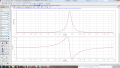
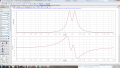
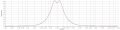
Logarithmic plots can't start at zero. Here's what the LogLog plot would look like if the frequency started at 1 Hz:

Graphic21.png

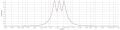
And if it started at 10 Hz:

Graphic22.png

I don't think either of those looks better; the interesting part of the curve is compressed to the right.

That way we'd see the starting amplitude the same for both plots regardless of plot technique. Normally people always start and end at the same values when comparing plots.
If the comparison is between a LinearLinear plot and a LogLog plot, it won't be possible to get the starting and ending amplitude AND the starting and ending frequency to be the same for both plots without getting a LogLog plot where the curve is skewed far to the right as in the two above. A different starting frequency (with the starting and ending amplitude, and ending frequency the same) for the LogLog plot allows the plot to be more nearly centered.

I think a dB vs log frequency plot would be best as that would bring out the differences in relative amplitude interpretation by a human ear. It's always your choice though.
A dB vs log frequency plot IS a type of LogLog plot, so the curve will look the same as in a non-dB LogLog plot, it will just be labeled with different values on the vertical axis.

When frequency response plots are produced for circuit gain vs. frequency, normally people use some type of LogLog plot. There are two common ways to label the vertical axis in LogLog plots. The vertical axis can be labeled with dB, or with pure numbers. In the early posts in this thread, the value of A was being discussed, which was a pure number, not a decibel value, so producing a LogLog plot with the vertical axis labeled with pure numbers was appropriate.
 

MrAl

Joined Jun 17, 2014
13,704
Both plots in post #71 have the same starting and ending amplitude, and the same ending frequency. The starting frequency is different for the reason I will address next.


Logarithmic plots can't start at zero. Here's what the LogLog plot would look like if the frequency started at 1 Hz:

View attachment 163114

And if it started at 10 Hz:

View attachment 163115

I don't think either of those looks better; the interesting part of the curve is compressed to the right.


If the comparison is between a LinearLinear plot and a LogLog plot, it won't be possible to get the starting and ending amplitude AND the starting and ending frequency to be the same for both plots without getting a LogLog plot where the curve is skewed far to the right as in the two above. A different starting frequency (with the starting and ending amplitude, and ending frequency the same) for the LogLog plot allows the plot to be more nearly centered.


A dB vs log frequency plot IS a type of LogLog plot, so the curve will look the same as in a non-dB LogLog plot, it will just be labeled with different values on the vertical axis.

When frequency response plots are produced for circuit gain vs. frequency, normally people use some type of LogLog plot. There are two common ways to label the vertical axis in LogLog plots. The vertical axis can be labeled with dB, or with pure numbers. In the early posts in this thread, the value of A was being discussed, which was a pure number, not a decibel value, so producing a LogLog plot with the vertical axis labeled with pure numbers was appropriate.
Hello again,

I appreciate your viewpoint but here are a couple points.

First, i did say "more than likely 1 or 10 Hz", but there is no reason on earth why you could not have started them both at your chosen 300Hz for the second. If you do the two plots started at 300Hz you will see the difference.

Second, there is a reason why filter amplitudes are often plotted in dB (not log10) and that is because that shows us the familiar comparison measures that are almost always associated with filters. In particular, the -3dB points relative to other points. In a dB plot we would be able to tell very quickly without doing any extra thinking where the -3dB point is relative to some other interesting point like the peak. In this plot in particular we would be able to spot right away that the dip in the center is maybe 3dB down or more from the peaks which tells us it might be too deep there and should be adjusted. If it was only 1dB we might not want to do that, but 3dB is a good measure for this as with other filters. Not only that though, we would probably be able to compare this to other filters much quicker too that way.
Of course on a log10 amplitude scale or linear scale we can always look for a certain amplitude ratio, but with a dB scale it's the same as any other filter plot.
Also, the shape does not matter as much it's the relationships between peaks and dips that matters, and where the plot is minimum near 1Hz or 10Hz because we do have to see that it is 0dB at certain places.

What i am mentioning here is the more typical view for filter circuits but there's no reason why we cant vary as long as we are willing to give up conforming to what we might call tradition here. To give a good example, i used to plot filter responses in dB vs log base 2 not dB vs log base 10. I did that because it seemed much quicker and easier to plot in base 2 on the horizontal axis. That was until i realized that the rest of the world was using log base 10 and that means that to compare my plots with theirs i'd have to examine each plot carefully and that was more time consuming than just plotting the horz axis log base 10.
If you do a plot with the horz axis log base 2, you'll see it is a very useful way to look at fitlers, but it gets more difficult to compare with other filters that have a log base 10 horz axis.
The recommended way though is still log base 10.

It's always up to you how you want to present your data of course, as i said before, but if you want to conform to what has been done for decades then there are certain guidelines we have to think about, and the reason for those guidelines is not just because someone felt like doing it that way.

In comparing two different ways of plotting though i cant see why you cant start at the same point, regardless what point you start with or what method you use. Obviously you cant start at 0 on a log plot, but you can start with 1, 10, 100, 1000, or anything in between. Shouldnt be a problem. That way if we saw certain information in one plot we'll see the same information in the second plot, and we'll be able to compare the way that information is presented in both plots. If we are missing information in only one plot or added information in only one plot we cant do that.
 
Last edited:

Thread Starter

Ronaldo95163

Joined Sep 2, 2018
52
Hello again,

When you ask a question like, "What is wrong with using a Q of 1", it may take some basic reasoning to answer that.

I think we have to remember that we are dealing with a response that is somewhat subjective. Is there such a thing as an 'ideal' graphic equalizer? In digital form yes but not in analog form, so perhaps we can use the digital form as a guide in deciding what kind of measure would be used in determining what a 'best' design would be.

An ideal GE would have band start and stop points that are well defined and they would have no influence outside of their respective band and they would have the same boost and cut over the entire range of that band. For example, if we had a band that went from 100Hz to 200Hz, then the response with full boost at 99.9 Hz would be 1 and at 100.1Hz would be 4 (or whatever is wanted for the boost amplitude for a band) up to 199.9Hz, then at 200.1Hz it would be back to 1. So the gain would be constant over the band, but the potentiometer responsible for that band would only adjust the gain for that band alone and nothing outside of that band, and it would adjust the band such that for a setting of full boost would boost the gain by 4 over that band alone and if set for 2 would boost by 2 over that band alone and if set for -2 would cut over that one band, etc. So we'd see flat response over any band, and the next band would do the same but have independent adjustment from any other band. So adjusting the different bands to different gains would make the response look like a series of steps, possibly both a step up or a step down, and we could make it look like a staircase by adjusting each gain slightly higher than the next.

Now back to analog.
An analog GE shows overlap and some interdependence, so a measure of just how good it is would required an optimizing algorithm that takes band independence and overlap into account, something that we are allowing to be subjective at the moment. The measure would be against a digital GE so we'd be looking at the response at the center and at the band ends, and finding a metric that could be used to adjust perhaps Q and maybe the bandwidth itself.

Now looking back at the current subjective analysis, we see that we can analyze various responses and get some idea what is happening and how it might affect music or voice in the real world. We dont want too much dip between bands, but yet we want band independence, and selectivity. What i see is that with a certain Q and a certain band width we see a certain dip between bands at full boost, and if that dip isnt too much it's probably OK. If the dip is too much, then perhaps we can make the band more narrow. If we make the Q lower we get the same effect except we loose selectivity.

So now back to the question of Q=1.
With Q=1 we get good in between band fill in, but we loose selectivity. This tells me that going to Q=1 might be too extreme. There's no harm in trying however, and so i'll try to provide a function that you can use to examine the response with two bands with different Q's and maybe that will help you decide.
Alternately all you have to do is reduce the transfer function you get down to having parameters Q, w1, and w2, where w1 and w2 are the two center frequency bands (w=2*pi*f), so you can examine what happens with different Q's and different band widths.

I hate to say this, but it might be worth trying to set up a design on a breadboard so you can hear how it actually works on different audio medium. That's once you think you are satisfied with a given design.

[LATER]
Here is a function you can use to look at the response for different bandwidth and Q.
The requirements for using this function are:
C1=C2, and
center frequency amplitude of the BP filter is 1 (R3=2*R1), and
pots adjusted for full boost, and
the Q is the same for both BP filters, and
the gain of that one op amp originally R5 and R6 is set to 4 as discussed before.
This allows you to look at different bandwidths and Q's without having to reanalize the circuit every time you change the Q.

Hs=(w1^2*w2^2*Q^2+s^2*w2^2*Q^2+s^2*w1^2*Q^2+s^4*Q^2+5*s*w1*w2^2*Q+5*s*
w1^2*w2*Q+5*s^3*w2*Q+5*s^3*w1*Q+9*s^2*w1*w2)/(w1^2*w2^2*Q^2+s^2*w2^2*Q^2+s^2*
w1^2*Q^2+s^4*Q^2+s*w1*w2^2*Q+s*w1^2*w2*Q+s^3*w2*Q+s^3*w1*Q+s^2*w1*w2)

and with s=jw we have:
|Hjw|=
(sqrt((w1^2*w2^2*Q^2-w^2*w2^2*Q^2-w^2*w1^2*Q^2+w^4*Q^2-9*w^2*w1*w2)^2+
(5*w*w1*w2^2*Q+5*w*w1^2*w2*Q-5*w^3*w2*Q-5*w^3*w1*Q)^2))/(sqrt(
(w1^2*w2^2*Q^2-w^2*w2^2*Q^2-w^2*w1^2*Q^2+w^4*Q^2-w^2*w1*w2)^2+
(w*w1*w2^2*Q+w*w1^2*w2*Q-w^3*w2*Q-w^3*w1*Q)^2))

With this function you can set w1 and w2 to what you want (like 100*2*pi and 160*2*pi) and then Q to some value (like 1,2,4, etc.) then plot over w over some range.
Once you determine what bandwidth and Q you want to use, you can then go back to selecting resistor and capacitor values for the bandpass filters.
That last function may be simplified i did not look into that too well yet.
Thanks!
Will run the simulations and post my results.
Was doing some reading and the only way really to get an Interpolating EQ is with DSP...with analog GE as you said there will be ripple, so the best way is to indeed reduce it as much as possible. I see what you're saying about Q=1 as well, the bandwidth gets way too wide (loss of selectivity) even though the points between the center frequencies are filled in.

I haven't got any word yet on the ripple tolerance but in the meanwhile i'll still do the simulations for Q=2.

About building the Circuit on a breadboard, what effect exactly does the output capacitor on each filter stage have?...is it for removing DC offset?

As well as the filter stage before the buffer, how do you go about choosing the right filter characteristics for that?
 
Thanks!
Will run the simulations and post my results.
Was doing some reading and the only way really to get an Interpolating EQ is with DSP...with analog GE as you said there will be ripple, so the best way is to indeed reduce it as much as possible. I see what you're saying about Q=1 as well, the bandwidth gets way too wide (loss of selectivity) even though the points between the center frequencies are filled in.

I haven't got any word yet on the ripple tolerance but in the meanwhile i'll still do the simulations for Q=2.

About building the Circuit on a breadboard, what effect exactly does the output capacitor on each filter stage have?...is it for removing DC offset?

As well as the filter stage before the buffer, how do you go about choosing the right filter characteristics for that?
Hello Ronaldo,

LTspice has the ability to read an audio wav file as an input while simultaneously writing an output wav file. It won't do this in real time, of course, but the quality is excellent and will be as realistic as is the simulation itself. You could use this capability to do comparative listening tests on various virtual equalizers.

Someone (MrAl?) previously commented on what response the ideal equalizer might have and suggested that each band have a "brick wall" pass band characteristic with vertical shoulders. I would guess that that would sound very weird, more like a special effect than an equalizer. Imagine a singer warbling their tone back and forth across the edge of a boosted band so that their loudness then warbled as well as a result - very unnatural!

I think the real question should be what sort of de-equalized natural listening environment responses are likely to be encountered in real life? The equalizer should be able to generate the opposite. These natural deficiencies are likely to have one or two pole shoulders, although half poles (diffusion) might possibly be encountered. It is also likely that natural Qs are between 0.5 and 5.

I would think that the ideal equalizer would be a touch-screen response-curve-display upon which one could drag peaks and valleys in the response and use two fingers to pinch or widen the shoulders and plateaus. Discrete graphic bands are an undesirable artificial constraint.

EDIT: By the way, way earlier you reported changing the source amplitude in the simulation, but with no effect on output. I am guessing you only changed the .tran sine wave amplitude and overlooked changing the .ac source amplitude (ac=0.5 should be ac=1).
 

MrAl

Joined Jun 17, 2014
13,704
Thanks!
Will run the simulations and post my results.
Was doing some reading and the only way really to get an Interpolating EQ is with DSP...with analog GE as you said there will be ripple, so the best way is to indeed reduce it as much as possible. I see what you're saying about Q=1 as well, the bandwidth gets way too wide (loss of selectivity) even though the points between the center frequencies are filled in.

I haven't got any word yet on the ripple tolerance but in the meanwhile i'll still do the simulations for Q=2.

About building the Circuit on a breadboard, what effect exactly does the output capacitor on each filter stage have?...is it for removing DC offset?

As well as the filter stage before the buffer, how do you go about choosing the right filter characteristics for that?
Hi,

The coupling capacitors are there to block any DC offset yet, and that offset often comes with op amps that are not exactly perfect due to their input offset and the gain makes it worse. With a coupling cap, it gets rid of that problem more or less.
The choice is usually based on the 3db down point of the response where that is the lowest frequency we need to pass. You can get this from the minimum resistance and the capacitor value. It looks like the 10uf cap might have been chosen based on a min frequency of around 63Hz. Double that would take it down to around 32Hz, double again then around 16Hz.
 

MrAl

Joined Jun 17, 2014
13,704
Hello Ronaldo,
Someone (MrAl?) previously commented on what response the ideal equalizer might have and suggested that each band have a "brick wall" pass band characteristic with vertical shoulders. I would guess that that would sound very weird, more like a special effect than an equalizer. Imagine a singer warbling their tone back and forth across the edge of a boosted band so that their loudness then warbled as well as a result - very unnatural!
.
Hi,

Yeah that would be something to hear with regular orchestra music i bet :)
It would completely block out some tones if that band was set to cut. We would not hear the entire melody as it would start and stop whenever it hit that band :)
Imagine The Barber of Seville missing one or more syllables in "Figaro" :)

That might be the ideal equalizer which is similar to how an ideal low pass filter is defined for example, but for the human ear we'd have to define transition regions and decide how much bandwidth is required there and what kind of slope, etc. I have to wonder now if anyone did this research already perhaps.
 

Thread Starter

Ronaldo95163

Joined Sep 2, 2018
52
Hello Ronaldo,

LTspice has the ability to read an audio wav file as an input while simultaneously writing an output wav file. It won't do this in real time, of course, but the quality is excellent and will be as realistic as is the simulation itself. You could use this capability to do comparative listening tests on various virtual equalizers.

Someone (MrAl?) previously commented on what response the ideal equalizer might have and suggested that each band have a "brick wall" pass band characteristic with vertical shoulders. I would guess that that would sound very weird, more like a special effect than an equalizer. Imagine a singer warbling their tone back and forth across the edge of a boosted band so that their loudness then warbled as well as a result - very unnatural!

I think the real question should be what sort of de-equalized natural listening environment responses are likely to be encountered in real life? The equalizer should be able to generate the opposite. These natural deficiencies are likely to have one or two pole shoulders, although half poles (diffusion) might possibly be encountered. It is also likely that natural Qs are between 0.5 and 5.

I would think that the ideal equalizer would be a touch-screen response-curve-display upon which one could drag peaks and valleys in the response and use two fingers to pinch or widen the shoulders and plateaus. Discrete graphic bands are an undesirable artificial constraint.

EDIT: By the way, way earlier you reported changing the source amplitude in the simulation, but with no effect on output. I am guessing you only changed the .tran sine wave amplitude and overlooked changing the .ac source amplitude (ac=0.5 should be ac=1).
Thanks alot for this tip!
I watched a youtube tut and it doesn't look to hard to setup (hopefully it's easy)

Hi,

Yeah that would be something to hear with regular orchestra music i bet :)
It would completely block out some tones if that band was set to cut. We would not hear the entire melody as it would start and stop whenever it hit that band :)
Imagine The Barber of Seville missing one or more syllables in "Figaro" :)

That might be the ideal equalizer which is similar to how an ideal low pass filter is defined for example, but for the human ear we'd have to define transition regions and decide how much bandwidth is required there and what kind of slope, etc. I have to wonder now if anyone did this research already perhaps.
Will try to work on this, will be amazing to hear what happens.
I finished doing the simulations for Q = 2. Did them for 25Hz, 40Hz and 63Hz all at full boost. Did the same for Q=4.

Q=2 looks to be the better bet, i'll give some Qs between 1.5 and 2 a shot as well and see what happens. The ripple is much smaller for a Q of 2, it should be even smaller for 1.5<Q<2, but i'll lose out on selectivity.
The maximum boost also increases when combining responses using non-interpolating EQs with decreasing Qs (well it seems that way atleast)
 

Attachments

Last edited:

MrAl

Joined Jun 17, 2014
13,704
Thanks alot for this tip!
I watched a youtube tut and it doesn't look to hard to setup (hopefully it's easy)


Will try to work on this, will be amazing to hear what happens.
I finished doing the simulations for Q = 2. Did them for 25Hz, 40Hz and 63Hz all at full boost. Did the same for Q=4.

Q=2 looks to be the better bet, i'll give some Qs between 1.5 and 2 a shot as well and see what happens. The ripple is much smaller for a Q of 2, it should be even smaller for 1.5<Q<2, but i'll lose out on selectivity.
The maximum boost also increases when combining responses using non-interpolating EQs with decreasing Qs (well it seems that way atleast)
Hi,

Yeah i noticed the increase with two adjacent channels too. The response for a single channel at full boost is 4, but it goes up to over 5 even with just two adjacent channels at full boost.

I also found that by inserting another channel in between two adjacent channels, the Q can be kept higher but yes it requires one more channel there, and for a 10 band GE that would mean adding 9 more channels, so 9 more potentiometers.

I also have to wonder if we cant find a more aggressive approach, albeit more complicated with more op amps but better band control. The key i think is to design a single band circuit that has a highly desirable response that mixes well with adjacent band channels.
 
Last edited:

Thread Starter

Ronaldo95163

Joined Sep 2, 2018
52
Hi,

Yeah i noticed the increase with two adjacent channels too. The response for a single channel at full boost is 4, but it goes up to over 5 even with just two adjacent channels at full boost.

I also found that by inserting another channel in between two adjacent channels, the Q can be kept higher but yes it requires one more channel there, and for a 10 band GE that would mean adding 9 more channels, so 9 more potentiometers.

I also have to wonder if we cant find a more aggressive approach, albeit more complicated with more op amps but better band control. The key i think is to design a single band circuit that has a highly desirable response that mixes well with adjacent band channels.
What do you mean by that?
So a 10 Band EQ would have 19 pots(pots for the in between bands)?

Regarding other approaches, i'm not entirely sure but I can do some more reading into them (The literature review has to cover different approaches for the project) but I think this was the best purely analog Graphic GE topology I came across, since it gives constant Q, only thing is the ripple between adjacent bands. I think this is a general issue with combining(non-interpolating) analog EQ topologies though...atleast that's what Rane showed when testing them.

I'm starting to wonder if commercial graphic EQs experience this as well hmmmm...but i've never really used a terrible EQ before, some require more tuning to get a desirable sound but they always come out pleasing to my liking in the end.

Check this Rane note out, he touched on interpolating EQs here again

https://www.rane.com/note122.html

"
Combining (Interpolating) Equalizer. Term used to describe the summing response of adjacent bands of variable equalizers. If two adjacent bands, when summed together, produce a smooth response without a dip in the center, they are said to combine well.

Good combining or interpolating characteristics come from designs that buffer adjacent bands before summing, i.e., they use multiple summing circuits. If only one summing circuit exists for all bands, then the combined output exhibits ripple between center frequencies.

Altec-Lansing first described Art Davis's buffered designs as combining, and the terminology became commonplace. Describing how well adjacent bands combine is good terminology. However, some variations of this term confuse people. The phrase "combining filter" is a misnomer, since what is meant is not a filter at all, but rather whether adjacent bands are buffered before summing. The other side of this misnomered coin finds the phrase "non-combining filter." Again, no filter is involved in what is meant. Dropping the word "filter" helps, but not enough. Referring to an equalizer as "non-combining" is imprecise. All equalizers combine their filter outputs. The issue is how much ripple results.

For these reasons, Rane [18] suggested the term "interpolating" as an alternative. Interpolating means to insert between two points, which is what buffering adjacent bands accomplishes. By separating adjacent bands when summing, the midpoints fill in smoothly without ripple.

Fig. 8 plots the summed response of adjacent filters showing good combining or interpolation between bands for an interpolating constant-Q equalizer. Fig. 9 plots similar results for a proportional-Q equalizer. Fig. 10 plots the summed response of adjacent filters showing combined response with ripple for either constant-Q or proportional-Q designs not buffering adjacent filters. Demonstrated here is the lack of interpolation between centers. "

Sadly only Rane touched on the topic of interpolating EQs and there isn't much out there on designing them...well I cant find much atleast
 
Last edited:

MrAl

Joined Jun 17, 2014
13,704
What do you mean by that?
So a 10 Band EQ would have 19 pots(pots for the in between bands)?

Regarding other approaches, i'm not entirely sure but I can do some more reading into them (The literature review has to cover different approaches for the project) but I think this was the best purely analog Graphic GE topology I came across, since it gives constant Q, only thing is the ripple between adjacent bands. I think this is a general issue with combining(non-interpolating) analog EQ topologies though...atleast that's what Rane showed when testing them.

I'm starting to wonder if commercial graphic EQs experience this as well hmmmm...but i've never really used a terrible EQ before, some require more tuning to get a desirable sound but they always come out pleasing to my liking in the end.

Check this Rane note out, he touched on interpolating EQs here again

https://www.rane.com/note122.html

"
Combining (Interpolating) Equalizer. Term used to describe the summing response of adjacent bands of variable equalizers. If two adjacent bands, when summed together, produce a smooth response without a dip in the center, they are said to combine well.

Good combining or interpolating characteristics come from designs that buffer adjacent bands before summing, i.e., they use multiple summing circuits. If only one summing circuit exists for all bands, then the combined output exhibits ripple between center frequencies.

Altec-Lansing first described Art Davis's buffered designs as combining, and the terminology became commonplace. Describing how well adjacent bands combine is good terminology. However, some variations of this term confuse people. The phrase "combining filter" is a misnomer, since what is meant is not a filter at all, but rather whether adjacent bands are buffered before summing. The other side of this misnomered coin finds the phrase "non-combining filter." Again, no filter is involved in what is meant. Dropping the word "filter" helps, but not enough. Referring to an equalizer as "non-combining" is imprecise. All equalizers combine their filter outputs. The issue is how much ripple results.

For these reasons, Rane [18] suggested the term "interpolating" as an alternative. Interpolating means to insert between two points, which is what buffering adjacent bands accomplishes. By separating adjacent bands when summing, the midpoints fill in smoothly without ripple.

Fig. 8 plots the summed response of adjacent filters showing good combining or interpolation between bands for an interpolating constant-Q equalizer. Fig. 9 plots similar results for a proportional-Q equalizer. Fig. 10 plots the summed response of adjacent filters showing combined response with ripple for either constant-Q or proportional-Q designs not buffering adjacent filters. Demonstrated here is the lack of interpolation between centers. "

Sadly only Rane touched on the topic of interpolating EQs and there isn't much out there on designing them...well I cant find much atleast

Hi,

Very simply put, if the between band dip is too low then you can either lower the Q (which also has the undesirable effect of reducing selectivity) or move the two bands closer together (which has the undesirable side effect of requiring more bands).

[EDIT]
Typo corrected.
 
Last edited:

Thread Starter

Ronaldo95163

Joined Sep 2, 2018
52
Hi,

Very simply put, if the between band dip is too low then you can either lower the Q (which also has the undesirable effect of reducing selectivity) or more the two bands closer together (which has the undesirable side effect of requiring more bands).
Oh Okay I see...i'm guessing it's a lose-lose situation either way then?
I've been playing with spice, this is the combined response with (Q=4) for all bands at full boost. Will run an audio signal through this and upload it

EDIT:
I just ran about 5 seconds using the Pink Panther theme song and it doesn't sound bad at all.
I'm running it atm for the entire audio file...it may take a while, but when it's done ill post the before and after.

Will try it for Q=2 afterwards

EDIT:
Okay so the entire thing is taking way too long, I did about 53 seconds.


This is the before file:
https://files.fm/u/vjbfpehh#sign_up

It's too large to upload so I had to upload it on that website (LTspice only uses wav files so thats why the song is so huge)
 

Attachments

Last edited:

MrAl

Joined Jun 17, 2014
13,704
Oh Okay I see...i'm guessing it's a lose-lose situation either way then?
I've been playing with spice, this is the combined response with (Q=4) for all bands at full boost. Will run an audio signal through this and upload it

EDIT:
I just ran about 5 seconds using the Pink Panther theme song and it doesn't sound bad at all.
I'm running it atm for the entire audio file...it may take a while, but when it's done ill post the before and after.

Will try it for Q=2 afterwards

EDIT:
Okay so the entire thing is taking way too long, I did about 53 seconds.


This is the before file:
https://files.fm/u/vjbfpehh#sign_up

It's too large to upload so I had to upload it on that website (LTspice only uses wav files so thats why the song is so huge)
Hello again,

It's interesting that the dips are lower than 3db down. A typical Band Pass filter would be specified by the band between the lower frequency -3db point and the upper frequency -3db point. So technically the Q=4 full boost response isnt that bad, keeping that in mind. On the other hand, -3db in voltage is 1/2 power in a radiator of some type so i still wonder if some carefully chosen sound source will sound a little off.
I'm thinking maybe some solo flute music, or to hit the nail on the head an artist practicing the chromatic or even diatonic scales. If some notes sound too much lower than the others then it's probably not right yet.
You could easily generate the two scales on the computer covering a wide range of tones at least equal to the full keyboard piano.
A simple exercise would be to just generate one of the scales but when a note gets close to one of the dip frequencies lower the voltage amplitude to 1/2 of what the others are, then see if you can pick out the reduced notes by listening. This would allow you to test it without even building a circuit. If i get a chance i will try this myself too and see if i can get it onto some transferable medium or program.

BTW there was a typo in my previous reply. Instead of:
"more the two bands closer together"
it was obviously:
"move the two bands closer together".
 
Last edited:

Thread Starter

Ronaldo95163

Joined Sep 2, 2018
52
You might benefit from reading these:

https://en.wikipedia.org/wiki/Comb_filter

https://www.soundonsound.com/sound-advice/q-what-exactly-comb-filtering

You might expect an effect from your equalizer with all that ripple when all bands are set to max boost, similar to that caused by a comb filter.
Thanks man.
I did get a slight ringing, resonating effect with Q=4 using the pink panther theme song. But I used my Windows Media player to play it, with the EQ on, i'll turn off that one and see how it sounds.

One thing however, the only way I get 10dB at max boost is if the input signal has a 1V Amplitude (I'm not sure if greater than that affects it i'll have to see), and well when I was monitoring the output signal on Spice, the peaks went above 1V, some up to 3V, which is understandable since its an audio signal, it wont be a perfect sine wave.

If that's the case would it make sense to add a pre-amplifying stage before the EQ, to constrain the peaks and troughs of the input signal so that I get as close as possible to 10dB at full boost/cut?


Hello again,

It's interesting that the dips are lower than 3db down. A typical Band Pass filter would be specified by the band between the lower frequency -3db point and the upper frequency -3db point. So technically the Q=4 full boost response isnt that bad, keeping that in mind. On the other hand, -3db in voltage is 1/2 power in a radiator of some type so i still wonder if some carefully chosen sound source will sound a little off.
I'm thinking maybe some solo flute music, or to hit the nail on the head an artist practicing the chromatic or even diatonic scales. If some notes sound too much lower than the others then it's probably not right yet.
You could easily generate the two scales on the computer covering a wide range of tones at least equal to the full keyboard piano.
A simple exercise would be to just generate one of the scales but when a note gets close to one of the dip frequencies lower the voltage amplitude to 1/2 of what the others are, then see if you can pick out the reduced notes by listening. This would allow you to test it without even building a circuit. If i get a chance i will try this myself too and see if i can get it onto some transferable medium or program.

BTW there was a typo in my previous reply. Instead of:
"more the two bands closer together"
it was obviously:
"move the two bands closer together".
This is what I was thinking as well!
However i'm yet to find a sound that completely exposes it as yet. I tried one with some vocals in it and it didn't sound that bad either.

Will post my results for Q=2 later after I run some audio files through it.
 

MrAl

Joined Jun 17, 2014
13,704
Thanks man.
I did get a slight ringing, resonating effect with Q=4 using the pink panther theme song. But I used my Windows Media player to play it, with the EQ on, i'll turn off that one and see how it sounds.

One thing however, the only way I get 10dB at max boost is if the input signal has a 1V Amplitude (I'm not sure if greater than that affects it i'll have to see), and well when I was monitoring the output signal on Spice, the peaks went above 1V, some up to 3V, which is understandable since its an audio signal, it wont be a perfect sine wave.

If that's the case would it make sense to add a pre-amplifying stage before the EQ, to constrain the peaks and troughs of the input signal so that I get as close as possible to 10dB at full boost/cut?


This is what I was thinking as well!
However i'm yet to find a sound that completely exposes it as yet. I tried one with some vocals in it and it didn't sound that bad either.

Will post my results for Q=2 later after I run some audio files through it.

Hi,

Well did you try a test signal that just starts out at low frequency and then gets higher little by little? That may shows a lot.
 
Top