Facebook
 Google
 GitHub
 Linkedin
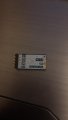
I'm looking for some help with the HC-12 modules,
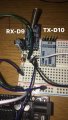
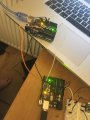
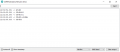
Two Arduino Uno's are connected to 2 different computers, in different rooms. I have type AT+RX into both units, output:
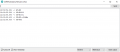
9600 baud rate
channel 1
code from this thread - https://www.allaboutcircuits.com/pr...enting-the-hc-12-wireless-transceiver-module/
when I type a message into the serial monitor nothing appears on the other unit, I have confirmed they are both on and working (all the AT commands work).
Both boards are Elegoo UNO R3 from Amazon, using Arduino IDE 1.8.8.
Context - Need to transmit a 2 digit number representing a heartrate every 10 seconds, not really important I just need to be able to transmit anything at this point.
Help??
Code:
#include <SoftwareSerial.h>
const byte HC12RxdPin = 9;                      // "RXD" Pin on HC12
const byte HC12TxdPin = 10;                      // "TXD" Pin on HC12
const byte HC12SetPin = 11;                      // "SET" Pin on HC12
unsigned long timer = millis();                 // Delay Timer
char SerialByteIn;                              // Temporary variable
char HC12ByteIn;                                // Temporary variable
String HC12ReadBuffer = "";                     // Read/Write Buffer 1 for HC12
String SerialReadBuffer = "";                   // Read/Write Buffer 2 for Serial
boolean SerialEnd = false;                      // Flag to indicate End of Serial String
boolean HC12End = false;                        // Flag to indiacte End of HC12 String
boolean commandMode = false;                    // Send AT commands
// Software Serial ports Rx and Tx are opposite the HC12 Rx and Tx
// Create Software Serial Port for HC12
SoftwareSerial HC12(HC12TxdPin, HC12RxdPin);
void setup() {
  HC12ReadBuffer.reserve(64);                   // Reserve 64 bytes for Serial message input
  SerialReadBuffer.reserve(64);                 // Reserve 64 bytes for HC12 message input
  pinMode(HC12SetPin, OUTPUT);                  // Output High for Transparent / Low for Command
  digitalWrite(HC12SetPin, HIGH);               // Enter Transparent mode
  delay(80);                                    // 80 ms delay before operation per datasheet
  Serial.begin(9600);                           // Open serial port to computer
  HC12.begin(9600);                             // Open software serial port to HC12
}
void loop() {
  while (HC12.available()) {                    // While Arduino's HC12 soft serial rx buffer has data
    HC12ByteIn = HC12.read();                   // Store each character from rx buffer in byteIn
    HC12ReadBuffer += char(HC12ByteIn);         // Write each character of byteIn to HC12ReadBuffer
    if (HC12ByteIn == '\n') {                   // At the end of the line
      HC12End = true;                           // Set HC12End flag to true
    }
  }
  while (Serial.available()) {                  // If Arduino's computer rx buffer has data
    SerialByteIn = Serial.read();               // Store each character in byteIn
    SerialReadBuffer += char(SerialByteIn);     // Write each character of byteIn to SerialReadBuffer
    if (SerialByteIn == '\n') {                 // Check to see if at the end of the line
      SerialEnd = true;                         // Set SerialEnd flag to indicate end of line
    }
  }
  if (SerialEnd) {                              // Check to see if SerialEnd flag is true
    if (SerialReadBuffer.startsWith("AT")) {    // Has a command been sent from local computer
      HC12.print(SerialReadBuffer);             // Send local command to remote HC12 before changing settings
      delay(100);                               //
      digitalWrite(HC12SetPin, LOW);            // Enter command mode
      delay(100);                               // Allow chip time to enter command mode
      Serial.print(SerialReadBuffer);           // Echo command to serial
      HC12.print(SerialReadBuffer);             // Send command to local HC12
      delay(500);                               // Wait 0.5s for a response
      digitalWrite(HC12SetPin, HIGH);           // Exit command / enter transparent mode
      delay(100);                               // Delay before proceeding
    } else {
      HC12.print(SerialReadBuffer);             // Transmit non-command message
    }
    SerialReadBuffer = "";                      // Clear SerialReadBuffer
    SerialEnd = false;                          // Reset serial end of line flag
  }
  if (HC12End) {                                // If HC12End flag is true
    if (HC12ReadBuffer.startsWith("AT")) {      // Check to see if a command is received from remote
      digitalWrite(HC12SetPin, LOW);            // Enter command mode
      delay(100);                               // Delay before sending command
      Serial.print(SerialReadBuffer);           // Echo command to serial.
      HC12.print(HC12ReadBuffer);               // Write command to local HC12
      delay(500);                               // Wait 0.5 s for reply
      digitalWrite(HC12SetPin, HIGH);           // Exit command / enter transparent mode
      delay(100);                               // Delay before proceeding
      HC12.println("Remote Command Executed");  // Acknowledge execution
    } else {
      Serial.print(HC12ReadBuffer);             // Send message to screen
    }
    HC12ReadBuffer = "";                        // Empty buffer
    HC12End = false;                            // Reset flag
  }
}9600 baud rate
channel 1
code from this thread - https://www.allaboutcircuits.com/pr...enting-the-hc-12-wireless-transceiver-module/
when I type a message into the serial monitor nothing appears on the other unit, I have confirmed they are both on and working (all the AT commands work).
Both boards are Elegoo UNO R3 from Amazon, using Arduino IDE 1.8.8.
Context - Need to transmit a 2 digit number representing a heartrate every 10 seconds, not really important I just need to be able to transmit anything at this point.
Help??
Attachments
-
 9.3 KB Views: 5