If you read the colors in one direction it reads 120ohms. If you read it the other way, it's 10k (brown, black, black, red, brown is what it looks like to me.) I bet it's 10k! That would make much more sense.
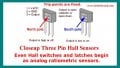
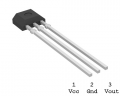
IN post #8 I gave you an example of an open collector current sinking output. The maximum current listed for the sensor is 20 mA. The resistance used needs to limit the current to 20 mA or less and 20 mA was an absolute maximum. Using 5.0 volts applied the absolute lowest resistance you can use is 250 Ohms. 5.0 Volts / 0.020 Amp = 250 Ohms. The only way to know if the sensor was damaged is to test it using a magnet to latch and unlatch it. Exactly as Max explained.
If you read the colors in one direction it reads 120ohms. If you read it the other way, it's 10k (brown, black, black, red, brown is what it looks like to me.) I bet it's 10k! That would make much more sense.
In your latest test, do you still have the sensor output connected to an input on your Raspberry Pi? That's what your diagram shows. If so, I'd either disconnect it and retest or disable all pull ups and pull downs on that input and retest.
The sensor has its own pull up, so adding more just creates a confusing voltage divider.
Well, I don't see anything in that color code to distinguish which direction it should be read, so based on resistor colors alone, it's a toss-up as far as I know (admitting that I'm no expert, and I've certainly misread my share of resistors!)
The reason I say it makes more sense is because one value would be dramatically outside the safe operating limits of the Hall Effect switch. It's relatively unlikely that the manufacturer of a mass produced flowmeter made that mistake. Since reading it the other way provides a value which is a very, very common pull-up value, and one which is well within the limits of the switch, it seems the likely choice.
Well, I don't see anything in that color code to distinguish which direction it should be read, so based on resistor colors alone, it's a toss-up as far as I know (admitting that I'm no expert, and I've certainly misread my share of resistors!)
The reason I say it makes more sense is because one value would be dramatically outside the safe operating limits of the Hall Effect switch. It's relatively unlikely that the manufacturer of a mass produced flowmeter made that mistake. Since reading it the other way provides a value which is a very, very common pull-up value, and one which is well within the limits of the switch, it seems the likely choice.
Don't get me wrong - it would be a good idea to confirm that the resistor really is 10k and not some other value. Assuming it is though, why would you want more pull ups? I suppose it's not a bad idea to do it just to protect the input from floating in the event of a disconnected wire.
Anyway, my main concern in my earlier statement was the possibility that the input was set to pull down, while the flow meter was pulling up, in which case the high signal would be dropped below its expected value. As long as the input is set to pull up, not down, I don't see a problem either way. As it happens, he says the flow meter wasn't even connected to the input on the last test, so clearly that wasn't the problem anyway!
How certain are you about the color coding on those wires? It's a little hard to tell from those fuzzy pictures, but it kind of looks like you might have red and green reversed - like green is supply and red is output. Take a good close look at the datasheet and at the pcb layout. I could easily be misreading something, but that's how I see it.
It certainly could be, but what makes you so sure that you shouldn't be reading right to left instead of left to right? I don't see anything to indicate which side of the resistor is which. Do you?
Direct measurement with a meter would be the best way to know for sure, although even then the readings may or may not be meaningful with the resistor in the circuit. It might have to be removed in order to get a useful reading.
I don't think I mentioned more that One!!?
It was the value of 120Ω I question.
I have used these for some years now in a similar application and they are very simple devices.
Max.
I don't think I mentioned more that One!!?
It was the value of 120Ω I question.
I have used these for some years now in a similar application and they are very simple devices.
Max.
Fair enough. You responded to my post in which I suggested he disable the internal pull up and pull down resistors in the Raspberry Pi. Leaving them on would mean two, and I thought you were saying he should leave them on. I must've misunderstood.
I agree that if the external pull up is 120 it needs to be replaced. I suspect it's actually 10k, but we don't know that for sure yet.
Fair enough. You responded to my post in which I suggested he disable the internal pull up and pull down resistors in the Raspberry Pi. Leaving them on would mean two, and I thought you were saying he should leave them on. I must've misunderstood.
I agree that if the external pull up is 120 it needs to be replaced. I suspect it's actually 10k, but we don't know that for sure yet.
Don't get me wrong - it would be a good idea to confirm that the resistor really is 10k and not some other value. Assuming it is though, why would you want more pull ups? I suppose it's not a bad idea to do it just to protect the input from floating in the event of a disconnected wire.
Anyway, my main concern in my earlier statement was the possibility that the input was set to pull down, while the flow meter was pulling up, in which case the high signal would be dropped below its expected value. As long as the input is set to pull up, not down, I don't see a problem either way. As it happens, he says the flow meter wasn't even connected to the input on the last test, so clearly that wasn't the problem anyway!
It certainly could be, but what makes you so sure that you shouldn't be reading right to left instead of left to right? I don't see anything to indicate which side of the resistor is which. Do you?
Direct measurement with a meter would be the best way to know for sure, although even then the readings may or may not be meaningful with the resistor in the circuit. It might have to be removed in order to get a useful reading.
How certain are you about the color coding on those wires? It's a little hard to tell from those fuzzy pictures, but it kind of looks like you might have red and green reversed - like green is supply and red is output. Take a good close look at the datasheet and at the pcb layout. I could easily be misreading something, but that's how I see it.
It works!!! I get alternating between 4.95 and 0 volts with EACH paddle passing the opening. So @Reloadron you we're right! That tiny spheroidal magnet does have a bunch of poles in it!
@ebeowulf17, I'm still interested in your response as to how to turn off the pull up and same time turn off the pull down on a single input channel on a Pi.
It works!!! I get alternating between 4.95 and 0 volts with EACH paddle passing the opening. So @Reloadron you we're right! That tiny spheroidal magnet does have a bunch of poles in it!
@ebeowulf17, I'm still interested in your response as to how to turn off the pull up and same time turn off the pull down on a single input channel on a Pi.
I'm not entirely sure. I know a fair number of Arduino controllers and I'm vaguely familiar with the MSP430 series, but I have zero first hand knowledge of Raspberry Pi coding. In other mcu environments, you can disable everything and leave an input floating (of course, if you do this, you want your external circuit to keep it from floating.) I was just guessing from your earlier code snippet that you would have similar controls:
If I were to guess, I would expect the code above to provide an input with all pull ups and pull downs disabled, with the two commented out lines above showing how to set alternate configurations.
Alternately, you may need to be more explicit to disable them:

 Facebook
 Google
 GitHub
 Linkedin