Facebook
 Google
 GitHub
 Linkedin
Hi all,
I'm using an SN754410 H-Bridge and an Arduino to push an actuator.
To understand how they worked I read chapter 4 of the Exploring Arduino book, link: http://www.exploringarduino.com/content/ch4/
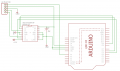
I put the circuitry together like the image below:
It worked perfectly, I also used the Arduino code from the book to push it forward and backward.
I recently had to use the bread board for another circuit and so I removed the circuit for the SN754410.
Now when I put it back, it no longer seems to work. It no longer pushes the Actuator.
These are some of the things I have tried and some of the observations:
Here is the datasheet for the SN754410: http://www.exploringarduino.com/wp-content/uploads/2013/06/SN754410-datasheet.pdf
I am looking for any help on what I could be doing wrong or what is wrong, I am happy to answer any questions to clarify anything!/
Thank You!
I'm using an SN754410 H-Bridge and an Arduino to push an actuator.
To understand how they worked I read chapter 4 of the Exploring Arduino book, link: http://www.exploringarduino.com/content/ch4/
I put the circuitry together like the image below:
It worked perfectly, I also used the Arduino code from the book to push it forward and backward.
I recently had to use the bread board for another circuit and so I removed the circuit for the SN754410.
Now when I put it back, it no longer seems to work. It no longer pushes the Actuator.
These are some of the things I have tried and some of the observations:
- I tried changing the SN754410 chip for another, did not fix it
- I tried using pull down resistors for the INPUTS of the SN754410 (1_2EN, 1A, 2A) did not work either
- I have tried changing the pins of the Arduino, nothing
- I took out the actuator and measured the INPUTS(1_2EN, 1A, 2A) and OUTPUTS(1Y, 2Y) of the SN754410 with a volt-meter
- 1_2EN works fine, it goes HIGH and LOW when the code tells it to
- 1A and 1Y also work fine, they go HIGH and LOW when the code tells them to
- 2A and 2Y are the ones that behave really weird
- 2A only stays low and when the code asks for HIGH it only goes to 1.1V (This is with a pulldown resistor) when it should be going for 5V
- 2Y always stays around 0.60V not matter at what 2A is at (This might be working fine since 2A never really goes HIGH)
Here is the datasheet for the SN754410: http://www.exploringarduino.com/wp-content/uploads/2013/06/SN754410-datasheet.pdf
I am looking for any help on what I could be doing wrong or what is wrong, I am happy to answer any questions to clarify anything!/
Thank You!