H-bridge driver for a 90VDC motor

ronv

Joined Nov 12, 2008
3,770
Yes, the motor stops real quick. And as for the timing of the optos, they're working according to specs. The problem is the MCU's going zombie on motor startup, which is something I'm hoping gets fixed with this changes.
Is the 5 volt regulator on this board?
 

ronv

Joined Nov 12, 2008
3,770
Yes, the motor stops real quick. And as for the timing of the optos, they're working according to specs. The problem is the MCU's going zombie on motor startup, which is something I'm hoping gets fixed with this changes.
Ooo. I keep forgetting your PWM is 180 volts. So anything close to the motor wires or the power for it is apt to pick up the edges of the switching.
Edit:
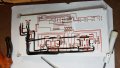
Blue and orange wires?
 

Thread Starter

cmartinez

Joined Jan 17, 2007
8,788
Blue and orange wires?
Yes, blue and orange, as shown in the AutoCAD drawing.
I'm also going to re-route those wires as far away from the MCU as possible. Maybe that's the key to the whole thing, and maybe it also explains why the different behavior in one particular direction. That's because one of the two wires is even closer to the MCU than the other, so it makes sense that emi is different in that wire in that direction.
 

Thread Starter

cmartinez

Joined Jan 17, 2007
8,788
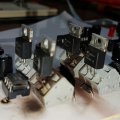
Another failure

c7b63d85-6e4a-4481-8123-37a498bebacd.jpg


8f90875d-6005-495e-bcbf-535ace71145d.jpg

I just don't get it... it worked fine for a couple of seconds, then the MCU kept on resetting and going berserk while the motor was spinning. And of course I tested it again and again, until it ended up blowing up in my face.... This time I added plenty of caps to the circuit. Strange thing is, it was even more unstable than the first circuit. Even though I placed the motor 2 meters away from the board. I think it has more to do with the fets emitting EMI than other thing. I even took the risk of connecting both grounds of the circuit together, see what happened... and nothing changed.

Good thing is, I installed quick spring connectors on the PCB this time, so I'm not gonna have to re-do the whole thing all over again.


What am I going to do????

108b - Plankton\'s Regular (008).jpg
 

shortbus

Joined Sep 30, 2009
10,049
cmartinez, your the second guy on two forums(ETO is the other one) having the same problem with a motor Hbridge. I'm just a learner, but everything I've read says you need gate to source resistor along with gate resistors. To keep, make sure the gate stays off when its supposed to be off. Your schematic in post #129 shows gate resistors but no G-S resistors. Could this be the problem? Every one ignored me at ETO for the suggestion, but that guy's still having the problem too. Without the G-S resistor the gate is "floating" and since it is basically a cap, couldn't it charge from any 'stray' field from the motor wires?
 

Thread Starter

cmartinez

Joined Jan 17, 2007
8,788
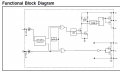
Thanks, shortbus. But the ir2104 already does that. The functional diagram clearly shows a totem-pole push-pull driver at its output. The external 10Ω resistors are there to minimize ringing. But at the frequencies that this thing is working at I doubt that's an issue.

Capture.PNG

I'm beginning to suspect something else. I'm gonna do a third trial and be back in a few hours with the results.

Thanks again for your help. And do let me know if the ETO guy has some success.
 

ronv

Joined Nov 12, 2008
3,770
Thanks, shortbus. But the ir2104 already does that. The functional diagram clearly shows a totem-pole push-pull driver at its output. The external 10Ω resistors are there to minimize ringing. But at the frequencies that this thing is working at I doubt that's an issue.


I'm beginning to suspect something else. I'm gonna do a third trial and be back in a few hours with the results.

Thanks again for your help. And do let me know if the ETO guy has some success.
Maybe what you could do is replace the 120 volt supply with a little 12 volt wall wort. Or a bench supply with current limit? Then you could replace the motor with a resistor. That should at least keep it from killing itself.:rolleyes:
Then you could see what you have.
Can you post your whole schematic and the .asc file?
Edit:
Are the 2 blown FETs opposite each other in the H? Or above and below each other.
 

Thread Starter

cmartinez

Joined Jan 17, 2007
8,788
Maybe what you could do is replace the 120 volt supply with a little 12 volt wall wort. Or a bench supply with current limit? Then you could replace the motor with a resistor. That should at least keep it from killing itself.:rolleyes:
Then you could see what you have.
Can you post your whole schematic and the .asc file?
The good news is that the second board was a lot easier to repair. The bad news is that it blew on my face again (third time's not a charm) ... what I missed after repairing it (and making a few changes that I think will point me in the right direction) was that the 10 ohm SMT resistors at the fet's gates had burned out too, and so the fet's gates were left floating when I switched it on ... with catastrophic results.... again...
 

ronv

Joined Nov 12, 2008
3,770
The good news is that the second board was a lot easier to repair. The bad news is that it blew on my face again (third time's not a charm) ... what I missed after repairing it (and making a few changes that I think will point me in the right direction) was that the 10 ohm SMT resistors at the fet's gates had burned out too, and so the fet's gates were left floating when I switched it on ... with catastrophic results.... again...
 

Thread Starter

cmartinez

Joined Jan 17, 2007
8,788
Ron, do you think it'll be ok if I just do away with the 10Ω ohm resistors at the gates of the fets and just connect them directly to the driver? The working frequency will be less than 3kHz
 

ronv

Joined Nov 12, 2008
3,770
Ron, do you think it'll be ok if I just do away with the 10Ω ohm resistors at the gates of the fets and just connect them directly to the driver? The working frequency will be less than 3kHz
I would leave them in. There purpose is to prevent ringing at the switching edge. This can cause a lot of EMI if it gets big enough.
 

Thread Starter

cmartinez

Joined Jan 17, 2007
8,788
I would leave them in. There purpose is to prevent ringing at the switching edge. This can cause a lot of EMI if it gets big enough.
I left them in... it's beginning to work now... after some adjustments. I'll be back in a few hours with a full report. Thank you very much for your help, btw.
 

Thread Starter

cmartinez

Joined Jan 17, 2007
8,788
Ok, here's what I did:

I had misplaced the 10Ω resistors in my circuit, and they were not connected to the gate of two of the four fets, but rather to their source pin. That explains why they burned out. I've now corrected and double-checked that situation.

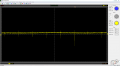
I scoped the optocoupler's outputs, and they were waaaayyy too slow. That means that the effective duty cycle was fare more than I intended it to be. So I figured, what the heck, and removed them from the circuit. And then I directly connected the MCU's outputs to the ir2104's inputs.

Also, I only placed one driver on one side of the H bridge (the left side), and I connected only one fet to it (the high-left). I did not install the down-left side fet, and neither the up-right, and shorted the low-right side where the fet should be. That left me with a single fet driving the motor on its high side. I did this to save myself the pain of more burnt parts, and to make sure that the driver never blew things up by accidentally activating both fets on one side at the same time when the MCU lost its marbles.

That last precaution has worked wonderfully. And I've been able to do extensive testing with varying results without any more fireworks.

I placed a few schottkey's here and there to see if I could quench the negative spikes that I was seeing in both the MCU's Vcc pin and its outputs, but it made no difference. The spikes are still there. I'm suspecting that's actually noise reaching the scope and things might be different on the PCB. But there's no way for me to know that.

Capture01.PNG

I also replaced the DC-DC (5 to 12V) converter that I was using to power the drivers, and I'm now using a 12V wall wart instead. I also installed a couple of ferrites (15 uH) in the line feeding the MCU to see if it would improve things a bit, and it made no difference.

What's happening is that the MCU keeps resetting itself due to the extreme EMI that's reaching it... there's no question about it now....

The MCU keeps resetting itself. Sometimes the circuit works beautifully, but after a while of its doing its thing the MCU resets and starts doing strange things. The problem is clear to me: EMI is doing nasty stuff to the MCU, and I have to find a way either to suppress or shield it. The motor's case is perfectly grounded, btw. But the wire reaching the motor is ordinary, single-line type... I'm going to twist it and see if it makes a difference.

My next step is going to be replacing the high-current wiring under the board (see pic) with shielded cable... see if that diminishes the problem.

550b20ac-e61f-4463-a406-3ea3f091b592.jpg
 

Alec_t

Joined Sep 17, 2013
15,125
Can't tell from the board pic, but are you using a star ground system to separate the heavy output current paths from the driver logic current paths? Ground bounce could otherwise account for the MCU reset perhaps.
 

MaxHeadRoom

Joined Jul 18, 2013
30,697
Incidentally are you fitting heat sinks or are the Mosfets just sticking up on their own?
I mounted mine on the under side of the board, laid flat, A screw goes through from the top of the board, through the Fet and into the heatsink (aluminum plate) also hold the board in place.
Max.
 
Top