hi,
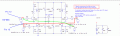
This is how we should test at the moment, using ONLY pins 12 and 13 of the 16F886, with the 100R and 1K pairs connected to these pins, as I have previously described.
E EDIT:
Re-posted the original connections drawing
hi,
This is how we should test at the moment, using ONLY pins 12 and 13 of the 16F886, with the 100R and 1K pairs connected to these pins, as I have previously described.
E EDIT:
Re-posted the original connections drawing
hi C,
Now that you have PWM speed and direction control for your Pan and Tilt motors, I would suggest that you complete the scanner head metal work assembly.
Use Manual control of the Pan and Tilt motors [ extend the wires to the outside of the head from the ADC speed control pots and the 2 Direction buttons Up/Down, Left/Right.]
Determine the maximum Slew rates required for Pan and Tilt [ note the ADC pot voltage settings], also the 'over run' degrees of the Head position.
On the ADC input pots, have a push button that will set the ADC input voltage to zero.
So determine the optimum slew rates and then when pushing the ADC Zero input, note how far the head over runs after pressing the button.
Lets know what you measure.
Future work:
You will also have to decide how and in what format you are going send Azimuth and Elevation data from the Neo RX/ 18F4520 PCB to the motor 16F886 PCB's
The 18F2431 Quad is going to be a major problem for you when using Oshonsoft Basic for programming as the IDE simulator does not support the Quad or ADC functions.
Your planned micro-switch Indexing of the 0 degree North and Horizontal level for your encoder discs will have to resolve to better than +/-0.05 degree, if the quadrature counters are to stay in sync.
E
BTW: IMO its too early to start laying out another PCB. For these tests, use the existing modified PCB with a 16F886 and the last program I posted.
hi C,
Now that you have PWM speed and direction control for your Pan and Tilt motors, I would suggest that you complete the scanner head metal work assembly.
Use Manual control of the Pan and Tilt motors [ extend the wires to the outside of the head from the ADC speed control pots and the 2 Direction buttons Up/Down, Left/Right.]
Determine the maximum Slew rates required for Pan and Tilt [ note the ADC pot voltage settings], also the 'over run' degrees of the Head position.
On the ADC input pots, have a push button that will set the ADC input voltage to zero.
So determine the optimum slew rates and then when pushing the ADC Zero input, note how far the head over runs after pressing the button.
Lets know what you measure.
Future work
You will also have to decide how and in what format you are going send Azimuth and Elevation data from the Neo RX/ 18F4520 PCB to the motor 16F886 PCB's
The 18F2431 Quad is going to be a major problem for you when using Oshonsoft Basic for programming as the IDE simulator does not support the Quad or ADC functions.
Your planned micro-switch Indexing of the 0 degree North and Horizontal level for your encoder discs will have to resolve to better than +/-0.05 degree, if the quadrature counters are to stay in sync.
E
BTW: IMO its too early to start laying out another PCB. For these tests, use the existing modified PCB with a 16F886 and the last program I posted.
Regarding the 18F2431 QEI, ADC problem. (I presume the PWM problem has been solved by you in the last program) I'll search for answers and start a separate thread to see if anyone else has any ideas, on how to get round this, as I think this this PIC has extra motor feedback internal properties.
As mentioned earlier in the thread, there is backlash in the gears, I'm not sure how to get over this. Although it is 1-2 degrees, and could be ignored for what's needed.
The 0 degree North and Horizontal level index are working ok. I chose photo interrupters instead of micro switches. They have 1mm aperture and 1mm light blocking pins at 120mm radius from the centres. They are giving 0.8v open and 5v as light pin blocks.
I fitted a small sash cramp as substitute for the aerials, to give a bit of weight. It's difficult to switch off and check the over run, but I estimate 3-5 degrees.
2.2v at the ADC input starts the tracker moving and once moving 1.7v stops it. At these minimum voltages the slew rate looks more than enough for distance tracking, but for very near the full 4-5V voltage could be needed.
I don't know how to get over the lack of Oshonsoft support for 18F2431 but depending on which pics are eventually used. Could the data be sent from TX of one pic to the RX of the other?
RA3 and RA4 in Quadrature sequence for incrementing QUAD simulation and RA6=1 or RA7=1 0 for hold, for incrementing TRACKER position simulation.
I'm still working on it, but you might like to try it in your SIM. This is for simulation only, don't try it on a circuit, it might damage the Mosfets.
It needs an interrupt and pause between motor direction changes, for Mosfet protection.
hi C,
The program basically works in simulation but will not be suitable for your application.
All the actions in your program are sequential which will not be the case in an actual application.
ie:
The Azimuth data from the Neo RX PIC to the PWM and position control will be asynchronous and your program will occasionally miss the software QA and QA inputs, so the Head Azimuth position will be incorrect.
The same problem applies to the Elevation quad, PWM and position control.
Its important that the Azim and Elev encoder detector software keeps an accurate count of the pulses, this is normally taken care of by the Quad module in the 18F2431, which counts the dec/inc of the QA and QB pulses without creating an interrupt.
The Quad module can be programmed to give an Interrupt under certain conditions, ie: when the Compare and Quad counters 'match' or when an Index pulse on the Encoder disk is detected.
If you plan to use software for QA /B detection and counting you will have to use Interrupts for every encoder pulse in order to ensure that no pulses are missed. The Index pulse will also have to raise an Interrupt.
The RS232 data link from the Neo RX PIC to the 18F2431 will also have to create an Interrupt.
You will have to decide to make use of the 18F2431 quad module, [ which is not emulated in the Oshonsoft IDE] or use interrupts for Quad pulse counting.
I have not checked if the Oshonsoft compiler will actually create the Hex code for the unsupported modules.
I suggest you contact Vladimir of Oshonsoft and ask if the 18F2431 will ever be fully supported.
<<I suggest you contact Vladimir of Oshonsoft and ask if the 18F2431 will ever be fully supported.<<<
Vlad said, he hopes to work on the 18F2431 sometime in the future. I'm not going to hold my breath
<<<I have not checked if the Oshonsoft compiler will actually create the Hex code for the unsupported modules.<<<<
I created a HEX file (attached), but Pickit2 won't program the 18F2431. (So it looks like I'm wasting my time with 18F2431 ) Assuming that if this is true it looks like we have to switch back to the 16F866, till Vlad does his stuff?
16F866: I can study some of your past programs for interrupt info, then I'll try to add them into my program #508. 1x interrupt for each QUAD count, NEO RX, PWM and Zero degrees index. Do you think this would work?
hi,
OK.
I have written a number of routines for checking the coding for the 18F2431 quad module using Oshon Basic, they work OK in Sim and in a PIC.
It will be an easy task to add the CCP [ PWM] drive ASM routines.
As you are counting 3600 pulse per Head rev, what format do you plan to use for sending the Neo PIC Azimuth value to the the 18F2431.?
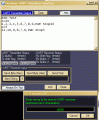
The method I have tested is UART, 'A123' [ all ASCII ] no Crlf,
Also did you intend using the MAXCNT counter or the INDEX for keeping the encoder in sync with the Neo values.?
Reason for asking is it makes sense for me to write routines that suit your programming.
E
hi,
OK.
I have written a number of routines for checking the coding for the 18F2431 quad module using Oshon Basic, they work OK in Sim and in a PIC.
It will be an easy task to add the CCP [ PWM] drive ASM routines.
As you are counting 3600 pulse per Head rev, what format do you plan to use for sending the Neo PIC Azimuth value to the the 18F2431.?
The method I have tested is UART, 'A123' [ all ASCII ] no Crlf,
Also did you intend using the MAXCNT counter or the INDEX for keeping the encoder in sync with the Neo values.?
Reason for asking is it makes sense for me to write routines that suit your programming.
E
That would be great, and save me a lot of time, thanks.
The NEO PIC Azimuth is received into the 184520 PIC which you have previously programmed to parse? the Azimuth and Altitude values. If the 4520 could send the AZ ALT values via the UART to each of the 2X 18F2431 UARTs this sounds ok.
The AZ index only sends a '1' at North, to re-set the AZ to zero. I don't fully understand how the encoder will keep in sync, but I think the interrupts only trigger when MAXCNT and POSCNT match, but I need to check a bit more. I'll go with whatever you suggest. Remembering the overrun when the motor is at full speed, I can't see how it won't 'hunt' around the 'match point', if we can't reduce the PWM as the tracker gets near to 'match point'
The AZ index only sends a '1' at North, to re-set the AZ to zero. I don't fully understand how the encoder will keep in sync, but I think the interrupts only trigger when MAXCNT and POSCNT match, but I need to check a bit more. I'll go with whatever you suggest. Remembering the overrun when the motor is at full speed, I can't see how it won't 'hunt' around the 'match point', if we can't reduce the PWM as the tracker gets near to 'match point'
hi,
Assume MAXCNT and POSCNT counters 'match' option has been configured in the program to generate and Interrupt.
The MAXCNT holds the maximum count that the POSCNT can count UP too before it rolls over from 359 to 000 or DOWN 000 to 359, at the same time generates an Interrupt.
eg:
If MAXCNT is preloaded with say 359 [ max count degrees in a circle] then if the POSCNT counter is counting UP, when it reaches 359, the module generates an Interrupt on the next QA, the POSCNT will be reset to Zero and the count up when receiving more QA pulses.
When counting down, the POSCNT will count down to Zero and on the next QA pulse it will preload the POSCNT with 359 and the count down from there, also generate an Interrupt.
The potential problem with this config option is the 359 UP or the 0 > 359 DOWN interrupt may not be in sync with the Head North. I realise its possible to point the Head North and initialise the POSCNT to zero.
When the 18F4520 sends the Remote Azimuth value the 18F2431 will PWM drive the Head towards that Azimuth value, you will have to keep reading the POSCNT until the to Azim values match.
OR
If you configure the POSCNT to reset on the INDEX pulse [ which should be at Head North], every time the Head passes thru North the INDEX will be re-synced. ie:000 or 360 depending on UP/DOWN.
So when the 18F4520 sends the Remote Azimuth value the 18F2431 will PWM drive the Head towards that Azimuth value, you will have to keep reading the POSCNT until the to Azim values match.
hi,
Assume MAXCNT and POSCNT counters 'match' option has been configured in the program to generate and Interrupt.
The MAXCNT holds the maximum count that the POSCNT can count UP too before it rolls over from 359 to 000 or DOWN 000 to 359, at the same time generates an Interrupt.
eg:
If MAXCNT is preloaded with say 359 [ max count degrees in a circle] then if the POSCNT counter is counting UP, when it reaches 359, the module generates an Interrupt on the next QA, the POSCNT will be reset to Zero and the count up when receiving more QA pulses.
When counting down, the POSCNT will count down to Zero and on the next QA pulse it will preload the POSCNT with 359 and the count down from there, also generate an Interrupt.
The potential problem with this config option is the 359 UP or the 0 > 359 DOWN interrupt may not be in sync with the Head North. I realise its possible to point the Head North and initialise the POSCNT to zero.
When the 18F4520 sends the Remote Azimuth value the 18F2431 will PWM drive the Head towards that Azimuth value, you will have to keep reading the POSCNT until the to Azim values match.
OR
If you configure the POSCNT to reset on the INDEX pulse [ which should be at Head North], every time the Head passes thru North the INDEX will be re-synced. ie:000 or 360 depending on UP/DOWN.
So when the 18F4520 sends the Remote Azimuth value the 18F2431 will PWM drive the Head towards that Azimuth value, you will have to keep reading the POSCNT until the to Azim values match.
Can you clarify 'QA' please? When QEA or QEB change, a 'counter' increments or decrements. (3600/REV) There are 360 degrees in a REV.
Reading a previous QUAD explanation from you, you mention POSCNT, MAXCNT, POSBUF and CAPBUF. Am I correct that these words are slightly different in the data sheet and need to be studied? i,e, POSCNT=POSCNTL or POSCNTH
EDIT: Just read that if PIC is set for IC then POSBUF and CAPBUF are used if set to QEI then POSCNT, MAXCNT are used. I think IC is used when sensing 3 phase motors (Brushless) for speed control.
hi,
I know there are 360 degrees in a rev.
So is due North, 000 degree or 360 degree or both.?
As the INDEX occurs after the next DOWN, QEA/QEB pulse after zero [000], the POSCNT cannot reset to 360 , else there would be no change.?
Also when counting UP, the counter resets on the next QEA/QEB pulse at MAXCNT, if it was preloaded with 360, it would reset to 000, so no change again.!
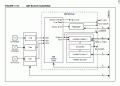
Reading a previous QUAD explanation from you, you mention POSCNT, MAXCNT, POSBUF and CAPBUF. Am I correct that these words are slightly different in the data sheet and need to be studied? i,e, POSCNT=POSCNTL or POSCNTH
Look at the attached figure from the d/s the POSCNT and MAXBUF have a second name depending on the configuration.
I have had to use the CAPBUF label in the program as Oshonsoft does not recognise the POSCNT and MAXBUF , only the CAPBUF's.
EDIT: Just read that if PIC is set for IC then POSBUF and CAPBUF are used if set to QEI then POSCNT, MAXCNT are used. I think IC is used when sensing 3 phase motors (Brushless) for speed control.
hi,
I know there are 360 degrees in a rev.
So is due North, 000 degree or 360 degree or both.?
As the INDEX occurs after the next DOWN, QEA/QEB pulse after zero [000], the POSCNT cannot reset to 360 , else there would be no change.?
Also when counting UP, the counter resets on the next QEA/QEB pulse at MAXCNT, if it was preloaded with 360, it would reset to 000, so no change again.!
Look at the attached figure from the d/s the POSCNT and MAXBUF have a second name depending on the configuration.
I have had to use the CAPBUF label in the program as Oshonsoft does not recognise the POSCNT and MAXBUF , only the CAPBUF's.

 Facebook
 Google
 GitHub
 Linkedin