GPS NMEA antenna aiming tracker.

ericgibbs

Joined Jan 29, 2010
21,459
I think of North being 000 and if MAXCNT was preloaded with 359 would the next count reset to zero [000] ?
This what I said in Post #517.

Perhaps I should have worded it: When QA is incremented/decremented, does the counter increment/decrement 1/3600 or 1/360?
In *4 Mode, the POSCNT will Dec or Inc on the Rising edge and falling edge of QEA and QEB, Up or Down, depending upon the High or Low state of QEB.
The Head turning thru 360 degrees, the Encoder disk will output 9 QEA pulses [ *4 Hi/Lo ] = 36 counts, then the gear reduction of 100 to the Head will give 3600 counts/head rev.

Assuming MAXCNT is loaded with 3599.
As the d/s explains the POSCNT reset states are 0000 - 1 count > MAXCNT loaded in POSCNT = 3599 ie: 0001, 0000, 3599, 3598 ...
Up counting 3599 +1 count > 0000 reset. ie: 3598, 3599, 0000, 0001
 

Thread Starter

camerart

Joined Feb 25, 2013
3,840
This what I said in Post #517.

In *4 Mode, the POSCNT will Dec or Inc on the Rising edge and falling edge of QEA and QEB, Up or Down, depending upon the High or Low state of QEB.
The Head turning thru 360 degrees, the Encoder disk will output 9 QEA pulses [ *4 Hi/Lo ] = 36 counts, then the gear reduction of 100 to the Head will give 3600 counts/head rev.

Assuming MAXCNT is loaded with 3599.
As the d/s explains the POSCNT reset states are 0000 - 1 count > MAXCNT loaded in POSCNT = 3599 ie: 0001, 0000, 3599, 3598 ...
Up counting 3599 +1 count > 0000 reset. ie: 3598, 3599, 0000, 0001

Hi E,

"This what I said in Post #517." Sorry, my eyes are crossed with concentration.

Much clearer now. Thanks.

C.
 

Thread Starter

camerart

Joined Feb 25, 2013
3,840
[QUOTE="ericgibbs,

In *4 Mode, the POSCNT will Dec or Inc on the Rising edge and falling edge of QEA and QEB, Up or Down, depending upon the High or Low state of QEB.
The Head turning thru 360 degrees, the Encoder disk will output 9 QEA pulses [ *4 Hi/Lo ] = 36 counts, then the gear reduction of 100 to the Head will give 3600 counts/head rev.

Assuming MAXCNT is loaded with 3599.
As the d/s explains the POSCNT reset states are 0000 - 1 count > MAXCNT loaded in POSCNT = 3599 ie: 0001, 0000, 3599, 3598 ...
Up counting 3599 +1 count > 0000 reset. ie: 3598, 3599, 0000, 0001[/QUOTE]

Hi Eric,

While it looks simple, it's not an easy concept to understand. I can see that there are various setting choices in the D/S

If I follow on from this statement: "MAXCNT loaded in POSCNT = 3599" (OR ZERO, tracker aiming North) Then if NEO data i,e, Azimuth 90 degrees, therefore 90*10 =900 loaded into MAXCNT [The maximum possible 360 (360*10=3600)] The tracker would move till MATCH, then at each MATCH, NEO data loaded into MAXCNT and so on, while POSCNT keeps counting between 0000 and 3600, with a possible correction at North when the index could zero it.

Would this work?

C.
 

ericgibbs

Joined Jan 29, 2010
21,459
hi,
The 18F2431 quad module can be configured to Reset on a equality Match between the POSCNT and MAXCNT counters OR a Reset on the INDEX input pin [ see image ], not both options at the same time.
Using the Reset on Match, means you load the MAXCNT with a value from 0 thru 65535, the count the incoming QEA and QEB pulses into the POSCNT, when they match the POSCNT is reset to 000. So that would mean loading the MAXCNT with the Neo Azimith *10 , so 0000 thru 3590, example: Azim =145degree [*10 = 1450]
The encoder then would have to send 1450 pulses to the POSCNT, [forward direction] when it reached 1450 the POSCNT would be reset to 000.
To drive from 145degree to say 045degree, the MAXCNT would have to be loaded with 65536- 450 = 65-85 and the POSCNT counter would count down to 65085 [ reverse direction].
The program would have to keep track of the original North point and keep calculating the changes in direction and counts.

Using Reset on INDEX, means point the Head due North, press a manual set Index button and load MAXCNT with 3599, so when ever the Head passes UP thru North the MAXCNT is reset to 000 and 3599 when counting DOWN
The 'match' operation would be done in the program by reading the required Azimuth and comparing it with the encoder count POSCNT value.
The program will also have to decide which direction to drive the Head.

You will have to decide which option to choose.

E
 

Attachments

Last edited:

Thread Starter

camerart

Joined Feb 25, 2013
3,840
hi,
The 18F2431 quad module can be configured to Reset on a equality Match between the POSCNT and MAXCNT counters OR a Reset on the INDEX input pin [ see image ], not both options at the same time.
Using the Reset on Match, means you load the MAXCNT with a value from 0 thru 65535, the count the incoming QEA and QEB pulses into the POSCNT, when they match the POSCNT is reset to 000. So that would mean loading the MAXCNT with the Neo Azimith *10 , so 0000 thru 3590, example: Azim =145degree [*10 = 1450]
The encoder then would have to send 1450 pulses to the POSCNT, [forward direction] when it reached 1450 the POSCNT would be reset to 000.
To drive from 145degree to say 045degree, the MAXCNT would have to be loaded with 65536- 450 = 65-85 and the POSCNT counter would count down to 65085 [ reverse direction].
The program would have to keep track of the original North point and keep calculating the changes in direction and counts.

Using Reset on INDEX, means point the Head due North, press a manual set Index button and load MAXCNT with 3599, so when ever the Head passes UP thru North the MAXCNT is reset to 000 and 3599 when counting DOWN
The 'match' operation would be done in the program by reading the required Azimuth and comparing it with the encoder count POSCNT value.
The program will also have to decide which direction to drive the Head.

You will have to decide which option to choose.

E
Hi,

Could the INDEX option be used only at start-up, for setting everything to zero, then switch to MATCH option.

C.
 

Thread Starter

camerart

Joined Feb 25, 2013
3,840
You could do, its your choice.
Hi E,
EDIT: I get the feeling that using reset on INDEX would be the easiest to program around, do you have a preference?

Using INDEX, Am I correct that after set-up at North/000 POSCNT will continually keep updating where the tracker is pointing? and as you said, the program will compare POSCNT and say NEWPOINT (NEWPOINT variable updated from NEO) to work out direction, speed and stop.

My program at #508 sets forward/reverse, distance to move and which is the shortest direction, if it helps.

C.
 
Last edited:

Thread Starter

camerart

Joined Feb 25, 2013
3,840
OR

If you configure the POSCNT to reset on the INDEX pulse [ which should be at Head North], every time the Head passes thru North the INDEX will be re-synced. ie:000 or 360 depending on UP/DOWN.
So when the 18F4520 sends the Remote Azimuth value the 18F2431 will PWM drive the Head towards that Azimuth value, you will have to keep reading the POSCNT until the to Azim values match.

This is the method I would suggest.

E
Hi Eric,

Sorry, I've just re-read this, and of course I choose this method.

C
 

Thread Starter

camerart

Joined Feb 25, 2013
3,840
Hi,

Previously we had a keypad for controlling the tracker, but I think that 2x push buttons on each motor control board would be enough. If the two buttons are held at the same time, then interrupt the program, and by letting one button go at a time, each motor could be controlled, left/right up/down. If both buttons are released then go back into the program.

Does this sound ok?

I already have a button on pin1.

C.
 

ericgibbs

Joined Jan 29, 2010
21,459
hi,
So you plan for only 4 push buttons in total and are they intend only for manual control of the head movement.?
Do you intend having a LCD display or some other indicator for displaying the azimuth and/or Receiver signal strength on the unit.?
E
 

Thread Starter

camerart

Joined Feb 25, 2013
3,840
hi,
So you plan for only 4 push buttons in total and are they intend only for manual control of the head movement.?
Do you intend having a LCD display or some other indicator for displaying the azimuth and/or Receiver signal strength on the unit.?
E
Hi,

Yes, I think for simplicity, the head motors (AZI and ALT) could be manually controlled by 2x push buttons on each of the motor drive circuits so 4x in total.

On the MAIN circuit board 18F4520 (Where the signals come in) there is an LCD screen, for displaying, AZI/ALT and any other data.

C.
 

Thread Starter

camerart

Joined Feb 25, 2013
3,840
Another piece of the jigsaw.

Just transmitted GPS signals from NEO-6-----50Yds-----received and read in Putty.

C.
 

Thread Starter

camerart

Joined Feb 25, 2013
3,840
Whats the transmitter frequency, power and expected range from TX to RX.?
E

The first working test is 433MHz, but I will change it to the Uk legal frequency 459Mhz.
Power. 100Mw
The aerials with the TX/RX are not so good, but with good aerials more than line of sight.

C.
 

Thread Starter

camerart

Joined Feb 25, 2013
3,840
hi,
OK.
I have written a number of routines for checking the coding for the 18F2431 quad module using Oshon Basic, they work OK in Sim and in a PIC.
It will be an easy task to add the CCP [ PWM] drive ASM routines.

As you are counting 3600 pulse per Head rev, what format do you plan to use for sending the Neo PIC Azimuth value to the the 18F2431.?
The method I have tested is UART, 'A123' [ all ASCII ] no Crlf,
Also did you intend using the MAXCNT counter or the INDEX for keeping the encoder in sync with the Neo values.?

Reason for asking is it makes sense for me to write routines that suit your programming.
E
Hi Eric,

Will you post one of your routines that use the INDEX method please. (Only if you have finished, no hurry)

C.
 

ericgibbs

Joined Jan 29, 2010
21,459
hi,
I am just final testing a emulator circuit/program for the quad signal gen and 18F2431 PWM drive.
It works OK, the PC sends the require Azimuth bearing as eg: A123 via the serial input to the 18F which then controls the 16F88 quad gen for Run/Fwd/Rev.
The quad gen sends the QEA/QEB and INDX pulses to the 18F, when the required Azimuth 'encoder' counts match in software the pulses stop and the 18F sends via the serial line to the PC display, the Head azimuth.
My intention is to complete the sim project and post the the full package as a Blog.

The attached Basic program should help you with the Index method, I have added comments.
Rem: its for a Sim App, so convert to hardware as required.
E
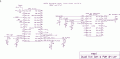
Added the draft circuit diagram for the project, the 18F2431 connections are shown, connect your hardware in place of the 16F88 inputs.
 

Attachments

Thread Starter

camerart

Joined Feb 25, 2013
3,840
hi,
I am just final testing a emulator circuit/program for the quad signal gen and 18F2431 PWM drive.
It works OK, the PC sends the require Azimuth bearing as eg: A123 via the serial input to the 18F which then controls the 16F88 quad gen for Run/Fwd/Rev.
The quad gen sends the QEA/QEB and INDX pulses to the 18F, when the required Azimuth 'encoder' counts match in software the pulses stop and the 18F sends via the serial line to the PC display, the Head azimuth.
My intention is to complete the sim project and post the the full package as a Blog.

The attached Basic program should help you with the Index method, I have added comments.
Rem: its for a Sim App, so convert to hardware as required.
E
Added the draft circuit diagram for the project, the 18F2431 connections are shown, connect your hardware in place of the 16F88 inputs.
Hi Eric,

Well done. I'll be able to use it for a practical 'ASM/18F2431 data sheet' lesson. (running and tripping over before I can walk:))

Thanks a lot,

C.
 

ericgibbs

Joined Jan 29, 2010
21,459
hi C,
Ref your PM, why Basic and not ASM used in the program.

If you recall Vladimir said that the quad module of the 18F2431 was not supported in the IDE.

I did say that I was testing which 'Oshonsoft Basic' statements existed for the quad module.
I was concerned that being told it was not supported, perhaps it did not create the machine code routines when compiling certain Basic statements.
So I went thru each Basic statement that Oshonsoft seemed to recognise [ when a recognised statement is typed in, it changes to upper case], I then checked the compiled/assembled code to see if the correct actual machine code was generated by the compiler.

I was then able to use the available Basic statements to construct a quadrature program module which works in a 18F2431.
NOTE: It will not work in the IDE simulator.

The ASM part of the program for the PWM generation using the CCP pins was required because of a bug in the Basic compiled machine code which did not completely switch Off the unused PWM pin, there was a residual 1uSec pulse, which meant both PWM pins [Fwd/Rev] were being called at the same time, which is not good.!
The bug was reported, if it been fixed I have no idea.

The draft program I posted should be enough to enable you to complete the project programming.

Eric
 

Thread Starter

camerart

Joined Feb 25, 2013
3,840
hi C,
Ref your PM, why Basic and not ASM used in the program.

If you recall Vladimir said that the quad module of the 18F2431 was not supported in the IDE.

I did say that I was testing which 'Oshonsoft Basic' statements existed for the quad module.
I was concerned that being told it was not supported, perhaps it did not create the machine code routines when compiling certain Basic statements.
So I went thru each Basic statement that Oshonsoft seemed to recognise [ when a recognised statement is typed in, it changes to upper case], I then checked the compiled/assembled code to see if the correct actual machine code was generated by the compiler.

I was then able to use the available Basic statements to construct a quadrature program module which works in a 18F2431.
NOTE: It will not work in the IDE simulator.

The ASM part of the program for the PWM generation using the CCP pins was required because of a bug in the Basic compiled machine code which did not completely switch Off the unused PWM pin, there was a residual 1uSec pulse, which meant both PWM pins [Fwd/Rev] were being called at the same time, which is not good.!
The bug was reported, if it been fixed I have no idea.

The draft program I posted should be enough to enable you to complete the project programming.

Eric
Hi Eric,

I know how much effort went into this, so thank you.

"NOTE: It will not work in the IDE simulator" When compiled into the IDE simulator, it appears to simulate. As I am trying to understand how it works, when it simulates will I be able to step through it and learn anything, or will it confuse me?

C.
 

ericgibbs

Joined Jan 29, 2010
21,459
hi,
The UART, PWM sims part of the program will work OK, but the IDE Sig Gen is not able to generate quadrature pulses, so there is now way of driving the QEA and QEB inputs.
I there was a way to drive the quad inputs I am not sure that the internal POSCNT counter and INDX Intr would be simulated.??
So after sending a UART Azimuth value the program would keep waiting for a match between the POSCNT and required Azimuth, which will not happen as there are no QEA/B pulses.?

If you find a way, let me know.
E

EDIT:
I wrote a Quad pulse genTool, using VB5 for the Oshonsoft IDE to check the simulation, as suspected the CAP2BUHL/H do not register the QEA or QEB pulses, so a complete sim is not possible.
E
 
Last edited:
Top