Can your design be saved to your personal computer? As some one (old?) that has a hard time using CAD, this looks like a pretty easy one to use. Thank you for answering.
I would use Scheme-iT for publishing great looking schematics. I would choose something else for personal designs that I might want to modify in future. For now, I am use Circuit Maker 2000 as shown in DIY Pong Blog. The schematics shown there were captured from the screen and edited with Corel Photo House.
No. It is done automatically by the software. Why it didn't do it in the first diagram posted, I don't know. I suspect it depends on where you start the connection. Maybe if you start at the T-junction it doesn't draw the dot and it draws the dot if you end at the T-junction. I will have to go back and test this.
I would use Scheme-iT for publishing great looking schematics. I would choose something else for personal designs that I might want to modify in future. For now, I am use Circuit Maker 2000 as shown in DIY Pong Blog. The schematics shown there were captured from the screen and edited with Corel Photo House.
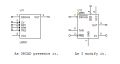
The blog answers my questions. With ORCAD I can call up ICs by part number and select different case styles if the pinout differs. If the IC isn't in the library (seldom) I can create it or modify some other chip.
what I don't like about ORCAD is the design of the ICs looks like they are made by draftsmen, not engineers, but they are easy to modify as needed. Inputs and outputs are identified correctly but position of the pin on the drawing is sometimes not practical.
I like the solid look of Scheme-iT for textbook publication. For engineering drawings with pin numbering etc. I would use Circuit Maker or Eagle. In any case, I would edit the graphics in Corel Photo House to suite my taste.

 Facebook
 Google
 GitHub
 Linkedin